300 Agentic Prompts for Tiny Worlds Coloring Books Review
I pasted one prompt and watched an agent plan, draw and package a 30-page tiny worlds coloring book. Here is what the files actually look like.
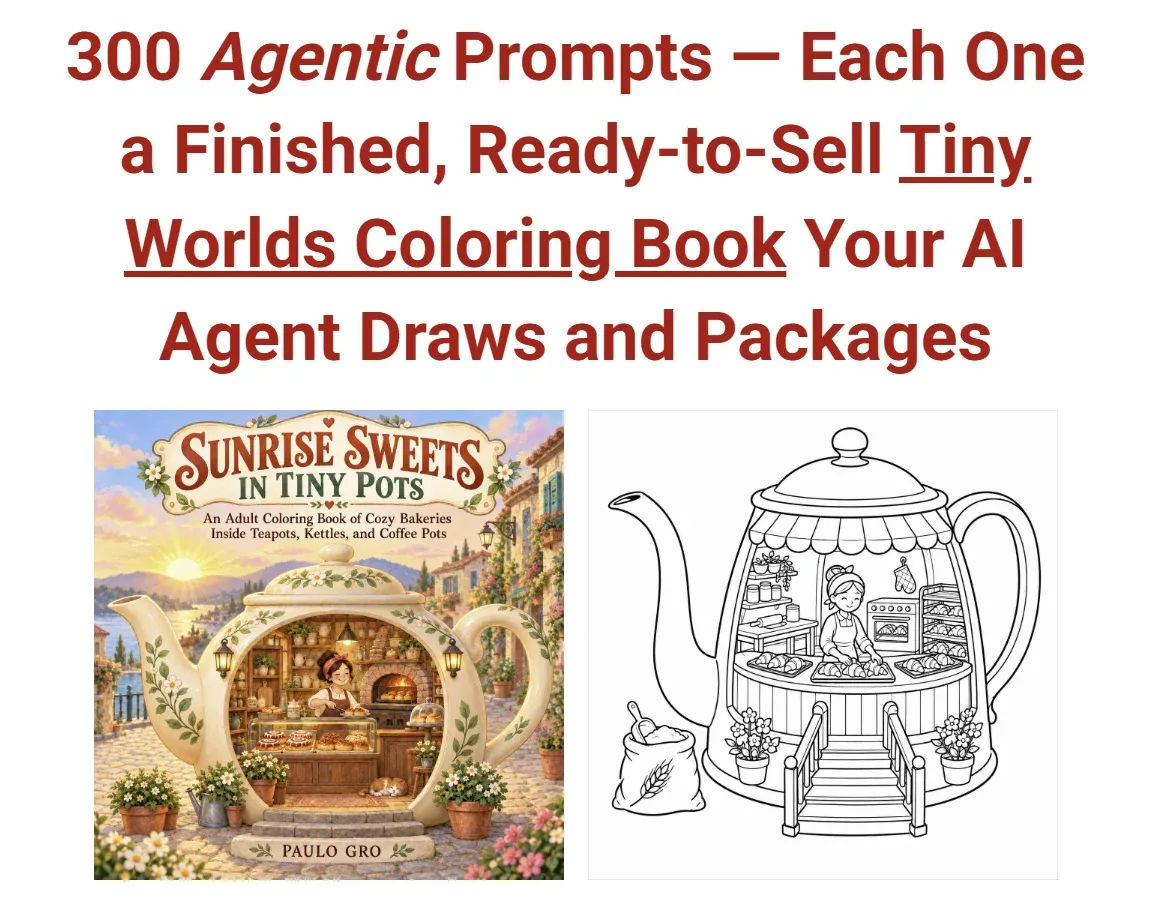
I bought 300 Agentic Prompts for Tiny Worlds Coloring Books on a Friday night after a week of arguing with an image generator. The argument was always the same. I asked for a cottage inside a teapot. I got a kitchen with a giant teapot standing next to it. I asked again. I got the same kitchen. By page four the illusion was gone and I had a folder of thirty pictures that were not a book.
What made me click buy was not the sales page copy. It was the line about the agent checking its own work. I have spent enough evenings cropping spouts out of frame and fixing transparency in thirty-two separate PNGs that the idea of a workflow that rejects its own bad pages sounded like the actual product. The prompts are just the delivery method.
So I ran it. This review covers what the $17 gets you, what the workflow is really like on a live build, and the parts that annoyed me.
Our Verdict
300 Agentic Prompts for Tiny Worlds Coloring Books
A genuinely different take on coloring book creation: 300 prompts written for ChatGPT Codex agents, each producing a full package of files for KDP and Etsy.
Instant download, works with ChatGPT Codex or Work
What You Actually Get
One download. Inside it, 300 agentic prompts. The word "agentic" is doing real work here and it is worth unpacking before you spend anything, because if you skim past it you will buy the wrong thing.
A normal AI prompt gives you a picture. An agentic prompt gives the agent a job description. Each of the 300 prompts is a complete brief that tells ChatGPT Codex or ChatGPT Work to plan a book, decide on an object family, build a scene list, generate both covers with the title painted into the artwork, render thirty interior pages, typeset the front matter, and package everything into folders.
You are not buying images. You are buying instructions that produce images, plus the plumbing around them. That distinction matters for pricing later.
The 300 prompts are organised under 50 themes. Each theme pairs a place people like with an object family they recognise instantly. Bakeries inside teapots. Bookshops inside flowerpots. Cottages inside pantry jars. Christmas workshops inside ornaments. Six prompts sit under each theme, so a single theme can fill a shelf before you ever need to type "Volume 2".
The themes I saw on the page are ordered by how strongly they land, with the cottage and bakery pairings first. The list runs long: pots and pans, colanders, watering cans, garden tools, teacups and mugs, lanterns and oil lamps, sewing baskets, bakeware and cake stands. I counted more than twenty distinct object families in the portion of the list that was visible. The sales page says fifty themes ship in total.
That is the whole product. Prompts, arranged by theme, built for agents rather than chat windows.
Key Features
The Object-to-World Lock is the feature I care about most, and it is the one that answers the problem I had before I bought. It is a single paragraph inside the generated plan that forces every page to read as the object first and the room second. The agent copies that paragraph word for word into all thirty interior prompts. So the spout, handle and lid survive on page one and on page twenty-nine, because the rule is restated on every single page rather than assumed.
The Variety Plan stops you getting one teapot with new furniture thirty times. The plan requires at least ten different host objects, each with its own opening, interior use, focal detail and viewpoint. That is a real constraint. It is also why thirty pages of a teapot bakery do not look like thirty variations of one drawing.
Self-contained interior prompts are the quiet workhorse. No prompt in the set says "same as above". Every one carries the full rendering rules, which means you can lift page nineteen out on its own, regenerate it, and it still matches the rest of the book.
The covers get real attention. The agent writes two cover prompts, front and back, with your title, subtitle, blurb and author name written into the prompt itself so the image model paints the lettering as part of the scene. No pasted text box. There is a spell-check step in the verification pass.
Line quality is handled by instruction rather than hope. Every interior comes out as medium-bold black outlines on opaque white, with large enclosed shapes, generous colouring areas, and an 8% clean margin. The prompts explicitly rule out grey shading, hatching and dense textures. If you have tried to get clean colouring lines out of an image model by asking nicely, you know why that list exists.
The self-inspection step is the one I did not expect to work as well as it did. After each page the agent compares the file against the plan and the rendering rules. Cropped spout, faint lines, wrong scene, transparency, misspelled title: it regenerates and writes the result into a Verification_Report.md. That report is a plain record of what was checked and what was redone. It is not a guarantee. It is a paper trail, and that is more than any manual workflow ever gave me.
Front matter gets set in type rather than drawn: a title page, a copyright page and a welcome page, slotted into position without you opening a layout app.
The output folders are where the promises get concrete. There is an Amazon_KDP folder with a 64-page no-bleed interior PDF, both cover PNGs, KDP notes, and a full paperback wraparound cover when the agent can verify the template. There is an Etsy_Printable folder with a single 35-page PDF including covers, front matter and print instructions for the buyer. And there is a High_Res_Pages folder with 32 numbered PNGs plus the Book_Plan and the prompts saved alongside.
Volume 2 costs one word. The agent saves its own Book_Plan.md, so when you ask for the next volume it reads the scene list it already used and plans thirty brand-new objects and rooms in the same world. None of the first thirty repeated. One prompt becomes a series, and a series is what buyers collect.
Actually Using It
I started with the bookshop inside a flowerpot theme because it is the one on the sales page and I wanted a fair comparison.
The paste itself took seconds. What followed was about twenty minutes of the agent planning. That planning step is worth the wait, because it puts the whole book on screen before anything gets drawn. I got an original title, a subtitle, a 150 to 200 word product description written for the actual planned scenes, seven keyword phrases, a back cover blurb, the world concept, the visual identity, the Object-to-World Lock paragraph, the variety plan, a 30-scene list, two cover prompts and the thirty interior prompts.
I read the scene list properly instead of skimming it, and this is the moment the product earned its place for me. Scene one was a shopfront built into the flowerpot's rim with the pot's curve as the awning. Scene eight used the drainage hole as a cellar window. Scene twenty-two had the saucer as a street level with customers crossing it. I did not have to prompt any of that. It came out of the plan.
You get two questions at the end of planning: which author name goes on the cover, and whether you approve. I typed a pen name and said yes. Those two answers are the entire manual workload. Everything after that runs without instruction.
The covers came first. Front and back, lettering painted inside the artwork. The title read cleanly at thumbnail size, which was the thing I had failed to achieve by hand four times in a row. I did have to regenerate the back cover once. The blurb was painted into the sky area and the agent had set it too small against the pot's shadow, which made two words hard to read. I said so. It redrew. Second pass was clean.
The thirty interiors took the bulk of the runtime. They render one at a time, each a square 8.5 inch page at 2550 by 2550 pixels. This is not fast. I went and did other things. When I came back the folder had thirty numbered pages plus the three front matter pages the agent had typeset in position.
Line quality is where these prompts beat anything I had written myself. The outlines were consistent across all thirty pages. Medium-bold, closed shapes, no grey. I checked three pages at 200% zoom looking for the soft edges that usually show up around page twelve, and did not find any. The 8% margin held on every file I measured.
The verification report was short and honest. It listed four regenerated pages: the back cover, two interiors where a potted plant had drifted off the object, and one page where the agent flagged faint line weight and redrew it. Four out of thirty-three files. I have shipped worse ratios after an entire weekend of manual work.
Two things annoyed me. The first is that the agent's image generation speed is entirely outside the product's control. The prompts are structured well, but if your ChatGPT plan throttles image generation you will feel every one of the thirty pages. The second is that KDP wraparound cover generation only happens when the agent can verify the template. Mine came through on this build, but the wording on the page tells you it is conditional, so do not plan around it as a certainty for every volume.
What I ended up with was a 64-page no-bleed KDP interior PDF, both covers, a full wraparound, a 35-page Etsy PDF with buyer print instructions, and 32 numbered PNGs. Plus the plan and prompts saved, which means Volume 2 is a one-word request away. I have not published either version yet, so I cannot tell you how it sells. I can tell you the upload step is shorter than any I have done before.
Ready to run the same build on your own theme?
Works with ChatGPT Codex or ChatGPT Work
Pricing and Value Analysis
Operator pricing for 300 Agentic Prompts for Tiny Worlds Coloring Books is $17, one time. That is the number you pay. The sales page itself discusses figures of $150 and $350, but those are market projections for the adult colouring category, not the product price. Do not confuse them.
To judge $17 fairly, compare it against what it replaces rather than against other prompt packs.
| What you would otherwise do | Typical cost | Time per book |
|---|---|---|
| Hire an illustrator for 30 pages plus covers | Hundreds of dollars | Weeks |
| Buy a generic AI prompt pack and adapt it | Varies widely | Days, with rework |
| Write your own prompts and fix every file manually | Nothing upfront | Days, with failures |
| 300 Agentic Prompts for Tiny Worlds | $17 one time | Mostly unattended |
The relevant comparison is the third row. My manual attempt produced eight usable pages before the illusion collapsed, and I never got the covers right at all. That was two evenings of work. The $17 buys back the part of the process I was worst at.
Value holds up on repeat use too. The 300 prompts sit across 50 themes, six prompts per theme. If you build one book and stop, $17 for a single published title is still cheap. If you build a series in one world, the next volume does not cost you anything. The prompts are the purchase, the volumes are free.
I do not have a refund term from my sources, so I am not going to state one. Check the terms on the order page before you buy if that matters to you.
Pros and Cons
Pros
- One paste produces a complete book package rather than loose images
- The Object-to-World Lock keeps the illusion alive across all 30 pages
- Self-inspection with a written verification report is rare in this category
- Volume 2 reads its own Book_Plan so the next book costs one word
- Output folders are genuinely upload-ready for both KDP and Etsy
Cons
- Requires ChatGPT Codex or ChatGPT Work and a plan that allows image generation
- The 30-page render is slow and outside the product's control
- KDP wraparound generation is conditional on template verification
Who This Is For
Someone already publishing colouring books on KDP or Etsy who wants a repeatable pipeline instead of one-off commissions. The workflow pays for itself on the second volume. It suits people comfortable letting an agent run unattended for a long stretch and then checking the output rather than watching every step. If you already write your own image prompts and your only real problem is line quality and packaging, this solves the packaging half completely. And if you want a series in one world rather than a shelf of unrelated titles, the Book_Plan carry-over is the feature you are buying.
Who Should Skip It
Skip it if you are not subscribed to ChatGPT Codex or ChatGPT Work. The prompts are written specifically for agents that can generate, open, measure and save files. In a plain chat window you lose the inspection, the packaging and the folder output, which is most of what you paid for. Skip it if you want a done-for-you book with no involvement at all, because you still answer two questions and you still review the result. And skip it if you are uncomfortable with AI-generated artwork forming the whole product. There is no hand-drawn element here and the sales page does not pretend otherwise.
Frequently Asked Questions
Is 300 Agentic Prompts for Tiny Worlds Coloring Books worth it?
At $17 it is worth it if you already use ChatGPT Codex or ChatGPT Work and plan to publish more than one book. A single build produces a 64-page KDP interior PDF, both covers, a 35-page Etsy PDF and 32 high-res pages. If you only ever make one book, a commission may still suit you better.
What do I actually need to run these prompts?
ChatGPT Codex or ChatGPT Work, plus a plan that allows image generation. The prompts assume an agent that can create an image, open the file, measure it, regenerate it and save folders. A standard chat window will produce pictures but not the packaging, the front matter or the verification report.
How many pages does each book have?
Thirty interior colouring pages, three front matter pages, and two covers. The KDP folder holds a 64-page no-bleed interior PDF. The Etsy folder holds one 35-page PDF with covers, front matter and print instructions for the buyer. Interiors are square 8.5 inch pages exported at 2550 by 2550 pixels.
Can I sell the books I make with these prompts?
Yes, the product is built for Amazon KDP and Etsy publishing, and the output folders are structured for both. The images are generated by your own agent account during your build. Check the current licence terms on the product page before you list, since terms can change.
Can I make more than one volume from the same theme?
That is the point of the Book_Plan file. The agent saves its own plan during the first build, so when you type "Volume 2" it reads the scene list it already used and plans thirty new objects and rooms in the same world, with none of the first thirty repeated. Volumes 3 and 4 work the same way.
How long does one book take to build?
Planning took about twenty minutes on my build. The thirty interiors were the long part and ran largely unattended, so the wall-clock time depends heavily on your ChatGPT plan's image generation speed. Budget an afternoon for a first build and check the verification report afterwards.
What are the alternatives?
Commissioning an illustrator costs far more per book and takes weeks. Generic AI prompt packs are cheaper but you handle the line quality, the cover lettering and the KDP packaging yourself. Hand-writing your own prompts is free but is where most people stall around page eight. The $17 sits between those options.
Final Verdict
I came in sceptical because prompt packs in this category usually turn out to be a PDF of one-line ideas. This is not that. What I ran was a production method: it planned a book I would not have thought of, drew thirty pages with consistent line weight, caught four of its own bad files, typeset the front matter and handed me folders I could upload.
The limits are real. You need the right ChatGPT plan, the render is slow, and the wraparound cover is conditional. But the thing I actually bought this for, the part where the flowerpot stops looking like a flowerpot somewhere around page twelve, never happened. Four point four out of five.
Build your first tiny world tonight
One paste, one finished book, three upload-ready folders