366 Prompts Bedtime Story Video: My Honest Review
I bought 366 Prompts Bedtime Story Video to see if one paste really turns into a finished 60-second vertical story. Here is what it does and where it stumbles.
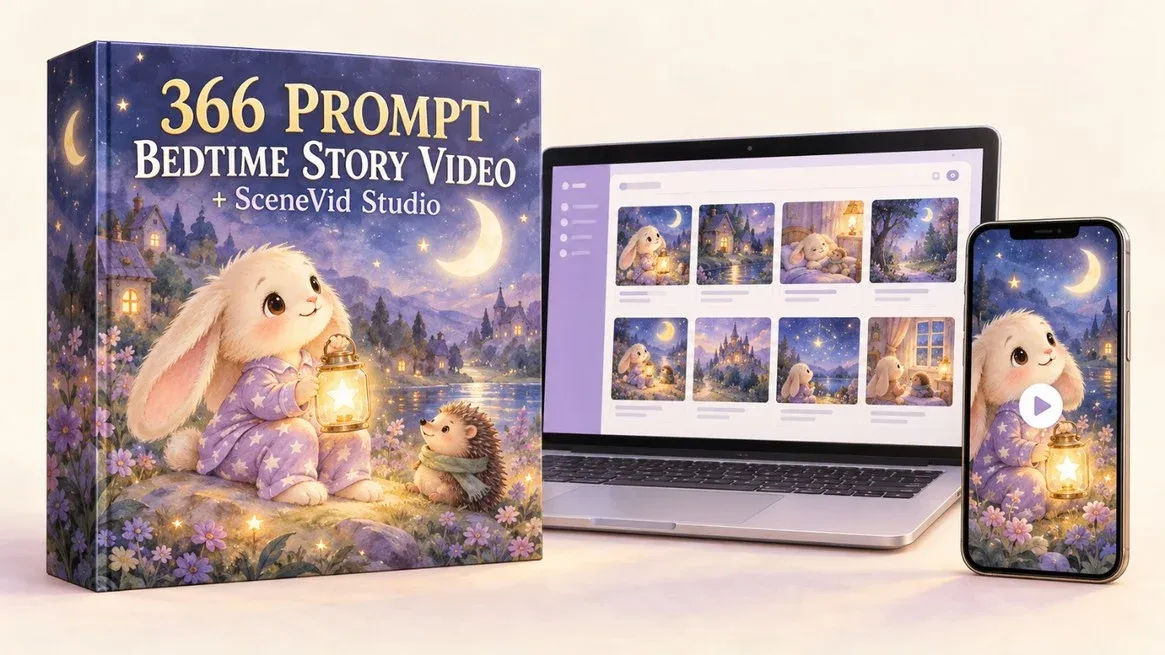
I bought 366 Prompts Bedtime Story Video on a Tuesday night because my daughter asked, for the fourth time that week, for a bunny story and I had run out of bunny stories. She is five. I am tired. So I paid the $17, opened the prompt library, and copied story #001, "The Little Bunny and the Lost Moonbeam," into ChatGPT to see whether this thing does what the sales page says it does.
Short answer: it mostly does. The prompt paste gives you a full story package, the tool turns the images and narration into a vertical MP4, and the whole loop is faster than building one from scratch in a normal editor. Longer answer is below, including the bits the sales page glosses over, because there are a few.
I should say up front what this is not. It is not a video generator. It does not make pictures for you. What you are buying is a very long, very specific text prompt plus a simple assembly tool, and you still generate the scene images with a separate AI image tool. If you were expecting a magic "click and a finished video appears" button, you will be disappointed. If you were expecting a shortcut past the blank page and the tedious editing, you will probably like it.
Our Verdict
366 Prompts Bedtime Story Video
A genuinely useful prompt library and a simple video assembler, but you still generate the images yourself and there are no refunds.
One-time $17, instant access, no subscription
What You Actually Get
The product is two parts, and it is worth being clear about the split because they do very different jobs.
Part one is the prompt library: 366 done-for-you bedtime story video prompts, sorted into 30 themes with 12 or 13 stories in each. Every prompt is a complete story already planned out. The one I read runs about 1,000 words and includes the named character with locked-in looks (Ollie, a cream-coloured bunny with long floppy ears and lavender star pajamas), a companion (Hazel the hedgehog in a sage scarf), a magical object, a list of cozy settings, and a soft goodnight ending. This is not a one-line "write me a bunny story" prompt. It is a full production brief.
The library itself lives online. You can filter by theme, search by animal or setting, save favourites, hit a "Surprise Me" button for a random story, and copy any prompt in a single click. There is nothing to download for that half.
Part two is SceneVid Studio, the tool that assembles the video. You upload your images in story order, paste the narration (one line per image), pick a calm voice, and export a 9:16 MP4 at 1080 by 1920. It is deliberately minimal: no timeline, no layers, no keyframes. The sales page says it was built for exactly this one job, and from what I can see, that is the truth.
On top of that there are two bonuses: a Character Consistency Cheat Sheet for when an image drifts off-model, and a swipe file of 100 bedtime thumbnail headlines. Both come with the package.
Key Features
What each prompt actually produces when you paste it into ChatGPT is the core of the product, so let me break that down, because it is more than just a story.
Scene image prompts. Each prompt asks ChatGPT to write storybook scene descriptions of 100 to 150 words per scene, each locked to a 9:16 vertical at 1080 by 1920, one clear focal point, no text or watermarks. That last part matters more than it sounds. Stray text and speech bubbles are the single most common thing that ruins an AI-generated children's picture, and the prompt heads it off.
Visual Consistency Lock. This is the feature I care about most. Every scene prompt repeats a fixed description of the character: same ears, same eyes, same pajama colour, same companion. The idea is that because each scene stands alone and repeats the lock, you can generate each image separately and still get the same bunny in scene one and scene eight. I tested it on Ollie and it held up decently, though not perfectly (more on that in a minute).
Short narration. One simple sentence per scene, written for children aged four to eight, totalling roughly 60 seconds read slowly. The narration comes back twice: once as part of the story package and once as a "Narration Lines" block, one line per scene, ready to paste straight into SceneVid Studio. That duplicate is a small thing but a good one. It saves you re-parsing your own story.
Thumbnail prompt. A thumbnail in the same storybook style, with natural empty space left for a headline. That is what the swipe file of 100 headlines is for.
Four-platform social pack. Captions for YouTube Shorts, TikTok, Instagram Reels and Facebook Reels, written separately for each platform with hashtags. Not one caption copy-pasted four times.
Beyond single shorts, the sales page also suggests themed playlists, longer 10 to 15 minute compilations strung together from one theme, read-alongs at home or in a classroom, and a posting calendar that covers a full year. Those are not features so much as ways to use it, and they are worth knowing before you buy.
Actually Using It
Here is what my Tuesday night actually looked like.
I opened the library, searched "bunny," and copied prompt #001. Pasting it into ChatGPT, I got back a full package in one go: eight scene descriptions, eight narration lines, a thumbnail prompt, and four captions. I read them, and the story arc was genuinely gentle and coherent. Ollie finds a lost moonbeam, meets Hazel, follows fireflies to a lily pond, lets the moonbeam go from a hilltop, and goes back to bed. My daughter liked it. That is the real test, and it passed.
Then came the part where the sales page gets quiet. I had to generate the images myself, in a separate AI image tool, from the eight scene prompts. This took the longest of any single step, maybe 20 to 25 minutes all in, because AI image tools are temperamental. Scene 1 and scene 2 were lovely. Scene 3 gave Ollie slightly wider eyes and a smudged nose, so I regenerated it. Scene 5 gave Hazel the hedgehog a different coloured scarf. The Visual Consistency Lock gets you close, but it does not get you perfect, which is exactly why the Character Consistency Cheat Sheet exists. If you expect frame-perfect consistency, you will be disappointed.
Once I had eight images I was happy with, the assembly was genuinely quick. I opened SceneVid Studio, uploaded the eight images in order, pasted the eight narration lines, picked the "Calm storyteller" voice from the three offered, and exported. The whole assembly step took maybe six minutes from opening the tool to having an MP4 on my desktop. No timeline, no scrubbing, no layers. That is the part that sold me, honestly.
The export was a clean 9:16 MP4 at 1080 by 1920. I posted it to a small test channel and it looked like a proper children's story video. Roughly 60 seconds, calm, watchable.
So the full build was around 35 to 40 minutes from opening the library to having a finished video, most of which was fiddling with image generation. The sales page pegs the "from scratch" alternative at five hours per video (6 PM to 11 PM), and I believe that, because I have done it the hard way before. So the saving is real, maybe 4 hours per video once you are practised. If you are posting daily, that is the difference between a channel that lasts a month and a channel that lasts a year.
It is not zero effort though. You still write nothing, but you do curate, generate, regenerate, judge images, and assemble. It is a shortcut past the blank page and the editing, not past the work.
Skip the blank page tonight
One-time $17, instant access, no subscription
Pricing and Value Analysis
The price is $17, one-time, no subscription, instant access. That is the number on the sales page and the number I paid.
The sales page frames the value with a stack of components that total $442. It is worth laying out the stack plainly so you can see what you are actually paying for versus what is marketing.
| Component | Stated value | What I think it is worth |
|---|---|---|
| 366 story prompts (30 themes) | $197 | The real product |
| SceneVid Studio | $97 | Simple but saves real time |
| Online prompt library | $47 | Filter, search, Surprise Me |
| 4-platform social pack | $47 | Bundled into every prompt |
| Bonus: Character Consistency Cheat Sheet | $27 | Handy when images drift |
| Bonus: 100 thumbnail headlines | $27 | Minor, but usable |
The $442 number is meaningless as a valuation. Nobody pays $442 for a prompt library. But the underlying product is genuinely substantial. 366 prompts, 30 themes, each prompt about 1,000 words of specific instruction, plus a working video assembler. At $17, the prompts alone are worth the price if you plan to make more than a handful of videos. If you make one video a month, you have got 30 years of content in there.
The thing to weigh against the price is the cost of the image tool. You will need an AI image generator, and that is separate from the $17 and not discussed much on the sales page. If you already pay for one, you are set. If not, factor that in.
One thing you should know before you click buy: there are no refunds. The sales page is explicit about it, all sales final. The reasoning given is that everything is shown on the page up front. So the $17 is a one-way door. That is a real limitation, and if you are on the fence, it is the reason to read the sales page carefully before you pay.
Pros and Cons
Pros
- 366 complete story prompts across 30 themes, so the blank page is gone
- SceneVid Studio is genuinely simple and turns images plus narration into a vertical MP4 fast
- The Visual Consistency Lock keeps characters close to the same across scenes
- Each prompt produces scene images, narration, a thumbnail and four-platform captions in one paste
- One-time $17, no subscription, instant access
Cons
- You still generate the scene images in a separate tool, which is the slowest step
- Character consistency is decent but not perfect, and you will regenerate some images
- No refunds, so $17 is a one-way door
- SceneVid Studio is basic and not a replacement for a full editor
Who This Is For / Who Should Skip It
This is for people who want to build a faceless bedtime story channel, or post Shorts and Reels, or make a calm story for their own kids, and who do not have a writer or an editor on hand. Parents and teachers who want to make read-alongs will get a lot out of it. Anyone who can already write a good bedtime story and edit video fine should not bother.
It is not for you if you expect the tool to generate images for you, or if you are not willing to own a separate AI image generator and spend 20 minutes playing with it. And if the no-refund policy makes you nervous, that is a fair reason to skip. If you want a full timeline editor, SceneVid Studio will feel thin.
Frequently Asked Questions
What is 366 Prompts Bedtime Story Video?
It is a two-part package: 366 copy-and-paste bedtime story prompts for ChatGPT, sorted into 30 themes, plus SceneVid Studio, a simple tool that turns your images and narration into a vertical 9:16 MP4 ready for Shorts, TikTok and Reels. One-time $17, instant access.
Do I need to be a writer or video editor?
No. The story is already planned inside the prompt, ChatGPT writes the scenes and narration, and SceneVid Studio assembles the video without a timeline or layers. You do need a separate AI image generator to create the scene images, and a little patience with it.
Does SceneVid Studio generate the images for me?
No. You generate the images yourself from the scene prompts ChatGPT writes, then upload them into SceneVid Studio in story order, paste the narration, pick a calm voice, and export. The tool's job is assembly, not generation. That is the main thing to understand before you buy.
Will everyone end up with the same videos?
No. ChatGPT writes the scene descriptions, narration and captions fresh each time, so wording varies. The images are generated new for you. With 30 themes and 12 or 13 stories per theme, two buyers who both love bunnies still have more than a dozen bunny stories to choose between. Your voice and timing are yours too.
Is there a refund if I don't like it?
No. The sales page says all sales are final and there are no refunds, because everything is shown on the page before purchase. The $17 is a one-way door, so read the sales page details carefully before you pay. You can check the current page and terms here.
What platforms can I post the videos to?
YouTube Shorts, TikTok, Instagram Reels and Facebook Reels. Each prompt includes a separate caption and hashtag set for all four, so you can post the same video four times without reusing the same text. The export is a 9:16 1080 by 1920 MP4.
What are the alternatives?
You can write your own prompts, which is free but slow, or buy a video editor plus a prompt pack elsewhere. The reason this one stands out is the coupling of a substantial prompt library with a purpose-built assembler at $17. If you already have a workflow you love, you probably don't need it.
Final Verdict
I am glad I spent the $17. The prompt library is genuinely substantial, the Visual Consistency Lock does useful work, and SceneVid Studio is the fastest image-and-narration-to-MP4 loop I have used. My daughter asked for the Ollie story again the next night, which is the review that matters.
The catches are real: you generate the images yourself, consistency is decent but not perfect, and there are no refunds. If those are deal-breakers, skip it. If you want a shortcut past the blank page and the editing, this delivers most of the way.
One calm video for every night of the year
One-time payment, instant access, no subscription