KDPEasy Storybook Prompt Kit Review: Building AI Coloring Books
I bought the KDPEasy Storybook Prompt Kit to see if it fixes character drift in AI coloring books. It writes every ChatGPT prompt for you, but it has limits. Here is my full review.
I have spent the better part of a month wrestling with ChatGPT to make a single coloring book. The first attempt, a story about a bunny, fell apart by page 4 when the bunny turned into a bear, then a dog, then something with too many ears. I re-prompted, I pasted reference images, I described the bunny in exhausting detail. Nothing held. Eventually I closed the chat and went back to my day job, convinced AI publishing wasn't for me.
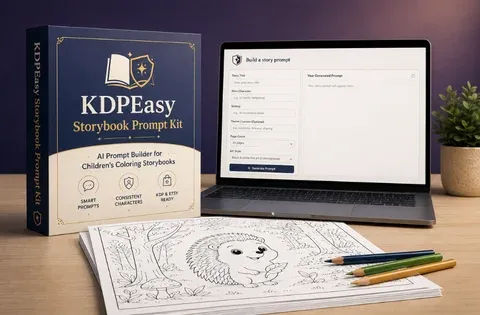
That frustration is exactly what led me to the KDPEasy Storybook Prompt Kit. I was reading a forum thread about character consistency and someone mentioned it as the fix. I clicked through, read the sales copy, and bought it for $16.95. It is a web app that assembles ChatGPT prompts for you, so you can build a full coloring storybook from one sentence, with a locked Character Bible so your hero stays the same from page 1 to page 30. I have used it on two books since. Here is what actually happened.
Our Verdict
KDPEasy Storybook Prompt Kit
A prompt assembly tool that actually keeps your AI characters consistent, if you are willing to put in the manual pasting work yourself.
One-time payment. 30-day money-back guarantee.
What You Actually Get
First, the price. You pay $16.95 once. There is no subscription, and it's a lifetime license to the web app. For that you get the main tool plus four bonuses, which the sales page values at $127 total. I am skeptical of inflated value stacks, but the contents are real.
- The main Storybook Prompt Kit app, where you type an idea and it generates four sets of prompts: the story, one image prompt per page, the covers, and the Amazon listing.
- Bonus 1 is 250 Story Sparks, paste-ready story ideas across 14 niches like Animal Friends, Dinosaurs, Space & Sky, Under the Sea, Fairy Tale & Magic, and the rest.
- Bonus 2 is the Canva Design Guide, which walks you through turning your images into a print-ready KDP interior, including the single-sided printing trick where you leave blank backs.
- Bonus 3 is the Niche Research Report, covering demand versus competition, a seasonal calendar, keyword ideas, and a framework for picking a niche.
- There is also a quick-start guide, a PDF you read once in ten minutes.
The tool itself is a simple web interface. It does not generate images. It does not call any AI. It assembles prompts from templates, which means running it is instant and free to use as often as you want. You generate the images yourself in ChatGPT, which works on the free plan with daily limits, though the sales page suggests Plus if you plan to publish regularly.
Key Features
The core idea is that ChatGPT drifts. Custom GPTs forget instructions. Hand-written prompts wander. The kit solves this by giving you an exact prompt to paste, every time, so the AI stays on track. There are several features worth knowing about.
The Character Bible lock is the main selling point. When you run the story prompt in ChatGPT, it creates a locked description of your character: species, body, face, colors, outfit. Then you generate every image in the same ChatGPT chat. No reference image juggling. The page on this explains it as a two-part system, and it genuinely works better than what I was doing before.
Story text placement is another. You can choose where the text sits on the page: top, bottom, left, right, or auto. I used auto for both books and it looked sensible.
Trim sizes are built in. Six real KDP sizes: 8.5 x 8.5, 8 x 8, 6 x 9, 8 x 10, 8.5 x 11, and 11 x 8.5 landscape, each with the matching Canva document size. That saved me the headache of remembering dimensions.
Art styles are limited to two: Bold & Simple and Bold & Rounded. Both are designed for children, ages 4 to 8. Simple shapes, short read-aloud text, wide spaces to color.
The listing helper is a nice extra. It writes a prompt for your full Amazon book description, seven sections, seven backend keyword phrases, and three category suggestions, all from your story. I used it on my second book and it saved me an hour of staring at a blank field.
The KDPEasy Storybook Prompt Kit page shows sample pages from three books built this way: a triceratops story, an astronaut story, and a clownfish story. I want to be clear these are real generated page samples, and they show the style accurately. Bold outlines, clean line art, not too busy.Actually Using It
I built two books with this kit: one about a dinosaur for my nephew and one about a firefly for testing the Etsy printable route. Both were 24 pages. I did not time myself to the second on the first book, but the second took me roughly four hours from idea to a finished PDF ready to upload, and that includes several breaks and at least six regenerated pages.
The workflow starts with typing one sentence into the tool. For the dinosaur book I wrote "A young triceratops who is proud of her horns learns to walk tall." I could have pasted a detailed paragraph for a tighter result, but the sentence was enough.
The tool then gives me the story prompt. I copied it into ChatGPT. The story came back complete with a beginning, middle, and end, split into 24 pages. It also locked the Character Bible, describing Tibby the triceratops in detail. I did not have to write any of that myself.
Step 2 is where I paste the story reply back into the tool. It asks me to choose where the text sits, and I hit auto. Then it gives me one image prompt per page. There are no page numbers, which is intentional, and there is a bulk .txt download of the whole set. I downloaded it and kept it as backup.
Step 3 is the real work. I opened a fresh ChatGPT chat for images, separate from the story chat. I pasted page 1's prompt first and checked the character. It looked right, so I generated every other page in that same chat, one by one. This is the part where the system earns its keep. The character stayed consistent the entire time. Tibby looked like Tibby on page 22 just as much as page 2. I did not need any reference images. I did need to regenerate a few pages where the text came out garbled or the composition was wrong. The sales page admits this will happen, and it did.
Step 4 is covers and listing. I filled in my title, no subtitle, and picked a cover style. The tool built a full-color front and back cover prompt that matched my interior character, with the bottom-right corner left clear for KDP's barcode. I generated both in the same image chat. The listing prompt came next, and I ran it in another ChatGPT window.
The assembly was the most tedious part. I took the images into Canva and followed Bonus 2's guide. The trick with coloring books is single-sided printing, where you leave the back of each page blank. It means you have to place each image carefully. It is manual work, and the sales page is honest that this is a manual process. Full automation is an optional upgrade that I did not buy.
What annoyed me most was the sheer volume of pasting. Twenty-four pages means twenty-four individual image prompts, and each one took a few seconds to paste and a few more to run. Then there was the odd regenerate. It is not a one-click thing, and anyone expecting that will be disappointed.
What did not annoy me at all was the quality. The line art is clean and the characters are genuinely consistent. The sales page says the tool assembles the same solid prompt every time, and that is the core value. It fixed the exact problem I had given up on a month earlier.
I also tested the firefly book for the Etsy route. I turned it into a printable PDF, and the process was identical, just without the barcode concerns. The niche report helped me pick a niche with lower competition, which is more useful than it sounds.
Fix your character drift for under $20
No subscription. Keeps working as long as ChatGPT does.
Pricing and Value Analysis
The price is $16.95. That is the only number I was charged. The sales page lists a value of $127 for everything included, which is marketing math. What matters is what you get for $16.95, and that is a web app with lifetime access, three bonuses, and a quick-start guide.
There is a 30-day money-back guarantee, so you can try it for a month and get a full refund if it does not save you time. The sales page says you get to keep the bonuses even if you refund, which is generous if true.
| Option | Price | What It Is |
|---|---|---|
| KDPEasy Storybook Prompt Kit | $16.95 | Prompt assembly web app plus all bonuses |
| Hiring an illustrator | $100+ per book | Full creative control but slow and expensive |
| Free ChatGPT prompts | $0 | Works but character drift will drive you mad |
| Custom GPT setup | $20/mo for Plus | Still drifts and forgets instructions |
Compared to hiring an illustrator, the $16.95 is nothing. Compared to doing it by hand for free, you are paying to save hours of frustration. For me, the consistency alone was worth it. I was about to give up on the whole idea, and this got me to a finished product.
Pros and Cons
Here is where I land after two full books and a whole weekend of using the system.
Pros
- Character consistency actually works, and that was my biggest problem
- The listing helper writes your full Amazon description and keywords for you
- Six real KDP trim sizes with matching Canva documents save real time
- One-time $16.95 price with no subscription and a 30-day guarantee
- The 250 story sparks across 14 niches mean you never face a blank page
Cons
- You still paste every prompt manually, which is tedious for 20-40 pages
- The tool does not generate images at all, so you need ChatGPT and it needs to cooperate
- Expect to regenerate pages now and then with garbled text
- Assembly into a final PDF is manual and you have to follow the Canva guide yourself
- Full automation is an upsell that costs extra, not included
Who This Is For
This is for people who are already comfortable using ChatGPT and pasting text around. If you sell coloring books on KDP or Etsy, or want to start, and you have been fighting with character drift, this directly solves that problem. It is also for people who want done-for-you story ideas and niche research instead of starting from scratch. If you publish regularly into children's niches, the speed gain is real.
Who Should Skip It
Skip this if you want a tool that generates the images itself. That is not what this is. You still do all the image generation in ChatGPT, and on the free plan you will hit daily limits. Skip it if you want one click to a finished PDF, because assembly is manual and the automated version is a paid upgrade. And skip it if you are set on full-color storybooks, because this kit makes black-and-white coloring interiors only. Video/Image Tools category buyers who want a hands-off generator should look elsewhere.
Frequently Asked Questions
Is the KDPEasy Storybook Prompt Kit worth it?
Yes, if you already use ChatGPT to make coloring pages and struggle with character consistency. For $16.95 one-time, it assembles prompts that keep your character locked from page 1 to the last page. It is not a full automation tool, so you still paste prompts yourself, but it fixes the biggest failure point.
Do I need ChatGPT Plus to use this kit?
No, the free ChatGPT plan can generate images too, but with daily limits. If you plan to publish regularly, the sales page suggests Plus may be better. The prompt kit itself works with any ChatGPT plan and does not cost extra to run.
Does the kit generate images for me?
No. The tool assembles prompts from templates, it does not call any AI or create pictures. You paste the prompts into ChatGPT and generate the images yourself. The kit writes every prompt you need, including covers and listing copy, but the actual image generation is on you.
What does the 30-day money-back guarantee cover?
You can try the kit for a month, and if it does not save you time, you email for a full refund. The sales page states you even get to keep the bonuses after refunding, though I did not test this myself. The guarantee is standard for the KDPEasy Studio team.
Can I use this for Etsy printables or just KDP books?
Both. The kit is built for KDP paperback publishing, but Etsy sellers can turn one character into a themed printable pack of 20-40 pages and sell it as an instant-download PDF. Bonus 2 covers the Canva assembly, and the same workflow works for either platform.
How long does it take to make one coloring storybook?
I built a 24-page book in about four hours, including breaks and regenerated pages. The bulk of that time was pasting image prompts into ChatGPT one by one. The story prompt itself takes minutes, but generating and assembling 20-40 pages is manual work.
What is a Character Bible in this kit?
A Character Bible is a locked description of your character, covering species, body, face, colors, and outfit. The story prompt creates it in Step 1. You then generate every page in the same ChatGPT chat, so the character looks the same on page 30 as on page 1.
Get the KDPEasy Storybook Prompt Kit for $16.95 and see if it ends your own character drift battles.Final Verdict
I went in expecting a gimmick and came out with my first publishable coloring storybook in four hours. The KDPEasy Storybook Prompt Kit does one thing well: it keeps ChatGPT on track so your character does not mutate into a different animal halfway through the book. For $16.95, that alone is worth it. The bonuses are genuinely useful, especially the Canva guide and the niche report. The limitations are real. It does not generate images, it will not produce a finished PDF with one click, and you have to tolerate the odd garbled page. But if you have been fighting with AI consistency and giving up, this is a cheap fix that works.
My final rating is 3.8 out of 5. Not perfect, but it did what it promised and it got me past a problem I had abandoned. That is more than I can say for most tools in this niche.