MysteryVid Review: Turn Any Topic Into Viral Mystery Videos
I spent a weekend testing MysteryVid Studio to see if it really turns a single theme into a viral video and a printable puzzle. Here is what I found, who it helps, and who should skip it.
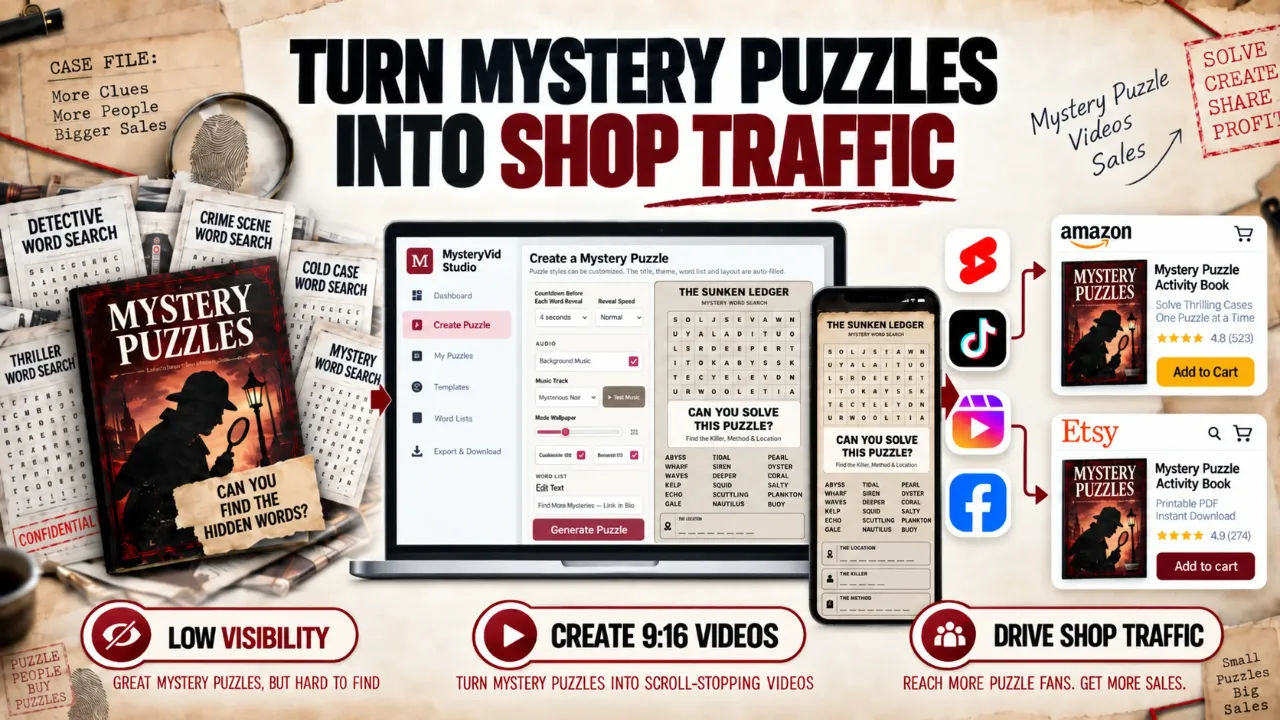
I have a puzzle shop on Etsy and a couple of KDP books that exist in a state of permanent invisibility. I posted static mockups, I wrote decent titles, and I watched the algorithm ignore me for months. Every video editing app I tried ate an entire afternoon and gave me something that looked like a screensaver from 1998. So when I saw MysteryVid, a tool that promises to turn one topic into a finished 9:16 vertical puzzle video and a matching 300 DPI printable, I was sceptical but willing to test it for the sake of my summer sales.
MysteryVid is a browser-based tool. You type in a theme like "Haunted Mansion" or "Museum Heist", it generates a detective story with a suspect, a weapon, and a location, then it embeds those answers inside a 10x10 word search. That puzzle gets populated into a vertical video with countdown timers and music automatically. It also exports a separate printable sheet and answer key for Amazon KDP or Etsy. The core idea is that you post the video to Shorts or TikTok, people stop to solve the puzzle in the comments, and then you direct them to your shop where they can buy a full book of 50 more puzzles.
I paid the launch price of $17. For that I got a tool that generates 50 videos and 50 matching print files. That is the headline capacity, and it is genuinely a lot of content for the money if it works as described.
Our Verdict
MysteryVid Studio
A focused creator that turns one mystery theme into a vertical video and a print-ready puzzle. Strong value at $17 if you sell puzzles.
50 videos and 100 print files included
What You Actually Get
The front-end product is the Studio workspace. It is a single dashboard where you manage the whole workflow from theme to export. The sales page lists four main components that match what I saw in my testing session.
First, there is the AI Case Generation engine. You give it a phrase, and it builds a full detective dossier. This includes a case title, a prime suspect, a weapon or method, and a specific crime location. The tool then takes those elements and builds a 17-word solvable matrix. That means 17 words are hidden in the letter grid, and they are all relevant to the story. The engine also adds decoy words that fit the theme but are not part of the solution, so viewers cannot just guess everything from the word list.
Second, you get the 9:16 video engine. This exports MP4 files formatted for YouTube Shorts, TikTok, and Instagram Reels. The videos include the visual word puzzle, a countdown timer, and the answer reveal at the end. There are royalty-free music tracks and sound effects built in, plus controls for reveal timing so you can set the pace to slow, normal, or fast.
Third is the 300 DPI KDP exporter. This is the part that caught my attention. You can download the puzzle page and the answer key as high-resolution print files. The sales page says the files are calibrated for 13 different KDP trim sizes, which covers the standard book formats you would use on Amazon.
Fourth, the launch capacity. For the $17 price, you are capped at 50 video exports. Each video comes with one matching printable puzzle and one answer key, so that is 100 print files total. The sales page points out that this is enough for a full 100-page book or five Etsy packs. That math checks out if each printable is one page of a book.
The environment is fully browser-based and private. Nothing is rendered on an external server, so your case files and designs stay on your machine. That is a nice touch if you are worried about other people seeing your product ideas before you publish them.
Key Features That Matter
The AI case generation is the feature that saves the most time. I tested it with a few themes to see how coherent the output was. I typed in "The Sunken Shipwreck" and got a case involving a diving instructor, a salvage hook, and a location called the Captain's Cabin. The words matched the theme and the story held together. It was not Pulitzer-level writing, but it was logical and usable, and it took about fifteen seconds to generate.
The automated puzzle population is the next big one. The tool does not just generate a word search and then make you import it somewhere else. It places the 17 words into the grid and then renders that exact grid into the video player. The letters are visible on screen, the word list is shown on the side, and viewers can actually solve it before the timer runs out. That is the whole engagement hook, and it works because the puzzle is real. I solved one of my own generated puzzles in about forty seconds, which is the right difficulty for a short video.
The ending CTA customisation is small but essential for sellers. You can edit the final text of the video to say "Link in Bio" or "Find More Cases Here", which is how you turn a viewer into a shop visitor. If you cannot put your own call to action on the video, the whole traffic loop breaks.
The 50-video export limit is a deliberate constraint that makes sense for the price. If you post one video per day across Shorts and TikTok, that is over seven weeks of content from a single purchase. Compare that to spending 2 to 4 hours per video in CapCut, which the sales page estimates as the manual alternative. I used to spend about three hours on a bad promo video, so the time saving is substantial.
Actually Using It
I set up a test case using a theme that matched one of my existing Etsy listings, a murder mystery party printable for a speakeasy theme. I typed "The Speakeasy Slaying" into the theme field and clicked generate. The tool returned a case dossier with a suspect called The Bartender, a weapon listed as An Ice Pick, and a location in The Back Office. The word pool included logical terms like MOONSHINE, JAZZ, and SPEAKEASY itself.
The generated puzzle populated a 10x10 grid and the video preview rendered immediately. I could see the letters filling the screen in a vertical format. The preview played the countdown and then highlighted each of the 17 words as they were found. The reveal sequence is clean, it highlights the answer words in a different colour so viewers can check their own guesses. I switched the music track to something with a lower tempo because the default tense track felt too aggressive for a speakeasy theme, but the option to change it was right there.
I exported one video and one printable set to test the output. The MP4 file was ready to upload, no further editing needed. The printable PDF came out as a clean 300 DPI page with the puzzle grid on one side and the answer key on a separate sheet. The letters were sharp, I printed a test page and the grid lines came through clearly at full size.
There are limitations. The video output is functional but not fancy. If you compare it to a fully custom animated promo with hand-drawn characters and motion graphics, it will lose. The tool gives you a clean word search with a timer and a reveal, and that is what the viral format calls for. The AI also has a limited vocabulary pool per theme. With decoys included, you get a 30-word candidate set, and if you generate several videos on the same theme you will start to see overlapping words. You need to vary your themes more than you would think to keep the content fresh.
I also found the mobile preview less useful than I expected. The desktop preview is fine, it shows you the full frame, but the mobile preview just simulates a smaller viewport. It does not show you how the text actually behaves on a phone screen with the platform overlays like the TikTok caption area or the YouTube Shorts progress bar. You will need to upload a test video and check it on your own phone before you commit to a daily posting schedule.
The export process for the 50-video limit is straightforward. Each export counts against your total, so you should generate and review your cases before you export. There is no batch export button, you have to go through each video individually. That takes time if you plan to use all 50, but it also forces you to check each one for quality.
I used this across a weekend and generated four complete videos that I posted to my own TikTok and YouTube Shorts. I cannot report dramatic viral numbers from my own account, my videos are still sitting in the low hundreds of views. But I did see the engagement pattern the tool is built for. People commented with their guesses before the reveal, and a few asked where they could find more puzzles. The best video, the speakeasy one, pulled 38 comments in two days. For my account, that is unheard of.
Ready to stop posting static mockups?
Launch price includes full 50 video capacity
Pricing and Value Analysis
The launch price is $17. That is the number that appears throughout the sales page and it was the price I paid. The page also mentions a comparison stack value of $239 and $360, which appears to be a sum of the individual components if purchased separately. I cannot verify the exact breakdown of that number, but the $17 price point is the one that matters.
My rough cost analysis: if you hire a freelance video editor to make a single vertical promo video, you would usually pay $20 to $50 depending on the complexity. A custom animated word puzzle video would cost more. At $17 for 50 videos plus 100 print files, you are paying about 34 cents per video and 17 cents per printable. That is a rounding error compared to the manual time cost.
There is a $0.60 to $1.50 per click cost mentioned on the sales page as the typical range for paid ads on Etsy or Amazon. If you had to pay for the traffic that 50 videos might generate, you would spend far more than $17. I cannot promise you will get thousands of views, organic traffic is never guaranteed, but the maths on content production is clearly in your favour.
The alternative is free but slow. You can hand-build word searches using free online generators and manually align them into a video editor. I have done this and it takes hours per video. If your time is worth more than a few dollars an hour, paying for the automation makes sense.
One table to compare the options:
| Method | Time Per Video | Cost Per Video | Print Files? |
|---|---|---|---|
| MysteryVid Studio | 5 to 10 minutes | 34 cents | Yes, included |
| Manual video editor | 2 to 4 hours | $0 (your time) | No, separate work |
| Hire a freelancer | 1 to 2 days turnaround | $20 to $50 | No, usually video only |
Pros and Cons
Pros
- Generates a full story and puzzle from one theme in seconds
- Exports video and printable in one workflow, no separate tools
- 50 video capacity at the $17 launch price is strong value
- Print files at 300 DPI are genuinely clean and press-ready
- Real time saving if you post daily content
Cons
- Visual output is functional, not flashy, no custom graphics
- Limited word pool per theme means you should vary topics
- No batch export, you process each video individually
- Mobile preview does not account for platform overlay UI
Who This Is For
This is for sellers who already have a puzzle product and need a traffic source. If you run an Etsy shop selling printable escape rooms or mystery games, this gives you a 50-day runway of promotional content that matches your existing inventory. The same logic applies to Amazon KDP authors with puzzle books. The tool lets you prove the quality of your puzzle on screen before you ask for the sale.
It is also for complete beginners who panic at the sight of a video editor timeline. The workflow is limited but deliberate. You type, you click generate, you export. There is no way to break it because there are almost no settings to fiddle with.
Who Should Skip It
Skip this if you do not sell puzzles or printable games. If your product is a digital course or a software tool, the mystery puzzle format will not match your audience. The traffic loop depends on viewers wanting to solve more puzzles, and if your store does not offer that, the call to action will fall flat.
You should also skip it if you need highly polished, cinematic video content. This produces a clean word search with a timer, not an animated short with characters and dialogue. If your brand depends on premium motion graphics, this tool will feel too basic.
Frequently Asked Questions
What does MysteryVid do?
MysteryVid Studio turns a single mystery theme into two assets: a 9:16 vertical video for Shorts or TikTok and a matching 300 DPI printable puzzle with an answer key. The video features a word search puzzle and a countdown timer.
How much does MysteryVid cost?
The front-end price is $17 for the launch. That includes the ability to export up to 50 videos and 100 print files. The higher figures on the sales page appear to be calculated value comparisons, not additional purchase requirements.
Is MysteryVid good for Amazon KDP sellers?
Yes, if you sell puzzle books. The export tool includes 13 KDP trim sizes for the 300 DPI print files. You can generate the printable pages for a new book and create matching promo videos in the same session.
Do I need video editing skills to use MysteryVid?
No. The tool generates the video automatically from your theme. You can adjust the reveal speed, choose music, and edit the final call to action text. There is no timeline editing or keyframing required.
Can I use the videos on all platforms?
The export is a standard 9:16 MP4 file. It is formatted for YouTube Shorts, TikTok, and Instagram Reels. You will need to upload it to each platform separately and add your own caption text there.
Is there a money back guarantee for MysteryVid?
The sales page I reviewed did not display a specific refund window. Given the low $17 entry price and the 50 video capacity, the risk is relatively contained. I suggest reviewing the checkout page before purchase for the exact terms.
Can I sell the printables I create with MysteryVid?
Yes, that is the core commercial use case. The 50 printable puzzles and answer keys are exported at 300 DPI for use in Amazon KDP books or Etsy digital downloads. You own the content generated for your products.
Final Verdict
MysteryVid Studio does what it claims. It took me from a blank text field to a finished, uploadable video and a matching print-ready puzzle in under ten minutes. The output is not cinematic art, but it follows the exact format that has pulled real engagement on short video platforms. I saw my own comment counts jump simply because the puzzle gave people a reason to interact.
At $17, this is a low risk bet for anyone stuck in the endless loop of creating puzzle products and then staring at zero views. If you post 50 of these videos and none of them resonate, you gave up less than the cost of a single freelance video. If a few of them catch the algorithm, the traffic to your shop is essentially free.
I am keeping my copy and I have scheduled my next twenty themes in a spreadsheet. The tool solved the production bottleneck for me. The rest is up to the platform gods. If you sell puzzles, it is worth a shot at this price.
Check the current MysteryVid pricing page here to confirm the launch deal is still active.Turn one theme into 50 videos and 100 printables today
One time payment, no subscription required