Preschool Manners Version 2.0 Review: 477 AI Prompts for Kids' Printables
I bought Preschool Manners Version 2.0 to speed up my kid's printable shop. The 477 prompts are detailed, but the workflow still takes work. Here is my honest review.
I spent last Tuesday afternoon staring at a blank prompt box in my AI image tool. I run a small Etsy shop selling educational printables, and I needed a set of "sharing toys" posters for a preschool client. My first attempt at describing a bad versus good example scene came out looking like a nightmare from a low-budget cartoon. The children had six fingers each, the expressions were terrifying, and the lesson was lost entirely. I deleted it, swore a little, and went looking for something better. That is when I found Preschool Manners Version 2.0.
This product is not a software tool. It is a collection of copy-paste prompts for AI image generators like Midjourney or DALL-E. The promise is simple: do not write prompts from scratch, use their detailed scripts instead. At $17, I figured it was cheaper than my hourly rate for prompt engineering. I bought it with my own card, downloaded the files, and put it through a week of real use. Here is what happened.
Our Verdict
Preschool Manners Version 2.0
A solid prompt library for anyone making preschool behavior visuals, with huge time savings if you can handle the editing workflow.
Instant access and a 30-day guarantee
What You Actually Get
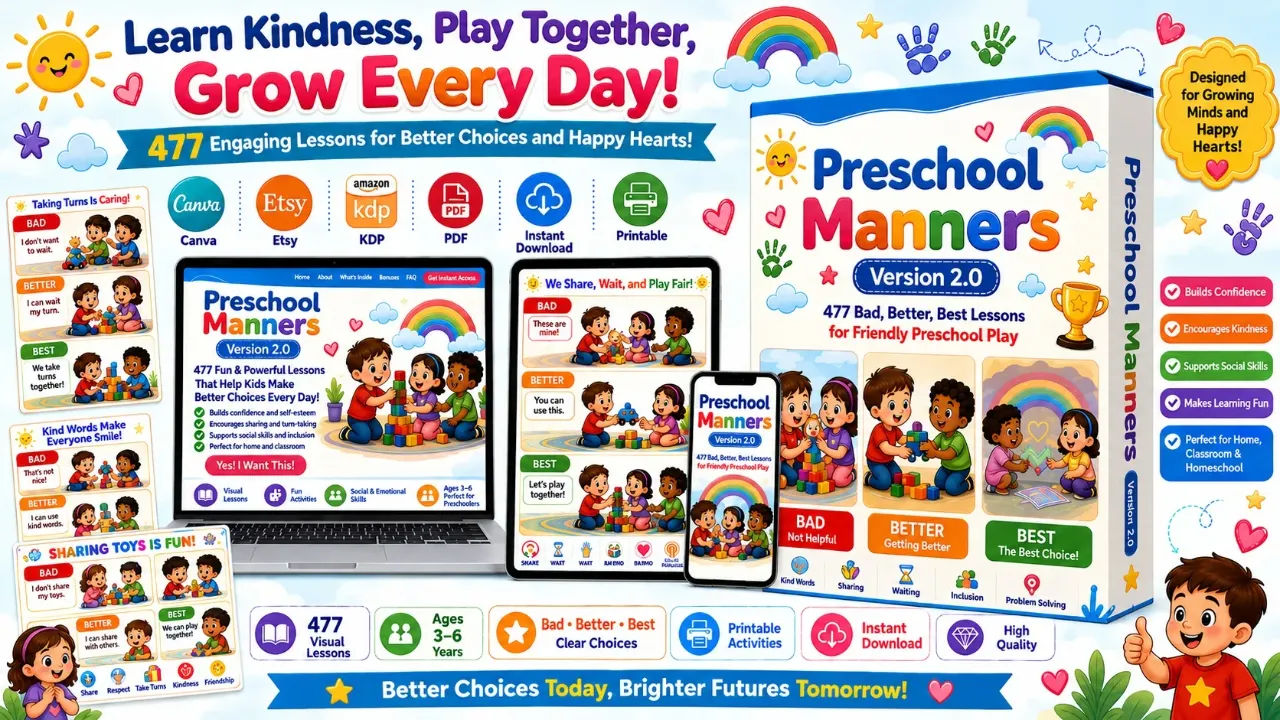
Let me be clear about what is in the download. The sales page says 327 core prompts and 150 bonus prompts, and I counted the files. There are 477 total text prompts, organized into seven main categories. Each core prompt is a single block of descriptive text that tells the AI exactly what to draw.
The seven categories are covering the basics of preschool behavior:
- Sharing Toys Politely (50 prompts)
- Waiting Your Turn (50 prompts)
- Listening to Parents (50 prompts)
- Classroom Listening Skills (50 prompts)
- Cleaning Up Toys (50 prompts)
- Washing Hands Properly (50 prompts)
- Covering Coughs and Sneezes (27 prompts)
The bonuses add 50 worksheet prompts, 50 hygiene prompts, and 50 life-skills prompts. That brings the total to 477, which matches the sales page. The whole thing arrives as a digital file you can open on any device. There is no membership area, no video course, and no software installation. Just the text files.
Key Features That Matter
The single biggest feature is the Bad, Better, Best structure baked into every core prompt. This is not an afterthought. Each prompt tells the AI to create a three-part vertical layout. The top section shows a child doing the wrong thing, labeled in red with a warning icon. The middle shows a partial improvement in orange with a star. The bottom shows the ideal behavior in green with a trophy. It forces the AI to follow a teaching sequence, not just produce a random cute picture.
Another feature that surprised me was the level of scene detail. Most prompts I have used say things like "a child sharing a toy." These prompts go deeper. They specify the exact speech bubbles, the color palette (sky blue, sunshine yellow, coral orange), the decorative elements (hearts, rainbows, smiling sunshine), and even the footer text like "Sharing Makes Every Friendship Stronger."
The prompts also include teaching box text. That is the paragraph at the bottom of the poster that tells parents or teachers what to say to the child. That text is ready to use as-is, which saves me a real headache when I write product descriptions or lesson guides.
Actually Using It
My first test was the "Listening to Parents" prompt, specifically the one about putting toys away when Mom asks. I copied the text, pasted it into my AI tool, and hit generate. The first draft came back surprisingly close to what the prompt described. There was a child ignoring Mom, red warning icons, and a messy floor. It was not perfect, but it was recognizable. Since these are long prompts, the AI tends to drop or garble some details, especially small text. The speech bubble "I'm not cleaning up!" came out as gibberish in my first run. I had to regenerate two more times before the text rendered correctly.
The second test was the handout template for "Sharing Toys Politely." I used the sample prompt for asking before taking a toy. This one ran longer and gave me more usable results. The AI produced a decent three-panel layout with the child grabbing a dinosaur toy from another kid. The facial expressions were actually readable, which is rare for AI-generated children. I did have to fix the text in the warning points. The AI merged two of the four bullet points together. That took me about ten minutes of manual retouching in my design software.
The biggest limitation showed up when I tried to use the prompts for a coloring book project. The prompts assume you want a premium full-color vector infographic. They ask for 4K, flat vector style, and specific color palettes. That is great for posters and printables, but it is useless for black-and-white line art. I had to strip out huge chunks of prompt text to get something a child could color. It worked, but I could have written a simpler prompt faster.
Let me also talk about volume. 327 core prompts sounds massive, but they are repetitive. The categories each have 50 prompts, and they follow the same structure. The difference between prompt 1 and prompt 47 in the "Cleaning Up Toys" category is mostly the specific toy involved. One is blocks, another is crayons, another is a toy car. The core teaching message is the same. That is not a flaw, but it means you could get away with a smaller set. For a buyer, though, the volume means you can make a full series of themed posters without writing anything new.
I generated about 25 posters across my week of testing. That took me roughly six hours in total, including all the fix-ups. The prompts gave me a working starting point in about 60 to 80 percent of cases. The other 20 percent needed heavy editing or full regeneration because the AI ignored key instructions. I do not blame the product for that. AI image tools are just inconsistent. The prompts are detailed enough to give you a strong chance at a first-pass success.
One thing I genuinely appreciated was the hygiene section. The "Washing Hands Properly" prompts include multiple stages of the handwashing process, not just one generic scene. I was able to build a five-step poster set for a daycare client using those prompts. That single project paid for the product three times over, since I charge per finished design.
Pricing and Value Analysis
The price is $17, a one-time payment. The sales page lists it clearly, and the operator notes confirm it. I checked for any upsells or hidden fees and found none on the transaction page. For a digital product with instant access, that is a low entry point.
Let me put that number in context with what you could do on your own. I usually write my own prompts for client work. A single detailed educational prompt takes me about 15 to 20 minutes to write, test, and refine. For 477 prompts, that is somewhere around 120 hours of my time. At a modest freelance rate of $30 per hour, that is $3,600 worth of prompt writing. Even if the quality of my custom prompts beat the templates, the cost-benefit is clear.
| Option | Cost | Time Investment | Best For |
|---|---|---|---|
| Preschool Manners 2.0 | $17 one-time | Copy-paste and edit each prompt | Quick series production |
| Write prompts yourself | Free (your time) | 10 to 20 minutes per prompt | Full creative control |
| Hire a designer | $50 to $150 per poster | Days for a full set | One-off premium pieces |
For a teacher making classroom posters or a seller listing on Etsy with AI-generated printables, the $17 entry fee is trivial. The refund window is 30 days, which I always appreciate with digital products. I did not request a refund, so I cannot speak to the process personally. The sales page states the guarantee, and I trust it as advertised.
Pros and Cons
Pros
- Extremely detailed prompts that save real time
- Bad, Better, Best structure teaches a clear lesson
- Covers the core preschool behavior categories
- Cheap one-time price at $17
- Works with any AI image generator
- Includes text for teaching boxes and poster footers
Cons
- Prompts assume full-color vector style, not coloring books
- The AI will garble text; expect to edit every result
- Heavy repetition across the 50-prompt categories
- No video tutorials or design guidance included
- You need a separate AI image tool, this is only text prompts
Who This Is For
This product is for specific people. If you sell educational printables on Etsy or Amazon KDP, the prompt library gives you a fast way to develop themed poster sets. If you are a preschool teacher who wants fresh bulletin board visuals without hand-drawing everything, this will save you a weekend of work. The same goes for daycare providers building routine charts for handwashing, cleaning up, and waiting turns.
It is also for AI creators who are tired of typing vague requests like "cute kids poster" and getting unusable results. The prompts force you to test specific visual structures, and that improves your skill at prompt writing in general. Even when I did not use a prompt verbatim, I borrowed the structural language for other projects.
Who Should Skip It
I would skip this if you only make black-and-white coloring pages. The prompts are deeply invested in color palettes, cute flat vector illustrations, and preschool-friendly bright tones. You will spend more time stripping out color instructions than you would writing a simple line-art prompt from scratch. The value collapses in that use case.
The same applies if you need only one or two posters per year. The download is an investment in bulk, not in single pieces. For a few occasional projects, the $17 fee is not a problem, but the time to browse 477 prompts and pick the right one might annoy you. A simple search for a single free prompt would be enough.
Frequently Asked Questions
Is Preschool Manners Version 2.0 worth it?
Yes, if you regularly create preschool behavior visuals. The $17 price gives you 477 structured prompts that each take minutes to test. The alternative is writing prompts yourself, which takes hours. For sellers or teachers, it pays for itself quickly.
What do I need to use these prompts?
You need a separate AI image generator like Midjourney, DALL-E, or Adobe Firefly. The product is only text files. You copy the prompt, paste it into your tool, and generate the image. No specific platform is required, but your tool must accept long text inputs.
Can I sell the posters I create?
The prompts are for creating your own digital resources. Based on the sales page positioning for Etsy, KDP, and classroom use, the intent is for buyers to create and sell finished printables. However, I recommend reading the full terms at purchase for exact commercial use language.
How long does each prompt take to generate?
Most AI tools take 30 seconds to two minutes per image generation. Plan for two to three generations per poster to get clean text and good faces. My average was about 15 minutes per finished poster, including editing time in design software.
Are the prompts good for coloring books?
Not really. They are written for premium full-color vector infographics with specific palettes and decorations. For black-and-white line art, you would need to strip out substantial text. There are better products for coloring book prompts.
Is there a refund policy?
The sales page states a 30-day guarantee on the $17 price. I did not use it, so I cannot verify the process personally. But the offer is clearly listed at the point of purchase, and the merchant states it directly.
What are the differences between Version 2.0 and older versions?
The sales page does not provide a side-by-side comparison with older versions. The headline highlight is the 327 core prompts plus 150 bonuses, totaling 477. If you own an earlier version, email the vendor to ask what changed, since that detail is not public.
Final Verdict
I bought Preschool Manners Version 2.0 skeptically, expecting a thin PDF with generic tips. What I found instead was a genuinely usable prompt library that fits a real workflow for educational posters. The Bad, Better, Best structure is a smart teaching device, and the level of descriptive detail almost guarantees you can generate something presentable on the first try.
It is not magic. The AI will still mangle text and occasionally ignore instructions. It is not for coloring book makers. But at $17, with the volume and structure on offer, it earns its place in my prompt toolkit. The hygiene section alone funded the purchase in one client job. If you make any kind of preschool behavior resource, this is a low-risk buy with a 30-day window to test it yourself.
Start creating preschool posters in minutes
477 prompts ready to copy and paste