Printable Niche Finder AI Review: Stop Guessing, Start Briefing
I spent a week using Printable Niche Finder AI to turn vague kids' themes into concrete product briefs. Here is my honest hands-on review of whether it beats guessing.
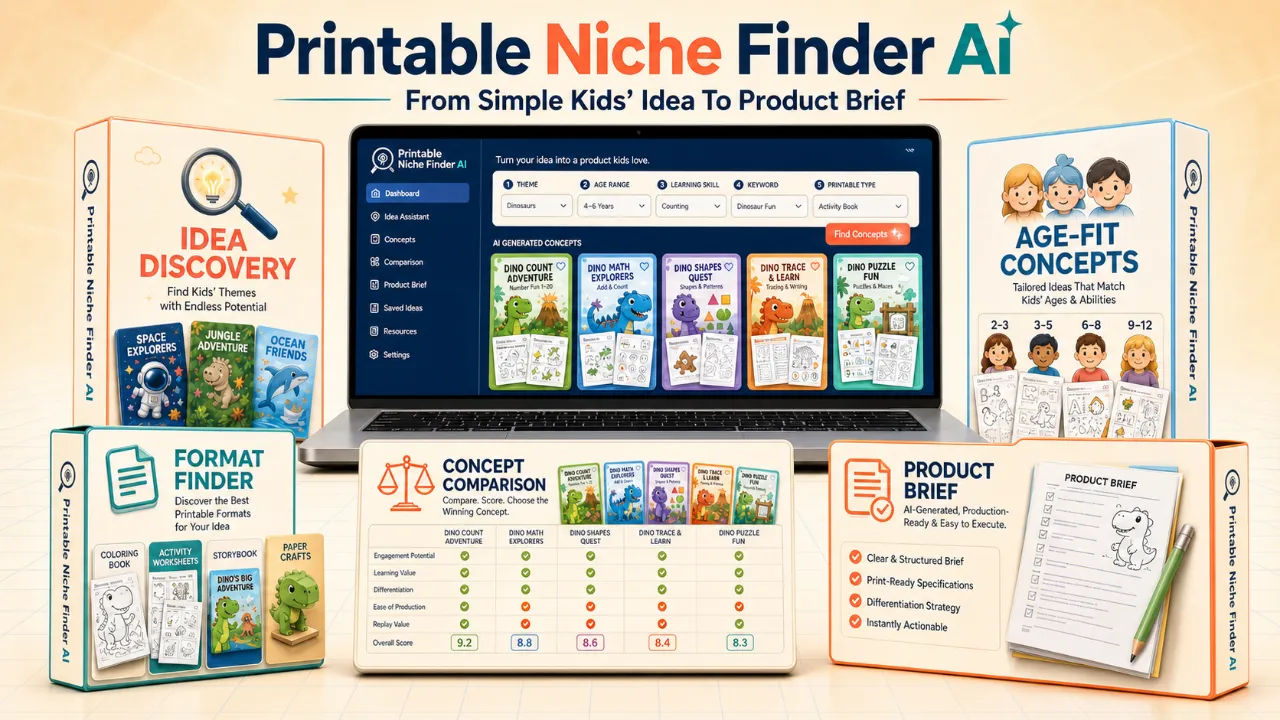
I have a folder on my desktop called "maybe printables" with 43 files in it. Each one is a half-finished worksheet, a coloring page I started at 11pm, or a note that says something like "dinosaur tracing?" and nothing else. The blank screen was never my problem. My problem was that I would get excited about a theme, spend three hours designing the wrong thing, and then abandon it because it did not hang together as a product a parent would actually buy.
That is exactly the frustration Printable Niche Finder AI claims to solve. It does not generate the finished printable. It generates the decision document you need before you open your design software. I bought it with my own money, ran it on a few themes I had been stuck on, and I have thoughts.
Some of those thoughts are good. Some of them are about how the tool will not do the production work for you, which is either a relief or a dealbreaker depending on where you are in your workflow.
Our Verdict
Printable Niche Finder AI
Turns vague kids' themes into concrete, age-aware product briefs before you design a single page. Best for creators who struggle with scope, not artwork.
One-time payment for the front-end tool
What You Actually Get
Let me be precise about the deliverables, because the sales page is a bit loose with the word "proof" and I want you to know what is in the box versus what is illustrative.
You get access to a guided workflow that moves through five stages. Discovery is where you type in your starting point, like "dinosaurs and ages 3 to 5" or "alphabet tracing for kindergarten." Creation generates multiple distinct concept directions. Comparison puts those concepts side by side so you can weigh clarity, learning value, production complexity and expansion potential. Selection is where you choose one. Brief produces the structured handoff document.
That handoff is the real product. It has 13 fields: product name, audience, age range, learning goal, theme, format, page range, activity families, differentiation angle, difficulty direction, visual direction, production complexity, expansion opportunities, and constraints. I counted them. The sales page lists them clearly in the FAQ, so this is not me guessing.
You are not getting a finished printable, a page-by-page plan, final images, or image prompts. The tool explicitly says it does not do those things. It stays in the strategy lane.
Key Features
I want to talk about the features that actually changed how I worked, not the ones that sound good in a bullet point.
Multi-concept generation is the first one. When I typed in "ocean animals for ages 4 to 6," I did not get five renamed versions of the same idea. I got five genuinely different directions. One was a counting activity, one was a scissor skills pack, one was a memory game, one was a habitat sorting worksheet, one was a coloring book with a narrative angle. That variety is valuable because it stops you from falling in love with the first thing that pops into your head.
Age-fit reasoning matters more than I expected. The tool kept reminding me that a 3 year old cannot cut along a dotted line reliably and a 6 year old will be bored by simple tracing. It grounded the difficulty direction in the age range you give it, which is something I was doing badly on my own.
Series mapping is the quiet winner. The tool shows you how one winning idea can expand by theme, age, skill or difficulty. My dinosaur counting concept became an ocean eggs version, a farm nests version, a space pods version. That is a whole product line from one brief, and I would not have thought of that on my own.
The structured product brief is the thing you will actually use. It is not a brainstorm. It is a decision document. When I handed it to my production process, I knew exactly what to design, who it was for, and what made it different from the thousand other dinosaur worksheets on Etsy.
The side-by-side comparison is fine. It is useful but not magical. It just lays out the tradeoffs clearly so you are not choosing based on which concept has the cutest name.
Actually Using It
I ran three real themes through the tool over the course of a week. The first was the dinosaur one, because that is the example on the sales page and I wanted to see if it was cherry-picked. It was not. I got the egg counting mission, the pencil-control adventure, the pattern detective, the alphabet hunt, and the shapes workshop. The product brief for the counting mission was genuinely good. It specified 24 to 32 activity pages, count and circle activities, match, trace, cut and sort, and a mission-based "egg rescue" progression as the differentiation angle.
The second theme I tried was "space for ages 5 to 7." This is where I hit the limitation. The concepts were solid and age-appropriate, but none of them felt surprising. I got a planet fact book, an astronaut maze pack, a rocket counting activity, a constellation tracing set, and a solar system coloring book. All of them were coherent. None of them made me sit up. The tool is good at turning a vague theme into a structured concept, but it is not going to invent something you have never seen before. It is a clarifying tool, not a creativity miracle.
The third theme was the one that sold me. I typed in "emotions and feelings for ages 3 to 5" because I had been stuck on that for weeks. The tool generated a concept called "Feelings Detective" where children match facial expressions to situations. The brief included a learning goal around emotional vocabulary, a page range of 20 to 28 pages, and an expansion path into feelings bingo, feelings flashcards, and a feelings storybook. I had been staring at that theme for a month and gotten nowhere. The tool gave me a product in about fifteen minutes of conversation.
The interface is nothing special. It is a guided chat flow, not a beautiful dashboard. You type, it responds, you refine, it generates. It works, but do not expect a polished SaaS experience. This is a front-end tool in a funnel, and it feels like one. The good news is that it is also fast. I never waited more than a few seconds for a response.
One thing that annoyed me: the tool kept offering to push me toward the OTO 1 production stage. That is the upsell. It is not pushy exactly, but it is present. If you do not want the production tool, you will need to ignore that nudge. I did, and the front-end tool still worked fine on its own.
I also want to be honest about the fact that Printable Niche Finder AI produces text, not images. The sales page shows finished worksheets and coloring pages as "proof." Those are illustrative examples of what your concept could become after you produce it. The tool itself will not draw a single line. If you were hoping for an all-in-one that generates both the idea and the artwork, this is not that.
Pricing and Value Analysis
The price is $14. That is what I paid, and it matches the operator notes. It is a one-time payment for the front-end tool. I did not buy the OTO 1 production stage, so I cannot review that, and I will not pretend to know what it costs.
Is $14 worth it? Let me put it in context. I have wasted more than $14 worth of my own time on a single abandoned printable, multiple times. If this tool saves you from designing one wrong product, it has paid for itself. If it gives you a product line you can actually sell, it is almost comically cheap.
The comparison that matters is not against other niche finder tools. It is against the cost of doing what I did before: staring at a blank page, sketching out five versions of the same idea, and then abandoning all of them. That process cost me hours and produced nothing.
| Option | Cost | What You Get |
|---|---|---|
| Printable Niche Finder AI | $14 | Concepts, comparison, series ideas, 13-field product brief |
| Your own brainstorming | Your time | Vague ideas and abandoned files (my experience) |
| Hiring a niche researcher | $50 to $200+ | Research report, but you still have to interpret it |
| Full production tool (OTO 1) | Not disclosed | Production stage after the brief |
For the price, the value is strong. The tool does one thing well and does not pretend to do more.
Pros and Cons
Pros
- Cheap one-time price of $14
- Genuinely different concept directions, not renamed copies
- Age-fit reasoning keeps difficulty realistic
- Product brief with 13 fields is production-ready
- Series mapping shows expansion paths you would miss
- No prompt engineering skills needed, ordinary language works
Cons
- Does not generate images or finished printables
- No page-by-page production plan
- Concepts are clarifying, not wildly original
- Interface is plain and funnel-style, not a polished app
- Upsell to OTO 1 appears in the flow
Who This Is For
This is for you if you sell kids' printables and your bottleneck is deciding what to make. If you have a folder full of half-finished ideas, if you keep designing things that are too broad or too generic, if you know you should make a series but never manage to plan one, this tool will help. It is also good for complete beginners who have no idea where to start. You can type "preschool math" and get a structured concept with an age range, a learning goal, and a page count.
Who Should Skip It
Skip it if you already have a winning product line and a consistent production process. If you know exactly what sells and you just need to crank out more of the same, this tool will slow you down. Skip it if you are looking for an all-in-one that generates ideas and finished artwork. It does not do that. And honestly, if you cannot articulate a child's age range or a learning skill, the tool will struggle because it needs that input to do its job.
Frequently Asked Questions
Does Printable Niche Finder AI create the finished printable for me?
No. It specializes in the strategic stage: discovery, concept creation, comparison, selection and the Final Product Brief. Production happens in the next step, which is a separate tool in the funnel.
What can I enter as a starting point?
You can begin with a child's age range, learning skill, theme, keyword, desired printable type, or combine several of them. For example, "ocean animals for ages 4 to 6" works well.
Can it help if I only have a broad theme?
Yes. Broad themes are ideal starting points. The workflow helps attach a learning goal, format, differentiation angle and appropriate difficulty to turn that theme into a concrete product.
Is it only for dinosaur products?
No. Dinosaurs are just the demonstration example. You can explore animals, space, seasons, emotions, fine motor skills, early math, literacy and many other kid-friendly directions.
What is included in the Final Product Brief?
Product name, audience, age range, learning goal, theme, format, page range, activity families, differentiation angle, difficulty and visual direction, production complexity, expansion opportunities and important constraints.
Do I need prompt-writing experience?
No. Clear, ordinary inputs are enough. You can refine the concept conversationally as the workflow guides you.
How much does Printable Niche Finder AI cost?
The front-end tool costs $14. That is a one-time payment, and it gives you access to the discovery workflow, concept generation, comparison, series mapping and the Product Brief generator.
If you want to check the current page and see whether the OTO 1 bundle is live, go here.
Final Verdict
I went in skeptical. A tool that promises to end your "blank-screen guessing" sounds like hype, and the sales page is heavy on pretty pictures of finished products that the tool itself does not make. But after running three real themes through it, I can tell you the core workflow works.
It did not make me more creative. It made me more decisive. That distinction matters. The tool took my vague, half-formed ideas and forced them into a structure that my production process could actually act on. I know what I am designing this weekend now. I have a page count and a learning goal and a differentiation angle. That is more than I had last week, and it cost me $14 and about twenty minutes.
If you are a kids' printable creator who keeps designing the wrong thing, this is worth the price. If you need an oracle of infinite creativity, it will disappoint you. I know which camp I am in.
Turn one theme into a product line
One-time payment, instant digital access