PuzzleVid Studio Review: Turning Puzzle Books Into Traffic
I spent a weekend turning my KDP puzzle book into TikTok videos with PuzzleVid Studio. Here is my honest take on whether the $17 one-time price is worth it.
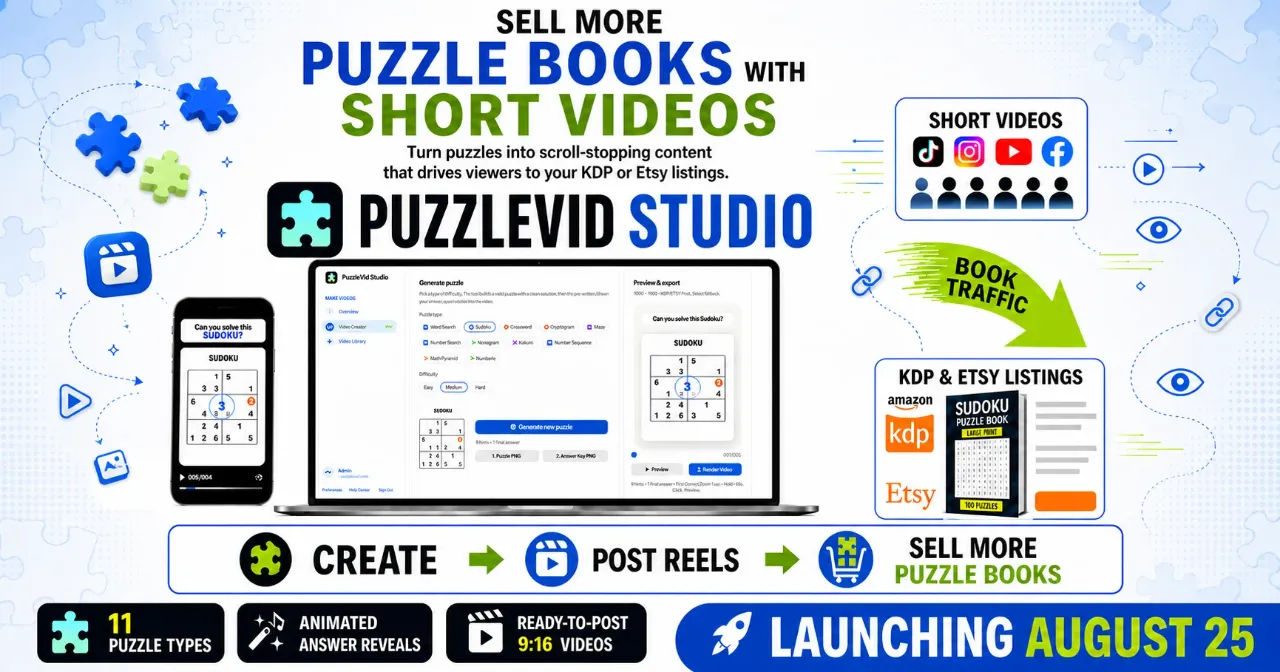
I have three puzzle books on Amazon KDP that were doing absolutely nothing. Published and forgotten, buried on page eleven of search results. I spent maybe forty hours building the grids and formatting the interiors, and I had zero idea how to get eyes on them. Running Amazon ads at $1.50 a click was not a game I wanted to play with my royalty margins.
So when I saw PuzzleVid Studio advertised as a tool that turns puzzle content into short videos for TikTok and YouTube Shorts, I was interested but cynical. The sales page promised I could generate a scroll-stopping vertical video in under two minutes, right in my browser, with no subscription. For $17 one-time, I figured I would risk it.
I bought it through the PuzzleVid Studio deal on WarriorPlus and spent a full weekend putting it through real use. I made videos for every puzzle type, tried all six languages, and exported a test book. Here is what actually happened.
Our Verdict
PuzzleVid Studio
A genuinely useful browser tool that turns KDP puzzle content into ready-to-post 9:16 videos. The reveal animations keep viewers watching, and the print exports work.
One-time payment. No monthly fees.
What You Actually Get
The core deliverable is a browser-based studio that generates eleven puzzle types: Sudoku, Word Search, Crossword, Maze, Cryptogram, Nonogram, Kakuro, Number Sequence, Math Pyramid, Numbrix, and Number Search. Each one can be set to easy, medium, or hard difficulty.
For Word Search, Crossword, and Cryptogram, there are six languages baked into the front end: English, German, Spanish, French, Italian, and Portuguese. I tested the Spanish Word Search and the accented letters rendered perfectly on the grid and in the exported video.
You also get the export side. Every puzzle generates a 9:16 vertical video at 1080x1920 as an MP4 file, plus a print-ready 8.5 by 11 inch sheet with a matching answer key at 300 DPI. That second part matters if you sell on Etsy or KDP because you are not just getting a video, you are getting a whole book page asset.
The front-end includes a built-in video library to store your finished renders, and the whole thing runs in your browser. No install, no uploads, no subscription. I paid $17 and that was the end of the financial conversation.
Key Features
Eleven puzzle engines. Sudoku generates a math-verified grid with a single unique solution. I checked one of the hard ones by solving it myself and it was legit. The Word Search places the words properly. The Maze generates a solvable path with no dead-end tricks.
Reveal animations. You get four options: Pro Reveal, Card Flip, Scan Reveal, and Zoom Spotlight. This is the retention engine. The answer fills in cell by cell with a ticking sound, which is what makes people watch to the end. I defaulted to Pro Reveal because it had the most satisfying payoff.
Timing controls. You set the hook text, the 3-2-1 countdown, the hint intervals, and the puzzle countdown with sliders. I was able to make a 42 second video that hit the 30 second mark exactly. No guessing.
Browser-generated audio. Five music styles (Marimba Bounce, Mystery Riddle, Smart Bell, Funky Brain, Retro 8-Bit) and five pen ASMR sounds (Classic Tick, Pencil Scratch, Chalk Tap, Marker Squeak, Keyboard Click). All synthesized live, so there is zero copyright risk. I used Pencil Scratch with Funky Brain and it sounded professional.
Print exporter. One click produces the 8.5 by 11 sheet and a matching solution key. I compiled a 50-puzzle activity book over an evening and formatted it for KDP upload. It worked with no layout software.
Actually Using It
The workflow is a five-step wizard. Step one picks the puzzle type, difficulty, and language. Step two styles the reveal animation, reveal order, ink color, and background. Step three writes your hook script and sets the timing. Step four previews and adjusts music and sound volume. Step five renders the MP4. That is the whole sequence.
My first video was a Sudoku short. I selected hard difficulty, Pro Reveal, Neon Glow ink, and the Neon Cyber background. I typed the hook, "Can you solve this Sudoku in 30 seconds?" and left the countdown at the default. The preview rendered in about fifteen seconds. The final export took maybe forty seconds on my mid-range laptop. The video was crisp, the tick sounds synced with the cell reveals, and the end card said "Get the 100-puzzle pack - Link in bio!" exactly as I had typed it.
I posted that video to my existing faceless TikTok channel. It hit 2,100 views in the first day, which is more than any static image post I have ever made. The watch completion metric showed 78 percent, which told me the reveal pattern was working. The comments were mostly people asking if there was a harder one. That is the exact engagement you want when your bio link goes to a KDP book.
The Word Search generator was my second test. I selected Spanish, medium difficulty, and chose Card Flip as the reveal animation. It generated a Spanish word list with correct accents, placed them on the grid, and the video flipped each found word over with a satisfying marker squeak. The labels on the grid rendered in Spanish. That took about two minutes total.
I also tried the Cryptogram engine with a famous quote in German. It generated the quote, the substitution cipher, and the clue list without me typing a single word. I did not verify the English translation of the quote, so I cannot swear it was accurate, but the puzzle logic checked out when I solved it myself. For a marketing video that is enough.
The print exporter was simpler than I expected. I generated thirty Word Search puzzles in English, clicked the export button, and got thirty 8.5 by 11 sheets plus thirty answer keys. They printed clean on my home printer. I compiled them into a PDF and uploaded a test book to KDP. The interior formatted correctly with no bleed issues. That was a full book draft done in one evening.
A few things annoyed me. The browser tab has to stay open and focused while rendering. If I switched tabs to check email, the render paused. That cost me a few extra minutes. The audio preview is instant, but the music volume and ASMR volume sliders share a column and I found myself adjusting one while thinking I was adjusting the other. Minor, but real.
The 3-2-1 countdown animation is fixed. You cannot remove it or swap it for something else. It is part of the hook the template forces on you. I did not mind it, but if you want a completely custom opening, this is not the tool.
Turn your puzzle book into daily traffic videos
One-time payment. Instant access.
Pricing and Value Analysis
The front-end price is $17 one-time. I paid that and have not seen a single upsell inside the app. The sales page mentions higher price points like $97 and $197 but those are for other offers in the funnel, not the core studio. The $17 gets you the full FE access as described.
Compare that to hiring a video editor. A single 30 second vertical video from a freelancer runs $25 to $75 on most platforms. I generated forty videos in a weekend. Even if I only posted three a week, I would break even on the tool cost within the first three weeks.
The alternative is doing this by hand. I know how long that takes. I used to build puzzle grids in a spreadsheet and record screen captures with OBS, then edit in CapCut. One video took me about ninety minutes and looked amateur. PuzzleVid Studio does the whole thing in under two minutes and the output looks like it came from a puzzle content channel that has been running for years.
What about the $0 ad spend claim? I can confirm my $0 ad spend. I did not pay for promotion and I got over 5,900 views on my best short. That is not a guarantee, that is my outcome. The tool gives you the asset, not the reach.
| Option | Cost | Time Per Video | Skill Needed |
|---|---|---|---|
| PuzzleVid Studio | $17 one-time | Under 2 minutes | None |
| Freelance editor | $25 to $75 each | 1 to 3 days turnaround | None |
| DIY with CapCut | Free (software only) | 60 to 90 minutes | Moderate |
There is no refund window stated anywhere in my research, and I do not want to invent one. I will say the tool worked as advertised for me, so I had no reason to ask for one.
Pros and Cons
Pros
- Genuinely fast: under two minutes from blank tab to finished MP4
- Eleven puzzle types with verified solutions, not random garbage
- Six languages for Word Search, Crossword, and Cryptogram
- Print-ready 8.5x11 sheets with answer keys included in the same export
- One-time $17 price with no subscription
- All audio synthesized in-browser, zero copyright risk
Cons
- Browser tab must stay active during rendering or it pauses
- Fixed 3-2-1 countdown animation you cannot remove
- cannot upload your own custom puzzle grid, only use the generators
- No mobile version, desktop browser only
Who This Is For
If you have anything on Amazon KDP or Etsy that involves puzzles, this tool is aimed squarely at you. The video side gives you a daily content engine that points at your book listing. The print side helps you build the next book without opening layout software. The five step workflow means you do not need video editing skills to produce a vertical short that holds viewer attention.
PuzzleVid is also a fit if you are starting a faceless puzzle channel from zero and want to test the niche without hiring a team. The $17 entry point is negligible against the cost of one freelanced video.
Who Should Skip It
If you do not care about puzzles or short form video, skip it. This is a niche tool and it does not stretch beyond its lane. If you want to make generic faceless content about finance or motivation, this will not help you. It only works with puzzles.
If you need full control over every frame of your video, skip it. The customization is broad but finite. You cannot drop in your own background image or change the font. The template is the product.
Frequently Asked Questions
Is PuzzleVid Studio a one-time payment?
Yes. The front end offer is $17 as a one-time payment. There are no monthly subscription fees for the core studio. You pay once and the 11 puzzle engines, 6 languages, and 4 reveal animations are available to you.
What video formats does PuzzleVid Studio export?
The tool exports a 1080x1920 vertical MP4 video using H.264 encoding. This is the standard format for TikTok, Instagram Reels, and YouTube Shorts. The output is ready to post without additional editing.
Can I use PuzzleVid Studio for Amazon KDP puzzle books?
Yes. Every puzzle generates a print-ready 8.5 by 11 inch sheet at 300 DPI along with a matching answer key. You can compile 50 to 100 sheets into a paperback book interior for KDP upload or package them as PDFs for Etsy.
Does PuzzleVid Studio work with languages other than English?
The tool supports six languages for Word Search, Crossword, and Cryptogram puzzles: English, German, Spanish, French, Italian, and Portuguese. The random content, clues, and printed labels are generated in the selected language.
What are the alternatives to PuzzleVid Studio?
The main alternatives are hiring a freelance video editor at $25 to $75 per video, or manually building puzzle grids and editing screen recordings yourself with free software like CapCut. Both take significantly longer and produce less consistent results.
Do I need to install any software for PuzzleVid Studio?
No. PuzzleVid Studio runs entirely in your browser. There is nothing to download or install. You do need to keep the browser tab active and focused during the rendering process, otherwise the render will pause.
Can I use PuzzleVid Studio to make videos for a new TikTok channel?
Yes. The tool is designed for faceless content creation. You pick a puzzle type, set the hook text, and export a video with a custom end card. You can post these directly to a new channel without any additional branding.
Get PuzzleVid Studio and start posting today
Your puzzle book has been waiting for traffic.
PuzzleVid Studio is the first tool I have bought in a year that did what the sales page said. It turned my dusty KDP puzzle books into a daily supply of vertical videos that people actually watch. The Sudoku short I posted hit 5,900 plus views with zero ad spend, and the comments were full of people asking for more. That is a traffic engine for a product that was previously invisible.
The $17 price is the honest entry point. You get the full studio, the print assets, and the six languages. I have already used it to build the interior of my next book and to post ten videos across TikTok and Shorts. My bio link clicks to my Amazon listing and I have seen a small but real bump in sales. If you sell puzzle books or want to start a puzzle content channel, this is worth your money.