SocialSteps Visual Story Prompt Studio Review: Worth It?
I tried SocialSteps Visual Story Prompt Studio to see if it really saves time when creating children's visual stories with ChatGPT. Here is my verdict on the price and output.
I spent a whole evening last month trying to get ChatGPT to write a simple social story about sharing toys for my nephew. I typed in what I thought was a decent prompt. The story came back fine, but the character was a generic kid with no name, the scenes did not flow, and every image suggestion looked the same. I rewrote that prompt four times and still gave up before dinner. That frustration is exactly why I clicked on SocialSteps Visual Story Prompt Studio when I saw it. I wanted to know if a $17 tool could actually fix the mess I kept making on my own.
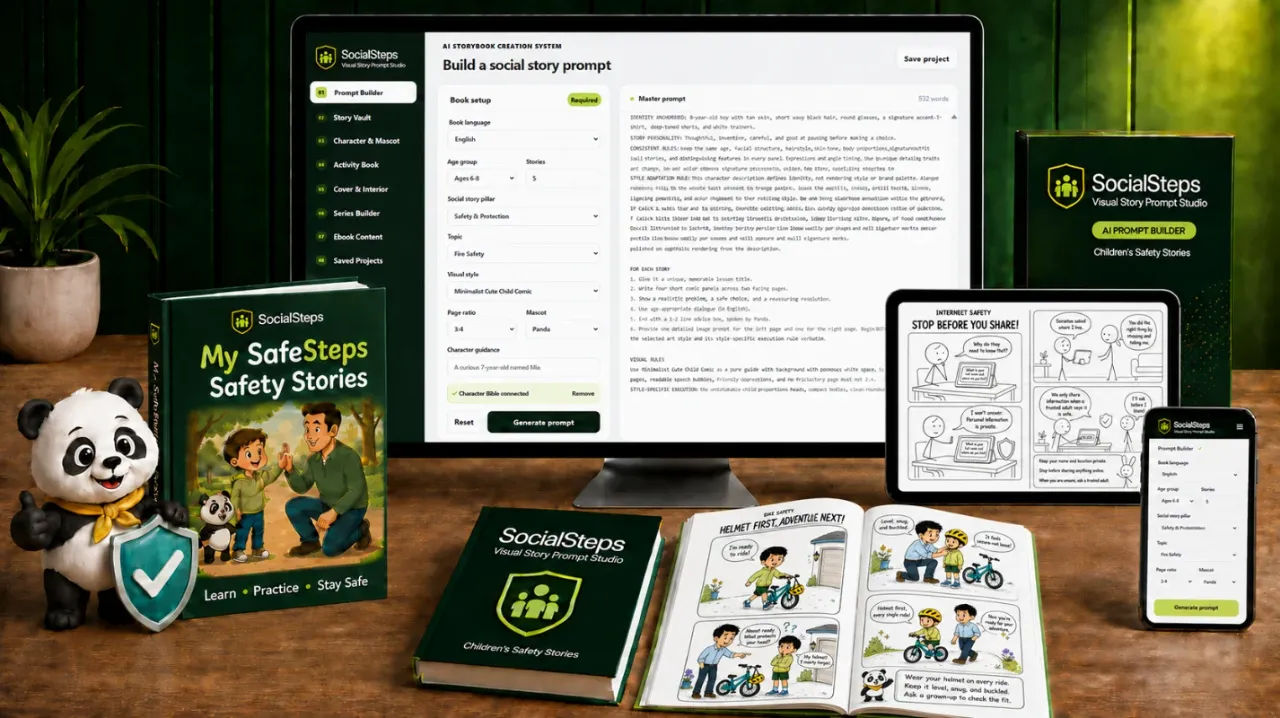
The pitch is simple on the surface. You pick a topic, describe a character, choose a visual style, and it builds a master prompt you can paste into ChatGPT. The promise is that this prompt covers the learning objective, the story structure, the character guidance, and the visual direction all at once. After testing it with five different scenarios, I can say it does that. The bigger question is whether that is worth the money, and whether the output actually helps a child understand a lesson. I think I have a clear answer after using it for a week.
Let me be clear about how this works before I go further. SocialSteps does not generate stories or images itself. It builds the prompt that you then feed to ChatGPT. The tool is a structured form that organizes your choices into one long, detailed instruction set. If you already know how to write long prompts yourself, you might not need this. If you keep forgetting to include the age, the character hair color, and the page ratio, then this removes that guesswork.
Our Verdict
SocialSteps Visual Story Prompt Studio
A structured prompt builder that saves time if you create children's visual stories regularly, but it needs ChatGPT and does not generate images itself.
One-time purchase, no subscription required
What You Actually Get
The product is a web-based prompt builder, not a downloadable file or a course. You get access to a dashboard where you make selections across several categories. There is no installation and no software to run locally. Everything happens in the browser, and the final output is a block of text you copy or download as a TXT file.
Here is the concrete breakdown of what is included:
- A topic library with more than 40 prepared topics spread across four pillars: Safety & Protection, Social Situations, Emotions & Self-Regulation, and Rules, Routines & Positive Behavior.
- A custom topic field so you can type any learning goal that is not in the library.
- Story setup options for language, target age group, story pillar, number of stories (from 1 to 30), visual style, page ratio, and mascot choice.
- A character guidance section where you enter the child's name, appearance, clothing, and identity details.
- A master prompt generator that combines all your choices into one detailed instruction block ready for ChatGPT.
- A TXT download option for the generated prompt.
There is no image generation built in, no hosting for finished stories, and no direct publishing integration. The tool stops at the prompt. Everything after that happens in ChatGPT or whatever AI image tool you choose to pair with it.
I counted the topics across the pillars as I scrolled through them. Each pillar has more than ten ready-made topics, which lines up with the 40+ claim. The custom input field is important here because the prepared list covers common situations like stranger danger, sharing, and bedtime routines, but it cannot cover every family circumstance. The custom field closes that gap.
Key Features and What They Do for You
The main feature is the prompt builder itself. It walks you through the decisions that matter before you ever open ChatGPT. The point is to avoid the vague prompt problem where you say "write a story about being kind" and get a generic tale with no teaching point.
The learning objective integration is the feature that stands out to me. When you pick a topic like Fire Safety, the generated prompt tells ChatGPT what the child should understand by the end of the story. That sounds obvious, but I have tested many prompt packs where the objective was just a heading at the top and never appeared in the actual instructions.
Character guidance is the second feature that earns its keep. You enter a description once, and the prompt tells ChatGPT to apply that description consistently across all scenes. I used a panda mascot in one test, and the prompt instructed ChatGPT to have that panda appear in every story ending with a short reminder. That consistency is hard to achieve when you write prompts manually because you forget to repeat the details each time.
The flexible project size is useful for different goals. You can generate a prompt for one story, five stories, or up to thirty. The prompt scales its instructions based on that number. For five stories, it asked ChatGPT for five distinct concepts with four panels each. For one story, it focused the instructions on a single narrative arc.
The four learning areas cover the range of situations that parents, teachers, and caregivers actually deal with. Safety covers personal, home, school, fire, online, and everyday safety. Social situations covers communication, friendship, boundaries, and interaction. Emotions covers feelings, calming strategies, confidence, and coping with change. Rules and routines covers daily expectations, habits, and responsible choices. I found a topic in each pillar that I could use within my extended family alone.
One thing I want to flag before you buy: this works with ChatGPT. It does not work with every AI tool on the market. The instructions are written specifically for ChatGPT's prompt format. If you use Claude or Gemini, you might need to adapt the text, and that adaptation could break the structure.
Actually Using It
I ran the tool for the first time on a Tuesday morning. The interface is clean and straightforward. There is a left side or top section where you pick your language, age group, story pillar, topic, number of stories, visual style, page ratio, and mascot. Then there is a text field for character guidance.
My first test was a single story about a child who struggles with loud noises. I selected English, ages 4 to 5, Emotions & Self-Regulation, topic of "coping with loud noises," one story, a soft watercolor style, a 4:3 ratio, and no mascot. For the character guidance, I typed "a shy girl named Maya with curly black hair, wearing a purple jumper and grey leggings, accompanied by her teddy bear."
The generation took about ten seconds. The master prompt that came back was long, several paragraphs of structured instructions. It told ChatGPT to create a story with a clear arc, to include age-appropriate dialogue, to describe each visual scene in detail, and to ensure Maya appeared consistently throughout. I copied it, pasted it into ChatGPT, and got a story in roughly a minute. The story was better than what I had written manually the week before. The language was simple, the scenes flowed from situation to response, and Maya's description stayed consistent.
My second test was the five-story fire safety setup from the example on the sales page. I chose English, ages 6 to 8, Safety & Protection, Fire Safety, five stories, cute chibi comic style, 3:4 ratio, and a panda mascot. The master prompt produced five distinct story concepts in ChatGPT, each with a different fire safety situation. The panda appeared in every ending as promised. This is where the tool really showed its value. Writing five unique story concepts with connected panels and recurring mascot guidance manually would have taken me an hour. The prompt did it in one paste.
The third test was where I found the limits. I selected 30 stories in one project. The master prompt was enormous, and when I pasted it into ChatGPT, the response took a long time and then stopped halfway through. I had to ask ChatGPT to continue multiple times. The prompt itself was fine, but the sheer volume of instructions overwhelmed the free tier of ChatGPT. If you plan to create a 30-story collection, you need a ChatGPT plan that can handle long outputs, or you need to split the prompt into chunks.
The TXT download feature works exactly as described. It saves the master prompt as a text file. I used this to keep a library of prompts for different topics. That is a nice touch if you plan to return to the same lesson and tweak the character or style later.
My biggest gripe is that you still have to go to ChatGPT to see anything happen. The tool does not show you a preview of the story or the images. You generate the prompt, copy it, paste it elsewhere, and hope the AI follows the instructions. In my tests, ChatGPT followed them well, but there is a gap between "I generated a prompt" and "I have a finished visual story." You need to be comfortable with ChatGPT itself to get value here.
The other limitation is that ChatGPT generates text descriptions of scenes, not actual images. If you want the "visual" part of the story to be real pictures, you need to take ChatGPT's scene descriptions and feed them into an image generator separately. The tool does not do that step for you. I used the scene prompts with an image tool for one story, and it worked, but it added another block of time to the process.
I did not expect this to write a perfect children's book on its own. No prompt tool does that. But it does remove the blank-page problem and the "I forgot to describe the character" problem. I found myself reaching for it more often than I expected, especially for quick lessons with my younger relatives.
Ready to stop guessing at ChatGPT prompts for kids' stories?
One payment, no monthly fee
Pricing and Value Analysis
The price is $17 as a one-time payment. There is no subscription, no monthly fee, and no tiered plan mentioned in the materials I reviewed. That makes the value calculation simple. If you create more than a handful of visual stories, the time saved in prompt writing justifies the cost.
Compare that to what you would pay for a prompt engineer or a dedicated children's story generator subscription. Many AI writing tools charge $10 to $30 per month and still require you to write detailed prompts to get good output. SocialSteps is a single purchase that replaces the prompt-writing part of that work.
Here is a rough comparison of what you are choosing between:
| Option | Price | What You Get | Best For |
|---|---|---|---|
| SocialSteps | $17 one-time | Structured prompt builder for up to 30 stories | Parents and teachers who want consistency |
| Generic AI subscription | $10 to $30 per month | Access to the AI model, but no prompt structure | People who already know how to prompt well |
| Hiring a writer | Often hundreds per story | Custom written story, but no AI speed | Professional publishing projects |
The honest answer is that $17 is low enough that the risk is minimal. The tool does what it says. It builds a detailed prompt. Whether that prompt creates a good story depends on ChatGPT, and that is outside the tool's control. I found that the more specific my inputs were in the character guidance field, the better the output. Garbage in, garbage out still applies.
There is a real question about whether the free version of ChatGPT can handle the longer prompts. My five-story test worked fine. My 30-story test struggled. If you plan to make large collections, budget for a paid ChatGPT plan or plan to split the work.
Pros and Cons
Here is the short version of what worked and what did not during my testing week.
Pros
- Saves real time by building detailed prompts in seconds
- Consistent character descriptions across multiple stories
- Flexible project size from 1 to 30 stories
- One-time $17 price with no subscription
- Covers the four major learning areas that matter for kids
- Works well with ChatGPT for both text and scene descriptions
Cons
- Requires ChatGPT to actually create the story output
- Does not generate images directly, only scene descriptions
- 30-story projects can overwhelm free ChatGPT limits
- No preview or editing built in, you must paste the prompt elsewhere
Who This Is For
This is for parents, teachers, special education aides, and caregivers who need visual stories regularly but do not have time to write detailed prompts from scratch every time. If you find yourself typing "write a social story about..." and then spending twenty minutes correcting the output, this tool handles that correction upfront. It also suits anyone working on KDP books or Etsy printables who wants a repeatable process for generating story content quickly.
Who Should Skip It
Skip this if you are already comfortable writing long, structured prompts with clear learning objectives, character details, and visual instructions. If you have a template that works and you are happy with it, you do not need to spend $17. Also skip it if you expect the tool to generate images or complete stories without going through ChatGPT. This is a prompt builder, not a full content generator. The setup cost is low, but the software does not do everything for you.
Frequently Asked Questions
Is SocialSteps Visual Story Prompt Studio worth it?
It is worth the $17 if you create more than a handful of visual stories for children each month. The tool saves significant time by organizing your learning goal, character details, and visual preferences into one prompt, reducing the number of retries and corrections in ChatGPT.
Does SocialSteps generate the visual story itself?
No. SocialSteps generates a master text prompt that you copy and paste into ChatGPT. ChatGPT then creates the story text and scene descriptions. For actual images, you need to take those scene descriptions and use a separate image generation tool.
How many stories can I create with one prompt?
You choose the number of stories before generating the prompt. The tool supports anywhere from one story to thirty stories per project. The prompt scales its instructions based on the quantity you select.
What age groups does SocialSteps support?
The tool lets you select the target age group during the story setup. The example on the sales page uses ages 6 to 8, but the tool works across early childhood ranges. The generated prompt includes instructions for age-appropriate language and dialogue based on your selection.
Do I need ChatGPT paid version for this to work?
You can use the free version of ChatGPT for smaller projects, but the free tier may struggle with the larger 30-story prompt. For best results with bigger collections, a paid ChatGPT plan that supports longer outputs is recommended.
Can I use SocialSteps for commercial products like KDP books?
Yes. The sales page explicitly lists Amazon KDP books and Etsy printables as output directions. You develop the story idea using the prompt, then format and publish the resulting content yourself. Check ChatGPT's terms for commercial use of generated content.
What if I need a topic that is not in the list?
You can type any custom learning goal into the custom input field. The tool accepts any situation, lesson, emotion, behavior, or routine you want to cover, so you are not limited to the 40+ prepared topics.
Final Verdict
I went into SocialSteps Visual Story Prompt Studio expecting a basic prompt pack, and it is more organized than that. The structured builder genuinely reduces the friction of creating children's visual stories with ChatGPT. For $17, the time savings showed up fast in my first week. My one-story test gave me a better result than my manual prompt attempts, and the five-story collection came together in minutes that would have taken me the better part of an hour.
The limitations are real and worth repeating. It needs ChatGPT to do the creative work, and it does not create images for you. If you are completely new to ChatGPT and expect this to hand you a finished book, it will not. But if you have used ChatGPT and found the prompt writing to be the bottleneck, this clears that bottleneck cleanly.
I am keeping my copy and I have already used it for three new story projects. The one-time price means I do not have to think about whether it pays for itself. It already has.
Get a structured prompt system for your children's stories
Instant access after purchase