Tracey Kids Review: 310 ChatGPT Handwriting Prompts
I printed twelve Tracey Kids worksheets in one sitting. Here is what the prompts actually produce, what annoyed me, and whether the $9.95 is worth it.
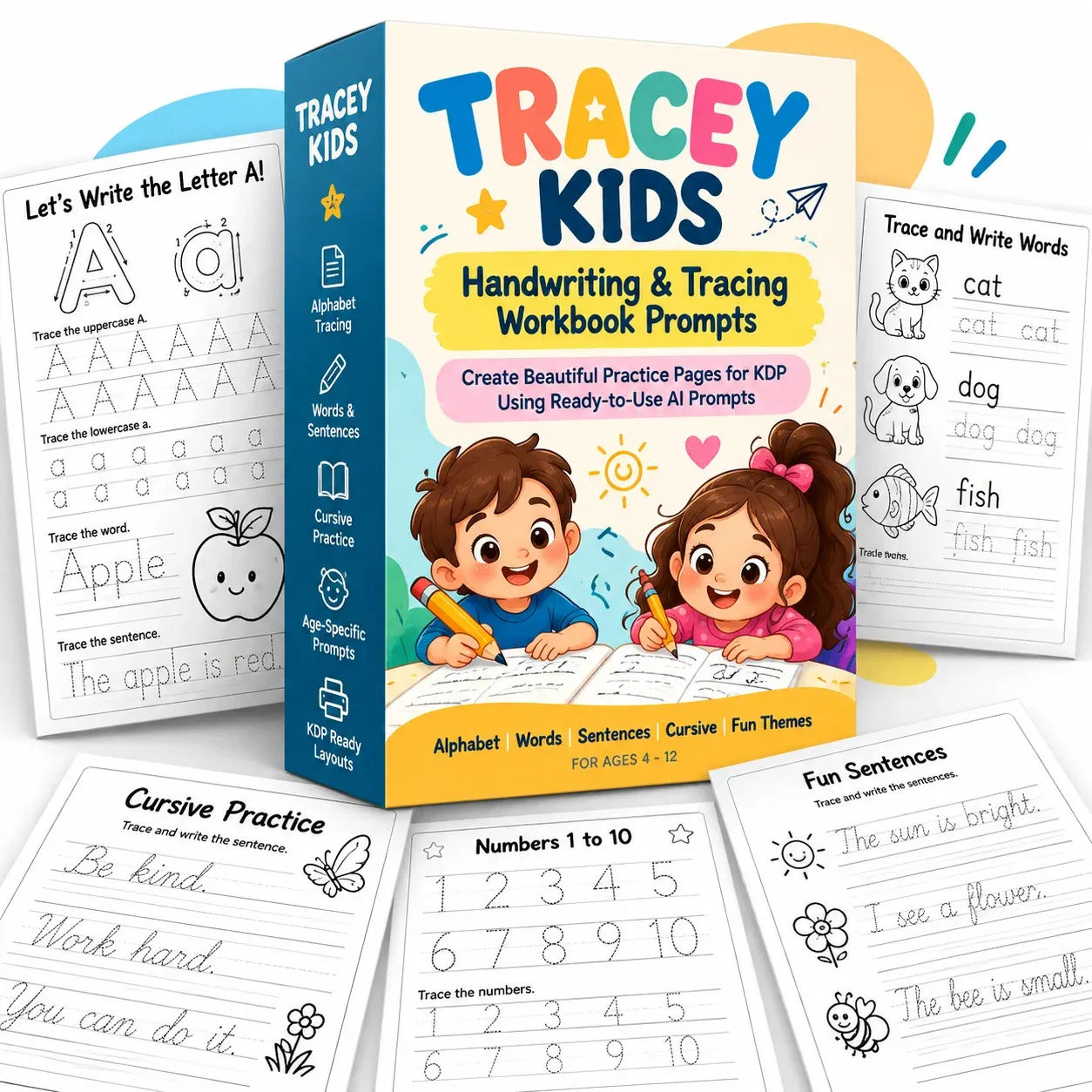
Tracey Kids landed in front of me on a Tuesday night while I was squinting at a tracing worksheet my six year old had brought home from school. The letter A on it was drawn by somebody's clip art, the arrows pointed in roughly the right direction, and the word underneath said "Aplpe." I am not making that up. That was the moment I understood why a prompt pack like Tracey Kids exists, because the problem it solves is not "I need a worksheet." The problem is "I need a worksheet where the letters are actually right."
So I bought it. $9.95, one payment, instant download. Twenty minutes later I had a chat window open with a template file attached and a prompt pasted in, and I was waiting to see what ChatGPT would spit out.
The short version: it worked, and it worked faster than I expected. The long version involves a missing file, a confused ChatGPT response, and a bit of fiddling that the how-to guide mostly covered. That is what the rest of this review is about.
Our Verdict
Tracey Kids
A genuinely useful prompt pack if you already have ChatGPT Plus and need accurate tracing pages fast. Skip it if you want drag-and-drop software.
One-time $9.95, instant download, commercial use included
What You Actually Get
For $9.95 you get a download containing 310 prompts and one file that does most of the heavy lifting. Here is the actual list, from the product itself:
- 310 copy-paste prompts for letters A to Z, numbers 0 to 20, arranged across 20 themes
- Letters in both big and small form, with stroke numbers and direction arrows
- Numbers 0 to 20 with counting pictures that draw the exact right number of objects
- The page-template file, a Python script that draws every letter, arrow and line
- A how-to guide covering attach, paste, print
- Nine extra pages: ABC charts, a numbers 0 to 20 chart, a "my name" page, days of the week, letter matching, and a certificate
- US Letter pages at 8.5 by 11 inches, black and white, 300 dpi, exported as both PNG and PDF
- A commercial use licence
The 20 themes are the part I did not expect to care about. My First ABC, 26 Animals, 14 Farm, 13 Food, 18 Home, 15 Toys and Play, 10 Clothes, 9 Nature, 12 My Body, 9 Vehicles, 11 Bugs, 9 Ocean, 8 Fruits and Veggies, 9 School, 10 Community Helpers, 11 Music, 8 Space, 6 Party, 7 Bath and Bedtime, 5 Garden, plus the numbers set. That means A is for Apple in the ABC theme, and A is for something else in the Animals theme, and you can pull the same letter from three different themes so a kid practicing A does not do the identical page four days running.
That is a small thing. It is also the difference between a pack you use once and a pack you keep coming back to.
Key Features
Stroke numbers and arrows. A big dot marks the start and numbered arrows show the order of strokes. If you have ever watched a child write a lowercase e starting from the bottom, you know why this matters. The template draws these, so they do not wander around the page between letters.
Big letters, then dotted rows. Each page has a model letter at the top and dotted rows below for capitals and lowercase. Standard handwriting instruction shape. Nothing fancy, which is correct.
Easy words and a traceable sentence. The example page uses "Apple" and "The apple is red." The prompts let you change the word and sentence, so if your kid is stuck on a particular vocabulary word you can swap it in.
Exact counting pictures. This is the one I tested hardest. Number pages ask for a specific number of animals or objects, and because the page is drawn with code rather than generated as an image, the count is right. Five fish means five fish. I have seen AI image generation hand back "count the five fish" over a picture of six fish. It happens constantly.
Draw-it box or colouring picture. Every page has a "Draw it here!" box, and you can optionally ask for a simple black-and-white colouring picture to be placed in it. That image step is separate and the prompt tells you how.
The template file. This is the actual product. The prompts are 310 well-written briefs, but the accuracy comes from the Python template that draws the letter shapes from hand-built outlines. Each letter is a shape with defined stroke order, not a guess by an image model. The sales page is clear that it is not a font.
Commercial use. You can print pages for your own kids, your class or your students. You can sell the worksheets and workbooks you make, on KDP, Etsy or your own store. You can change the wording in any prompt. You cannot resell, share or give away the prompts, you cannot share or sell the template file, you cannot sell the prompts as your own prompt pack, and you cannot use famous characters or brands in what you make.
That licence split is the fairest one I have seen on a product like this. The bits you are allowed to sell are the outputs. The bits you are not allowed to sell are the engine.
Actually Using It
I have ChatGPT Plus, so the Python tool was available. That matters, and I will come back to it. I opened a fresh chat, attached the template file, and pasted prompt number one exactly as written.
First attempt: nothing. ChatGPT told me it could not find the template file. I had attached it to the message rather than to the conversation in the way the script was looking for, or at least that is my read of it. The prompt has a rule built in that says if the template file is missing, stop and ask me to attach it, which is exactly what happened. Annoying for about ninety seconds, and then I re-attached it properly and ran it again.
Second attempt: it worked. ChatGPT ran the load step, ran the draw step, saved the page as a PNG at 300 dpi and as a PDF, showed me a preview, and gave me both download links. From paste to download links, maybe a minute and a half. The sales page claims one to two minutes and that matches what I saw.
The page itself: US Letter, black and white, the big letter A at the top with a dot and numbered arrows, dotted rows for the capital and the lowercase, the word "Apple", the sentence "The apple is red.", and a draw box. Clean. Nothing bent, nothing misspelled, arrows where they should be.
Then I did eleven more. Letters B through F across two themes, plus numbers 0, 5 and 12, plus a "my name" page. Total time from opening the chat to a folder of twenty-four files (twelve PNGs, twelve PDFs): about twenty-five minutes. I was not rushing. Some of that was me re-reading prompts to check I had not broken anything when I swapped the word "Apple" for "Ball".
The swapping worked, which was the thing I most wanted to test. I changed the sentence on one page from "The ball is red." to "The ball is big." and the template drew the new text in the same style. No layout break. No missing letters. The rule inside the prompt says not to rewrite or restyle anything the template draws, and in my testing it honoured that.
The picture step is where it gets less smooth. Adding an optional colouring picture means ChatGPT has to generate an image, save it, then run the page draw again with the picture path passed in. On two of the three pages where I tried this, ChatGPT could not reach the image from Python and asked me to download it and upload it back to the chat. So the picture route is a few extra steps and a bit of back-and-forth. It works. It is not one click.
A few smaller things I noticed. The preview render inside ChatGPT is small, so you want to open the actual PDF before you print, not trust the thumbnail. The PNG at 300 dpi and the PDF both come out fine on my cheap home printer. And the prompts are verbose, because they have to be: each one is a full brief with the load step, the draw step, the save step and a rules block. That means pasting one prompt is a real paste, not a line. Fine if you are doing a handful. Tedious if you plan to do two hundred in one sitting.
And here is my honest limitation. This is a prompt pack for a tool that is not always predictable. On a bad ChatGPT day, the Python tool is slow or flaky, and you will be re-running the same prompt. That is not Tracey Kids' fault, but it is the reality of the product you are buying. You are buying a very good set of instructions for a sometimes moody assistant.
Try the trace pages yourself tonight
Instant access after checkout, one-time payment, no subscription
Pricing and Value Analysis
The price is $9.95. One payment, no subscription, instant access. That is the whole commercial model as far as I can tell from the page. There is no upsell ladder described in the sales copy, no monthly fee, nothing to cancel.
To work out whether that is good value, I compared it against the other realistic routes to the same output: an accurate tracing page you can print or sell.
| Route | Realistic cost | Time per page | Accuracy |
|---|---|---|---|
| Tracey Kids | $9.95 once, plus ChatGPT Plus if you do not have it | 1 to 2 minutes | Correct letters, arrows and counts |
| Design tool + handwriting font | Free to $20 a month depending on the tool | 15 to 30 minutes once you learn it | Correct, but arrows and stroke numbers are manual |
| Buying finished worksheets | Varies wildly, often per pack | Zero, but you get what is in the pack | Usually fine |
| Asking ChatGPT for an image | Free | Under a minute | Wobbly letters, misspellings, wrong counts |
The comparison that matters is the bottom row. Free is free, and asking ChatGPT to draw a worksheet as an image is what most people try first. That is also what produces the "Aplpe" page my kid brought home. $9.95 to stop that happening is, to me, an easy call.
The design tool comparison is closer than it looks. If you already know your way around a layout tool and you already own a good handwriting font, you can produce accurate pages without Tracey Kids. You will spend more time, and you will draw the arrows and stroke numbers yourself, but the output is fine. The pack wins on speed and on accuracy of stroke order, not on capability.
One cost the sales page is upfront about and I will repeat: you need ChatGPT with its Python tool, and it works best on Plus. If you are on the free tier you may hit limits. I would not buy this pack and then also buy a ChatGPT Plus subscription just to run it, unless you were going to make a lot of pages or sell workbooks.
For somebody doing a class set, or building a KDP workbook, the maths is obvious. Twenty-five minutes for twelve pages, at $9.95, and you can sell what you make. The value analysis basically writes itself.
There is a refund policy referenced in the terms, though the sales page does not spell out the window in the copy I read. Check the terms page at checkout if that matters to you, and know I cannot tell you the number of days. For a $9.95 digital download, most people either love it in the first ten minutes or they do not.
Pros and Cons
Pros
- Pages are accurate: correct letters, arrows and counts
- One to two minutes per page once the template is attached
- 310 prompts across 20 themes, so the same letter can be rehearsed in different ways
- Commercial use lets you sell the worksheets and workbooks you make
- $9.95 one-time with no subscription
- Extras like ABC charts, name page and certificate add real classroom value
Cons
- You need ChatGPT with the Python tool, and Plus is recommended
- The optional picture step takes extra back-and-forth
- Prompts are long to paste, which gets tedious for bulk runs
- ChatGPT itself can be slow or flaky on a bad day
- No standalone software, no drag-and-drop editor
- Refund window not spelled out on the sales page copy
Who This Is For
Parents of kids aged four to six who are learning to write and keep asking for the same letter, or a different one, and would rather print a clean page in two minutes than drive to a shop. Teachers who need a full class set of the same letter without hand-drawing arrows. Homeschoolers who want a page for every letter and number without buying a dozen separate workbooks. And KDP or Etsy sellers building a handwriting workbook who want accurate pages fast and have the commercial licence to sell them. If you already pay for ChatGPT Plus, this slots straight into what you have.
Who Should Skip It
Skip it if you do not have ChatGPT and have no intention of getting it. Skip it if you want a piece of software where you click a button and a PDF appears, because this is not that. Skip it if you only need one tracing page a year, because you can ask ChatGPT for a free one and accept that it might have a typo. And skip it if you were hoping to buy finished worksheets rather than make your own, because the whole point is that you do the prompting.
Frequently Asked Questions
Is Tracey Kids worth $9.95?
For most people who already have ChatGPT Plus, yes. It turns a slow, error-prone design job into a paste-and-wait routine that takes a minute or two per page. If you need fewer than a handful of worksheets, or do not have ChatGPT, the price is harder to justify.
Do I need ChatGPT Plus to use Tracey Kids?
You need ChatGPT with its Python tool, sometimes shown as Code or Analysis. It works best on Plus. The free tier can hit limits and the Python tool is not always available there, so if you are on the free plan expect some friction.
Can I sell the worksheets and workbooks I make with Tracey Kids?
Yes. The licence lets you print pages for your class or family and sell the worksheets and workbooks you create, including on Amazon KDP, Etsy or your own store. You cannot resell, share or give away the prompts, and you cannot sell or share the template file.
What is the difference between Tracey Kids and asking ChatGPT for a worksheet?
Accuracy. Asking ChatGPT to generate a worksheet as an image often produces bent letters, broken tracing lines, misspellings and the wrong number of objects. Tracey Kids prompts make ChatGPT draw the page with code from hand-built letter shapes, so letters, arrows and counts come out right.
What age is Tracey Kids designed for?
Ages four to six. It covers letters A to Z with easy words children that age already know, and numbers 0 to 20 with counting pictures. The page layout, big letters and dotted rows, is built for early handwriting practice rather than older children.
What size are the pages and what format do I get?
Every page is US Letter at 8.5 by 11 inches, black and white, print-ready at 300 dpi. Each prompt produces both a PNG and a PDF, usually in one to two minutes. US Letter is the standard size for KDP workbooks.
What are the alternatives to Tracey Kids?
A design tool with a good handwriting font, or buying ready-made worksheet packs. Both work. The design tool route costs more time and needs you to draw arrows and stroke numbers yourself. You can also try free ChatGPT prompts, but you will be fixing letter shapes by hand.
Final Verdict
Tracey Kids does one job and does it well: it makes ChatGPT produce tracing pages that are actually correct. The letters are right, the arrows are right, the counts are right, and it takes about a minute and a half a page once you have the template attached. The $9.95 is easy money for a parent, teacher or KDP seller who already has ChatGPT Plus.
It is not software. It is a prompt pack and a template file, and it leans on a tool that occasionally has an off day. That is the honest limitation, and if it is a dealbreaker, buy a design tool instead. If it is not, you can be printing clean pages in under half an hour.
Print your first clean tracing page tonight
One-time $9.95, instant access, commercial use included