Faceless Podcast Traffic Studio Review: Two Hosts, No Camera
I ran a one-sentence idea through Faceless Podcast Traffic Studio and got a two-host episode, a Short and a thumbnail. Here is what worked and what did not.
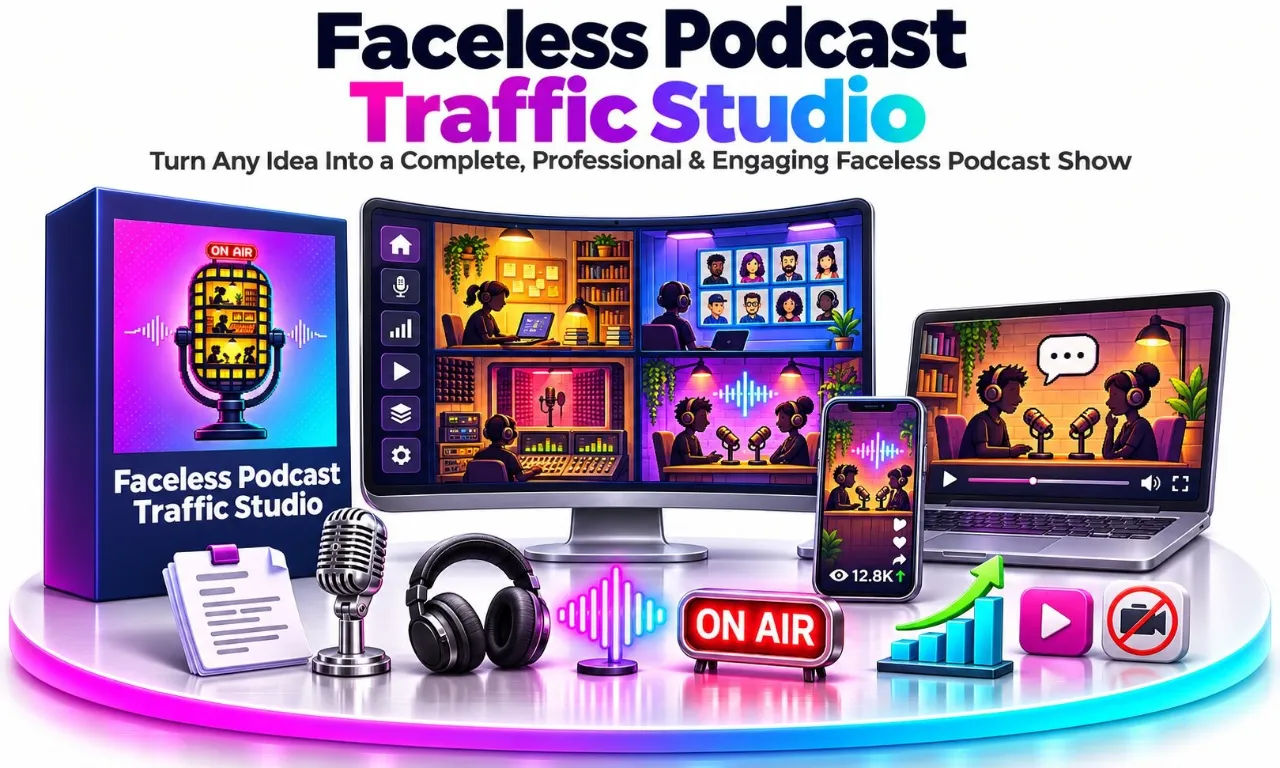
My first attempt at a faceless channel died somewhere around episode two. I had the idea, I had a spare afternoon, and I had absolutely no desire to hear my own voice played back forty times while I cleaned up the breaths. So when I saw Faceless Podcast Traffic Studio promising a finished two-host episode from one sentence, I did what I always do: I paid the $17 and tried to break it.
What I got back on the first run was a five-minute episode about a recurring dream, two pixel-art hosts who interrupted each other at roughly the right moments, and a vertical clip I could have posted to Shorts without touching it. It was not perfect. There are things about it that annoyed me, and I will get to those, because a review where nothing goes wrong is a review you should not trust.
But the gap between what I expected for seventeen dollars and what landed in my Downloads folder was wide enough that I have kept using it. This is what I found.
Our Verdict
Faceless Podcast Traffic Studio
A genuinely surprising one-time-purchase studio that turns a sentence into a two-host episode, a Short and a publishing kit, with a minute allowance you will feel if you post daily.
One-time $17, 200 podcast minutes included, runs on Windows and Mac
What You Actually Get
The core download is a desktop app for Windows and Mac, and the license covers three computers. You are not logging into a web dashboard and hoping the servers stay up. The episodes render on your own machine, which mattered to me because I have been burned by subscription tools that vanish.
Inside, you get what the page calls seven AI teammates, each with a name and a job. Nora runs the desk and asks you the decisions. Mia pitches three concepts from your idea and writes the script. Leo edits that script so it reads like people talking rather than people writing. Ava casts the hosts, gives them names and personalities, and lets you audition voices. Max records every line with an emotion attached. Zoe renders the video in 16:9 and 9:16, cuts the Short and makes the thumbnail. Sam writes the publishing kit: three title options, a description with chapter timestamps, tags and posts for eight platforms.
That is the whole chain from a single sentence to something you can upload. Alongside it you get a starting cast of 15 hosts and 8 studio sets, 3 opening styles, 8 music tracks, and 3 custom hosts you can build yourself in the Character Builder and save to My Library.
The minute allowance is 200 podcast minutes. One minute of your pool equals one minute of finished podcast, so that is ten 20-minute episodes or forty 5-minute ones. Re-renders, line edits, new thumbnails, extra Shorts and set changes do not touch the pool. The minutes stay valid for 12 months from your latest purchase, and buying again extends the pool rather than resetting it.
Three bonuses come with it. The Idea Vault is 160 episode idea cards, ten per genre, each with the exact line to paste, a hook, a title and a moment to cut as a Short, across 15 pages. The 10-Episode Launch Playbook is a day-by-day 30-day calendar taking you from zero to ten published episodes. The third bonus was cut off in what I could read, so I will not pretend to describe it.
Key Features
Hosts that react to each other. This is the part that separates the tool from every text-to-speech generator I have tried. Max records each line with one of 15 emotions, and the other host responds out loud: a laugh, a sigh, a "wait, what?". Turn-taking and interruptions are built into the recording, not something you have to edit in afterwards. On my dream episode, one host cut in while the other was mid-explanation, and it sounded like a real podcast rather than a script read at a microphone.
111 voices with pitch and speed controls per host. The voices chuckle, sigh and laugh where the script calls for it. You can audition them before committing, and change pitch and speed per host. I swapped one host out twice before I found a pairing I liked.
Multi-camera studio video. Your pixel-art hosts sit in a real set with camera cuts, caption bubbles and your show name on air, rendered in both 16:9 and 9:16. It looks like an animated show, which is the whole point: the page argues that original animated characters and original voices are not the "realistic synthetic content" YouTube asks creators to label. I am not a platform policy expert and rules change, so treat that as the seller's claim, not a guarantee. If you add a real person's face or voice, the disclosure rules apply to you like anyone else.
The automatic Short. Zoe finds the most engaging moment, cuts it and captions it for Shorts, TikTok and Reels. I did not have to open a second editor once.
Publishing kit. Three titles, a description with real chapter timestamps, tags, and ready-written posts for YouTube, Spotify, Apple, X, Instagram, TikTok, LinkedIn and Facebook. I used the titles largely as written and trimmed one of them.
Plain-language changes. You can type "make the cold open scarier" or "use the dark set" instead of hunting through menus. There is also a chat mode with Nora if you connect Claude, though the buttons work fine without it and I mostly used the buttons.
Pause, Continue, Stop. If something hiccups, it retries itself, and fixes never cost minutes. I paused a render to answer the door and picked it straight back up.
Actually Using It
My first project was deliberately lazy. I typed one line about a recurring dream where a family I had never met kept showing up. I picked Self-improvement, five minutes, two co-hosts. Mia came back with three angles within what felt like a couple of minutes, and I picked the one framed around memory rather than meaning, because the other two sounded like horoscopes.
The script she wrote was good enough that I only changed two lines. Leo's pass had already removed the worst of the written-not-spoken cadence, the "furthermore" problem. Ava suggested a host pairing and I audited three voices before settling. That audition step is where I spent the bulk of my eleven minutes, and I would spend more next time, because the voices carry the whole illusion.
Then I pressed Produce and went to make coffee. Recording, mastering and rendering a ten-minute episode takes roughly 10 to 20 minutes according to the page, and my five-minute run landed inside that window. When I came back there was an MP3, a 16:9 video, a 9:16 video, a 60-second Short and a thumbnail, all in one Downloads tab, plus Sam's publishing kit with chapter timestamps that actually matched the audio.
I have listened to that episode more times than any reasonable person should. The first thirty seconds are the tell. One host opens with a question, the other answers with a small laugh before the sentence, and it reads as two people in a room. My partner, who did not know I had made it, asked what channel it was from. I am choosing to take that as a win and not ask follow-up questions.
Where it wobbles is in the middle of longer episodes. At five minutes the format is tight. When I pushed to a 20-minute episode, one segment circled the same point twice before Leo's script caught up with itself. The front end caps at 20 minutes; the 57-minute horror episode on the sales page is a PRO length, so if you are planning hour-long shows, price that in before you start.
The second thing I noticed is the visual sameness. Pixel-art hosts in a set is a strong look, but if you are running three channels off the same tool, the sets start to feel like the same studio with the lights changed. With 8 sets and 15 hosts on the front end, you have room, but you will notice the recycling faster than your viewers will. I do not know how distinct the 36 PRO sets feel, because I have not bought that tier.
The pixel office itself is a small thing that I enjoyed more than I expected. Watching Max light up line by line while I answered an email made the wait feel like production rather than a loading bar.
Try it on your own idea tonight
One-time payment, 200 minutes included, runs on Windows and Mac
Pricing and Value Analysis
The front end is $17 one-time, down from the $27 launch price the page quotes. No monthly fee. The purchase includes the 200-minute pool, the three bonuses, and a 1-year support warranty. Re-renders, edits, thumbnails and Shorts are free of minutes, so the only thing that eats your allowance is finished audio length.
Let me put the maths where you can see it. Two hundred minutes at $17 works out to about 8.5 cents a finished minute. If you produce ten 20-minute episodes, that is $1.70 per episode across the pool. Compare that to the usual stack: a voice tool, an editing subscription, a thumbnail designer, a captioning service. The page claims an 8-plus hour manual workflow against roughly ten minutes here, and while I did not time a manual episode to check, my hands-on run was closer to eleven minutes than an afternoon.
There is an upgrade path. Extra adds 250 minutes a month from inside the app if you produce daily, and PRO opens all 148 looks and 36 sets plus the longer episode lengths. Those are inside-the-app upgrades, and I have not bought them, so I cannot tell you whether they are worth the money. What I can tell you is that at $17 the front end is cheap enough that the risk is your Saturday, not your wallet.
| What you are comparing | Typical cost | What you get |
|---|---|---|
| Faceless Podcast Traffic Studio | $17 one-time | 200 podcast minutes, 15 hosts, 8 sets, Shorts, thumbnails, publishing kit, 3 bonuses |
| Voice generation subscription | Monthly recurring | Voices only, no video, no Short, no publishing kit |
| Video editing subscription | Monthly recurring | Editor only, you still write, record and cut |
| Doing it manually | Your time | 8+ hours per episode by the seller's own reckoning |
One note on the numbers the page shows for those big faceless channels. It cites two Social Blade examples with 13.2M and 9.8M subscribers, and the page itself says those channels are not theirs, were not made with the studio, and the earnings are estimates from typical ad rates, not verified income. Results like that take years. I am mentioning it because the sales page is honest about it, and you should not read the subscriber counts as a forecast for your channel.
Pros and Cons
Pros
- Two-host conversation that actually sounds like two people reacting
- One sentence in, finished episode plus Short plus thumbnail out
- One-time $17 with no monthly fee and no API keys
- Re-renders, edits and Shorts never cost minutes
Cons
- Front end caps episodes at 20 minutes, longer shows need PRO
- Pixel-art sets start to feel repetitive across multiple channels
- Mid-episode pacing can sag on longer runs
- The no-label situation is the seller's reading of YouTube policy and could change
Who This Is For
People who want a channel without a camera or a microphone, and who have an idea but not a production pipeline. If you have watched two-voice illustrated channels and thought "I could write that if someone else made it", this is the someone else. It also suits anyone with a blog, a newsletter or a stack of articles: paste the text in and the hosts discuss it faithfully, which turns old writing into new audio and video.
It suits the person who wants to test a niche cheaply. At $17 and eleven minutes, you can find out whether horror radio or self-improvement explainers are your lane before you commit to anything bigger.
Who Should Skip It
If you want a real human voice and a real face, this is the wrong tool. If you are planning hour-long episodes on day one, the front end will not get you there and you will be buying PRO on top of the $17 before you have published anything.
And if you are expecting the software to run the channel for you, skip it. The studio removes the production. The schedule is the part you bring, and that is the part most faceless channels die on.
Frequently Asked Questions
Is Faceless Podcast Traffic Studio worth it?
For $17 one-time, yes, if you want to test a faceless podcast channel without hiring voices or editing video. The 200 included minutes cover ten 20-minute episodes or forty 5-minute ones, and re-renders do not touch them. The limits are episode length on the front end and the repetition you will notice across multiple channels.
How much does Faceless Podcast Traffic Studio cost?
The front end is $17 one-time, down from the $27 launch price on the product page. That includes 200 podcast minutes, 15 hosts, 8 studio sets, the Short and thumbnail generation, the publishing kit and three bonuses. There is no monthly subscription on the front end.
Does it sound like AI?
The reactions are what sell it. Each line is recorded with one of 15 emotions, and the other host laughs, sighs or cuts in, so it reads as two people in a room. On my first five-minute episode I only had to audition voices twice before it stopped sounding synthetic to me.
Do I need to appear on camera or record my voice?
No. The hosts are pixel-art characters with their own names, personality and original voices. You type the idea or paste a script, pick a concept, approve the script and press Produce. Nothing in the workflow asks you to record anything with your own voice or face.
Can I use my own script or existing articles?
Yes. One sentence is enough to start, but you can also paste an article, a blog post or a full script, and the two hosts will discuss it faithfully. I tested this with a long draft and the episode tracked the original argument without inventing new claims, which is more than I expected.
How long does an episode take to make?
The click-through takes about ten minutes of your time. After you press Produce, recording, mastering and rendering a ten-minute episode takes roughly 10 to 20 minutes, according to the seller, and the studio tells you the estimate before it starts. You can use your computer for other things while it renders.
Is there a refund?
The page includes a one-year support warranty rather than a stated money-back window, and I have no additional refund information beyond that. Check the terms on the order page before you buy, especially if you are on the fence.
What are the alternatives?
You can build the same workflow manually with a voice generator, an editor and a thumbnail tool, but that is the 8-plus hour per episode route the seller describes. The nearest direct comparison is any AI podcast tool that outputs a flat single-voice read. This one casts two hosts and produces video, a Short and a publishing kit in the same pass.
Final Verdict
Faceless Podcast Traffic Studio is the first $17 tool I have bought this year that did not feel like a template with a price tag. The two-host format is the reason. One sentence became a finished five-minute episode, a vertical clip and a thumbnail, and the only part I had to work at was picking voices.
I would buy it again. I would tell you to plan around the 20-minute cap and to expect the pixel office to look familiar by your tenth episode. And I would tell you that the eleven minutes it saves on production is not the same as the schedule it takes to grow a channel. The software makes the show. You still have to post it.
Start your first episode tonight
One-time $17, 200 minutes included, three computers per license
Related Posts
313 Printable Workbook Prompts: My Honest Review
I bought the Printable Workbook Prompt Pack to test whether 313 ChatGPT prompts can really produce a full workbook. Some prompts are strong, some are filler, and $17 is still a fair deal.

Cozy All-Year Book Prompt Vault Review: 273 Book Prompts
I pasted one Cozy All-Year prompt into ChatGPT and it produced a full 66-page coloring book interior. Here's what worked, what needed remaking, and whether $12.95 is fair.

Hoax Noir AI Review: Graphic Novels From Real Hoaxes
I built a 12-page hoax graphic novel in a weekend using Hoax Noir AI and my own image tool. Here is what $19 actually buys, and the part that annoyed me.

Luxury Lace Holiday Collection Review: 714 PLR Prompts
I spent a weekend generating sheets from the Luxury Lace Holiday Collection to see if 714 ChatGPT prompts actually produce sellable printables. Some sheets impressed me, one needed three retries.

WellPrint Review: I Made a 30-Day Wellness Plan in Four Minutes
I timed WellPrint from blank page to a finished 30-day plan PDF. Under four minutes, and the words were the part I'd normally lose a weekend to. Here's the honest breakdown.
Prepper Book Builder Review: 72 KDP Topics, One Prompt
I turned one prepper topic into a full editorial brief and pasted it into my AI. Here is what the Prepper Book Builder actually does, and where it falls short.