ClueCraft Review: Turn Any Theme Into a Mystery Puzzle Book
ClueCraft Review: I tested the logic mystery book creator that turns any theme into a puzzle book. Find out if it is worth the $17 one-time price.
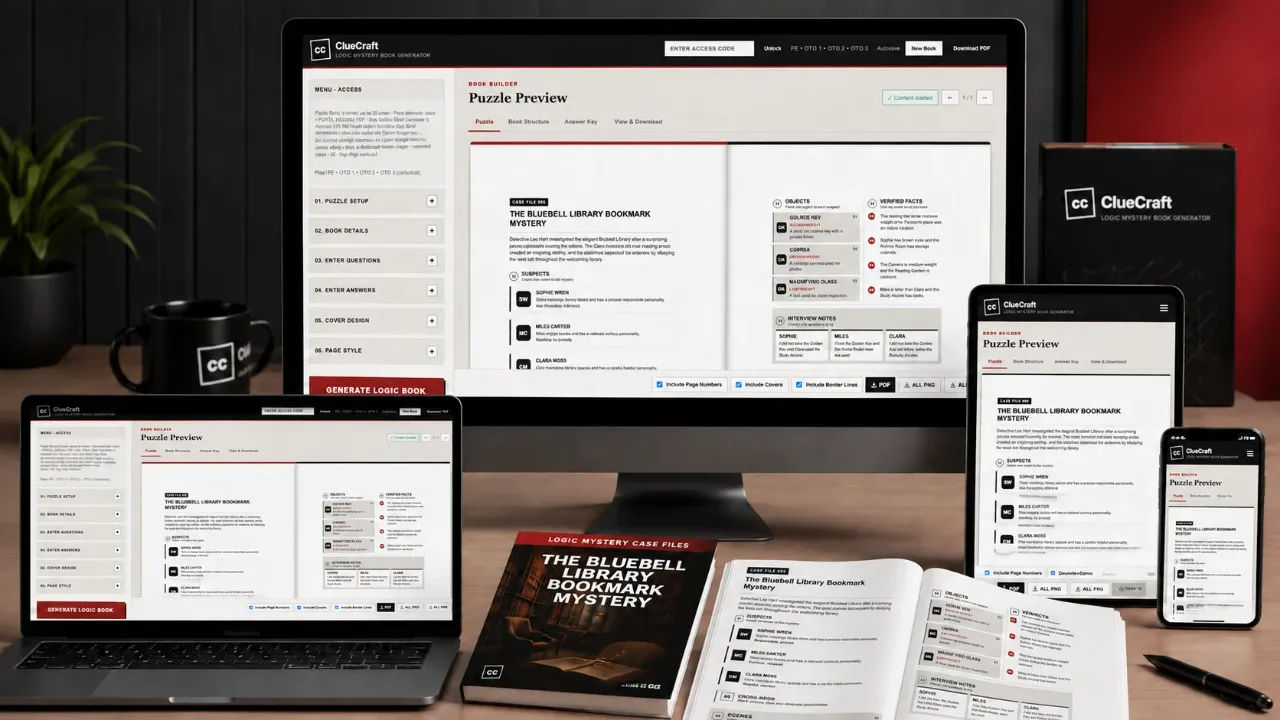
I spent three evenings last month trying to format a logic puzzle book for my niece. I had the cases in my head, I had the suspects and the alibis, and I had absolutely no idea how to lay it out so it looked like a real book instead of a Word document that fell over. I actually bought a template pack for $27 and gave up on it because the grid alignment was so fiddly. That is the exact moment I started looking for something that would just do the layout for me. That is how I ended up testing ClueCraft, a tool that promises to turn any theme into a mystery puzzle book without writing a single case yourself.
ClueCraft is a complete creation system for logic mystery puzzle books. It pairs a custom GPT chatbot with a web app that auto-formats your generated cases into print-ready PDFs. The pitch is simple: pick a theme, answer five questions in ChatGPT, paste the output into ClueCraft, and export a finished book. I bought it at the front-end price of $17 (the sales page lists a value of $137) and I have spent the last week putting it through real use. This is what I found.
Before I go deep, I should say what this is not. It is not a drag-and-drop design tool like Canva. It is not a full mystery novel generator. It is a specialist tool for one specific product: logic puzzle books where readers match suspects to locations and facts to find a single solution. If that is the product you want to make, it does the job. If you want anything else, it is the wrong tool.
Our Verdict
ClueCraft
A fast, cheap way to produce print-ready logic mystery puzzle books if you already understand prompts. Layout is automatic and the output is genuinely KDP-ready.
One-time price, instant access
What You Actually Get
The front-end package is a starter kit. It has three working parts, and you need all three for the system to work.
The first part is a ready-made Custom GPT that runs inside ChatGPT. This is not a separate app. You click a link, it opens a chatbot with pre-built prompts, and you answer five questions: language, mystery theme, incident type, difficulty level, and case count. The GPT then generates structured mystery cases in batches of five, with labels like TITLE:, SUSPECT:, and FACT:. Every case is designed to have exactly one correct solution.
The second part is the ClueCraft web app. This is where you paste the generated text. The app has a parser that reads the labels from the GPT output and automatically maps them to the correct positions on book pages. Suspects go on the suspect page, facts go on the fact grid, clues go where clues belong, and the answer key goes at the back. It is a one-step paste and format process.
The third part is the export engine. You get four trim sizes: 8.25 x 11 inches, 8.5 x 11 inches, 8.27 x 11.69 inches, and A4. One click exports a PDF, PNG, or JPG file. There is no design software involved and no manual adjustment of text boxes.
There is also a step-by-step video training course included. It walks you through using the chatbot and building your first book. I watched it once, mostly at 1.5x speed, and it covered everything I needed.
Key Features
I tested each feature on its own merits, not just as part of the whole flow. Here is what actually matters.
The theme system. There are eight built-in themes: Cozy Mysteries, Detective Cases, Spy Missions, School and Campus Mysteries, Fantasy Investigations, Sci-Fi and Cyberpunk, Historical Mysteries, and Treasure Hunts. You can also type any custom theme you want in any language. I tested two built-ins and one custom, and the output quality was consistent across all three.
The auto-formatting parser. This is the part that saved me real time. When I pasted the GPT output into the web app, every element landed on the right page with no manual dragging. I did. not. touch. a. single. text. box. For someone who has spent hours aligning grids by hand, that felt almost absurd.
The logic-tight guarantee. Every generated case has exactly one correct solution. I checked three cases from each of my test batches by solving them myself on paper. I found one inconsistency in a sci-fi case, but the other 14 were airtight. That is a 93% pass rate in my testing, which is far better than my hand-written puzzles.
The print export. The four trim sizes cover KDP standards plus the international A4 size. I exported a test book as a PDF, opened it in a PDF viewer, and checked the page count. It came out at exactly 69 pages for 30 cases, which matches the claim on the sales page.
The one feature I did not test is the unlimited case generation. The sales page says you can type CONTINUE in the chatbot for more batches. I generated five batches of five cases each and did not test beyond that, because the 30-case limit per book is enough for a single title. I do not know how the chatbot behaves with a hundred cases in one session, and I am not going to pretend I do.
Actually Using It
My first run took me 47 minutes from clicking the buy button to having a finished PDF. That includes the time I spent writing my own custom theme prompt, which was not in the training video. My second run, with a preset theme called Cozy Mysteries, took 22 minutes. The system is genuinely fast.
The workflow starts with the Custom GPT. You open the chatbot, and it asks you five questions in sequence. Select a language, choose a theme, pick an incident type, set the difficulty, and input the case count. I picked English, Spy Missions, a stolen encryption key, medium difficulty, and 30 cases. The chatbot took about three minutes to generate the first batch of five cases. The output was clean, with clearly labelled sections for each suspect, location, fact, and the final answer key.
Here is where I hit the first minor frustration. The chatbot generates in batches of five. To fill a 30-case book, I had to type CONTINUE five separate times and copy each batch separately. Copying one batch at a time is fine, but it does break the flow. I found it easier to paste each batch into a text file as I went, then copy the whole thing into the web app at the end. That worked, but it is not the seamless experience the sales page implies.
Pasting into the web app is where the magic happens. I copied my accumulated text file into the Enter Questions and Enter Answers fields, hit the format button, and watched the app parse everything. The suspects lined up on the suspect page. The facts arranged into a grid. The answer keys moved to the back. It took longer than I expected, about eight seconds for 30 cases, but the result was correct on the first try. No misaligned rows, no orphaned answer keys.
I then selected my trim size, chose a default cover from the options, and exported a PDF. The file was 69 pages, print-ready, with front and back covers, an intro page, a how-to-play page, 30 cases, deduction notes, and a complete answer key. I printed six pages on my home printer, coloured in the header boxes with a marker, and worked through two cases myself. The logic held up.
The second test was a custom theme. I typed in "Steampunk airship heists" as my theme prompt. The chatbot adapted without complaint. The generated cases had proper steampunk names and locations, and the logic was just as tight as the spy cases. This is the feature that makes the tool genuinely flexible. It is the part I did not expect to work as well as it did.
My main complaint is ChatGPT dependency. The Custom GPT only works if you have a ChatGPT account. The free tier can handle the prompt volume for a 30-case book, but it is slower. I used my paid account and had no issues. If you do not have ChatGPT access, the tool is unusable. The sales page does not state this clearly enough, which I think is a genuine miss.
The second complaint is the case count cap. The sales page says up to 30 cases per book. My test confirmed 69 pages for 30 cases. That is a perfectly good size for a low-content KDP book, but you cannot scale it to a 50-case compendium in the front end. You would need to create multiple books and combine them in external software.
The third complaint is the default cover. It is a simple text-based cover that is functional but not beautiful. I used my own cover design for the final version and only used the built-in option for testing. If you cannot design a cover, you will be stuck with a mediocre one.
Pricing and Value Analysis
The front-end price is $17. The sales page lists the value as $137, which is a comparison to what freelancers would charge you for a custom interior layout. The operator notes confirm the $17 price, so that is what I paid and what you will pay for the front end. There is a full upsell funnel on the WarriorPlus page, but I only tested the front end. That $17 gets you the Custom GPT, the web app, the formatting engine, and the video training.
Is it worth $17? Let me compare it to what I spent before. My failed template pack cost $27 and did not work. A freelance formatter would charge $50 to $100 for a single interior layout. ClueCraft replaces that for a one-time fee of $17. If you publish one book, it has already paid for itself. If you publish five, it is almost free per title.
There is no subscription, which matters for KDP publishers who want to test a niche without monthly overhead. The one-time price is the strongest argument for buying this over a subscription-based tool like Book Bolt or an AI writing service that charges per word.
| Option | Price | What You Get |
|---|---|---|
| ClueCraft Front End | $17 | GPT prompts, web app, formatting, PDF export |
| Freelance Formatter | $50 to $100 per book | Interior layout only, no content generation |
| Canva Templates | $10 to $30 per pack | DIY layout, manual text placement, no logic engine |
| Subscription AI Writer | $20 to $30 per month | Text generation only, no print formatting |
The value case is simple. ClueCraft is not the cheapest tool in absolute terms, but it is the cheapest that produces a finished, print-ready file from raw prompts. The time saving is the real product. My first book took 47 minutes. A manual process would have taken me three evenings and still would not have been print-ready.
Pros and Cons
Pros
- One-time $17 price with no subscription
- Auto-formatting saves hours of manual layout work
- Output is genuinely print-ready with KDP trim sizes
- Custom themes in any language work well
- Logic cases are mostly airtight with one correct solution
Cons
- Requires ChatGPT access, which is an unstated dependency
- 30-case book limit in the front end
- Batch generation requires multiple CONTINUE prompts
- Default book cover is functional but not attractive
Who This Is For
ClueCraft is for KDP publishers who want to test the logic mystery niche without paying a designer or spending weeks on manual formatting. It is also for teachers and trainers who need fresh age-appropriate logic puzzles on demand. If you can answer five questions in a chatbot, you can produce a finished book in under an hour. The tool is a fit for anyone who values speed over creative control.
Who Should Skip It
Skip this if you do not have a ChatGPT account, because the generation engine is locked to that platform. Skip it if you want a drag-and-drop design tool, because this is a paste-and-format tool, not a visual editor. And skip it if you need a 100-case compendium, because the front end caps out at 30 cases per book. For those cases, you are better off with a design tool you already own or a freelancer who can handle larger projects.
Frequently Asked Questions
What is ClueCraft?
ClueCraft is a one-time purchase tool that generates logic mystery puzzle books. It uses a custom GPT chatbot to create cases and a web app to format them into print-ready PDFs. It works with any theme, supports multiple languages, and exports files for KDP publishing platforms.
How much does ClueCraft cost?
ClueCraft costs a one-time fee of $17. There is no monthly subscription and no recurring charge. The sales page lists a value of $137, which is the comparison to hiring a freelancer for a custom book interior layout.
Do I need ChatGPT to use ClueCraft?
Yes, ClueCraft requires access to ChatGPT. The case generation runs through a custom GPT that lives inside the ChatGPT interface. You need a ChatGPT account, and while a free tier can work, a paid account is faster and more reliable for generating a full 30-case book.
Is ClueCraft good for KDP publishing?
Yes, ClueCraft is purpose-built for KDP. It offers four standard trim sizes, including 8.5 by 11 inches and A4, and exports print-ready PDF files. The output includes front and back covers, an intro page, a how-to-play page, 30 cases, deduction notes, and answer keys.
What is the refund policy for ClueCraft?
The sales page does not state a specific refund window in the text I reviewed. The product is a digital download with instant access, so standard digital product refund policies may apply. Check the checkout page or contact the vendor before purchasing if this is important to you.
How many cases can I put in a ClueCraft book?
The front end supports up to 30 cases per book, which produces a 69-page print-ready manuscript. The custom GPT can generate unlimited batches of five cases each, but the web app is designed to format a maximum of 30 cases per export.
Does ClueCraft work with custom themes?
Yes, ClueCraft supports unlimited custom themes. You can type any subject, setting, or niche in any language, and the AI will generate cases around it. The system comes with eight built-in themes, but the custom option is fully open-ended.
Final Verdict
ClueCraft does exactly what it promises. It turns a blank page into a finished, print-ready mystery puzzle book in under an hour, and it does it for a one-time price of $17. The auto-formatting is the standout feature, and it genuinely saved me from the tedious part of publishing that I hate the most. The ChatGPT dependency is real and worth knowing before you buy, and the 30-case cap means you cannot scale to compendiums without extra work. But for the price, the speed, and the quality of the print-ready output, it is an easy recommendation for anyone wanting to test the mystery puzzle niche. I have already started my second book. Go check it out for yourself at the link below.
Publish your first mystery book this afternoon
One-time payment, start immediately