Ephemera Sheet Engine Review: 360 Prompts, One Catch
I bought Ephemera Sheet Engine to see whether 360 structured prompts beat writing my own. It is a production system, not an image library, and that distinction decides whether you want it.
I bought Ephemera Sheet Engine on a Sunday afternoon after spending most of the previous week staring at seventeen half-finished ephemera sheets in a folder called "v2 final USE THIS ONE". Three of them were tag sheets that had drifted into being card sheets. Two had pieces touching the page edge so tightly that nothing would cut cleanly. And the palette across the whole batch was all over the place, archive brown on one file, bright modern teal on the next.
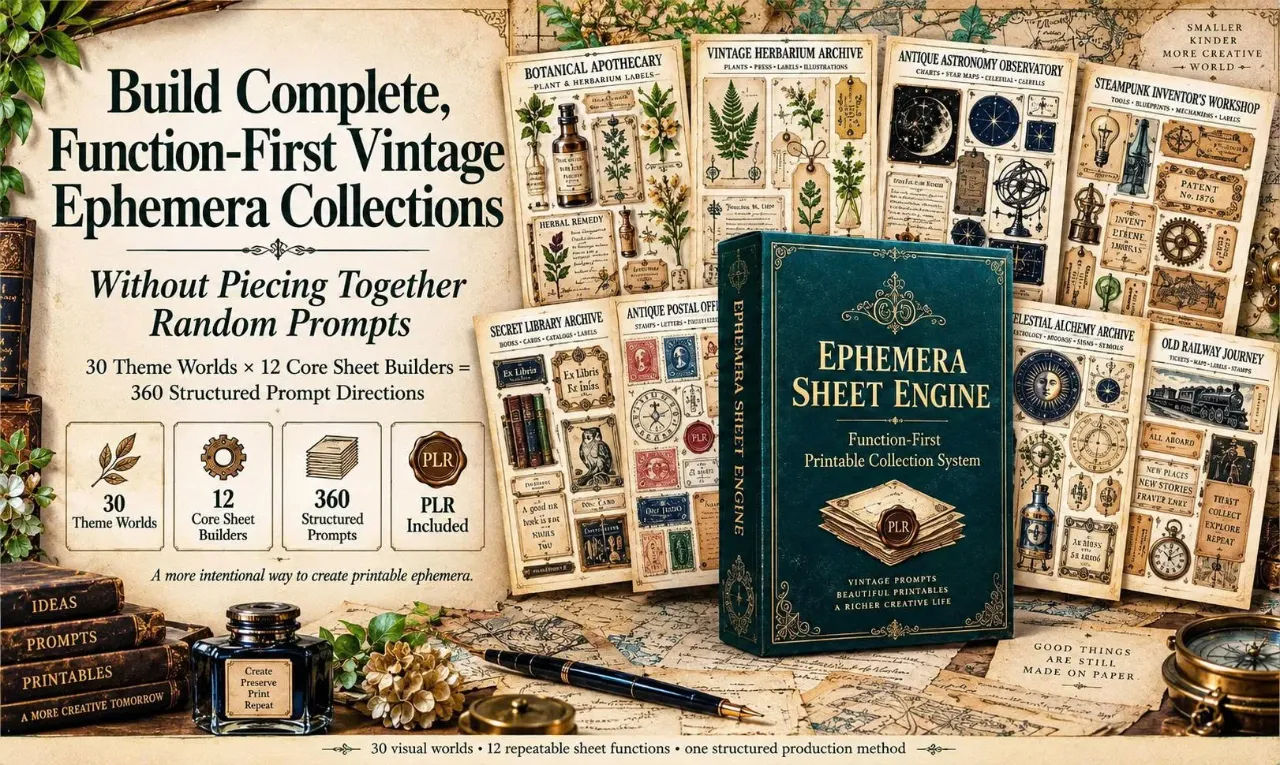
That is the specific thing Ephemera Sheet Engine is built to fix, and it is worth saying up front that it does not fix it by handing you images. Ann Le's product is a prompt system. You get 360 structured text prompts, a 286-page vault to hold them, and a workflow that runs from prompt to generated sheet to finished printable. The generation still happens in ChatGPT Image, and the results still vary.
I have been making printable kits for about four years, mostly junk journal and archive style packs, so I have opinions about what a prompt library is worth. I paid the $17 and worked through it properly. Here is what I found, including the parts that annoyed me.
Our Verdict
Ephemera Sheet Engine
A genuinely structured prompt system for printable makers. Buy it if you already sell ephemera packs; skip it if you want finished artwork.
One-time $17, instant digital delivery
What You Actually Get
The front-end package is more concrete than most things I buy at this price point, so let me just list it.
- A 286-page Master Vault containing the full 30 by 12 system
- 360 structured prompts, one for every Theme World and Sheet Builder pair
- A 15-page Quick Start Guide covering navigation, generation, refinement and quality review
- Prompt files in PDF, DOCX and TXT
- 30 Theme Worlds and 12 Core Sheet Builders
- Five implementation bonuses covering planning, packaging, rebranding, listing and presentation
- Full PLR plus Resell Rights plus Master Resell Rights across the whole front-end package
The DOCX and TXT versions matter more than they sound. PDF is fine for reading, but nobody wants to retype a prompt out of a PDF every time. The TXT files are what I actually use, because I can open one in a text editor, tweak two words, and paste it straight into ChatGPT.
The five bonuses are substantial in page count: a 32-page product planner, a 30-page packaging blueprint, a 32-page rebrand playbook, a 96-page listing vault with 100 listing prompts, and a 30-page mockup studio with 60 presentation prompts. Whether you use them depends on whether you are actually selling. If you are, the packaging and listing ones have real utility. If you are making sheets for yourself, you will skim them and close the folder.
Key Features
The obvious feature is the grid: 30 theme worlds crossed with 12 sheet builders gives you 360 prompts. But the grid is the least interesting part. What matters is what is inside each prompt.
Each prompt carries a production architecture rather than just a style description. There is a theme DNA lock that keeps palette, period cues and motifs tied to the chosen world. There is a count target that states how many pieces the sheet should contain and how those pieces break down internally. There is a function lock that keeps tags, cards, records, labels and loose objects in distinct roles so your tag prompt does not quietly turn into a card prompt. There is an anti-drift rule for exactly that failure. There are text and fallback rules for when the model cannot render clean lettering. And there are cut edge and safe margin controls telling the model to leave separation gaps and clear page margins.
That last group is the reason I think this product exists at all. Every ephemera maker I know has produced a sheet where the beautiful part is 2mm from the trim line. The prompt instructs the model to avoid that, and it works more often than it does not.
The 12 builders are Mixed Ephemera, Journaling Cards, Tags, Tickets and Labels, Feature Artifacts, Seals and Medallions, Fussy-Cut Objects, Collage Clusters, Mini Labels and Word Strips, Archive and Specimen, Decorative Accents, and Large Ephemera. Since the same 12 repeat across every theme, you can build a coordinated pack by running one theme through four or five builders, which is the workflow I settled into.
The theme worlds are grouped sensibly. Botanical and natural worlds include Botanical Apothecary and Vintage Herbarium Archive. Science and exploration includes Antique Astronomy Observatory and Steampunk Inventor's Workshop. There is a books and correspondence group, a mystical and folklore group, and a travel and nostalgia group with things like Old Railway Journey and Heirloom Recipe Archive. Thirty is enough that you will find three or four that match your niche and ignore the rest.
Want the full 360-prompt vault?
One-time payment, instant access, PLR and resell rights included
Actually Using It
My first session was a Saturday morning and it ran just over three hours, which included a coffee break and one argument with my printer.
I started with Vintage Herbarium Archive because it is closest to what I already sell. I opened the TXT version of the prompt library, searched for the theme name, and found the entry for the Tags builder. The prompt ran to a decent paragraph, not a single line. I pasted it into ChatGPT Image without changing anything, partly to test the system as written and partly because I wanted to see how much of the structure the model would actually respect.
The first generation came back with six tags in a row, all the same shape, which is not what I wanted. The count target in the prompt said a higher piece total with a mix of shapes, and the model had ignored the variety instruction. I regenerated. Second attempt gave me nine tags with three distinct silhouettes and a faded botanical border that matched the archive tone. Better. The text on two of the tags was mush, which the prompt's fallback rules anticipate but cannot prevent, since that is a model limitation.
Third generation was the keeper. I exported it and opened it in Affinity Photo to check the margins. The pieces sat well inside the page edge, which does not happen by accident when I write my own prompts.
Then I ran the same theme through Journaling Cards, Feature Artifacts, Seals and Medallions, and Decorative Accents. That took about an hour and produced a coherent nine-piece pack where the palette genuinely held together across all five sheets. That consistency is the thing I could never get on my own. My previous packs always had one sheet that looked like it wandered in from a different project.
Where I hit friction: the quality review step. The workflow tells you to check piece count, category mix, text, spacing, cut edges, overlap and overall usability. That is good advice and it is also work. I found myself regenerating three and four times on some builders to get something usable, particularly Seals and Medallions, which kept producing circular objects with soft edges that looked muddy at print size. Fussy-Cut Objects was similarly hit and miss, because fine detail and clean cutting edges fight each other.
I also want to be clear about the pixel side. The intended production target is US Letter portrait at 2550 by 3300 pixels, 300 DPI. ChatGPT Image does not hand you files at that size. I upscaled three sheets and resized the rest, and the upscaled ones held up acceptably at the sizes I was printing. If you need absolutely crisp output at large print sizes, budget time for that step and know it is on you, not the product.
The second session was faster. Once I understood that the prompt structure rewards specificity, I started editing prompts before pasting, swapping in my own palette hex values and adding a line about the paper texture I wanted. The prompts are a starting point and they take edits well, which I think is the correct design. A locked prompt you cannot modify would be useless after the tenth run.
One more practical note. I used the DOCX files to build my own working document, pasting in the twelve prompts for Vintage Herbarium Archive and adding my own notes under each about what worked and what to regenerate next time. That took twenty minutes and has saved me considerably more since. The vault is a menu, as the product itself says. Treating it as a checklist of 360 things to generate would be miserable.
Pricing and Value Analysis
Ephemera Sheet Engine is $17 as a one-time purchase. No recurring fee from the front-end. Instant digital access. The operator's notes confirm the same $17 figure, matching what the page states three separate times.
Optional upgrades are shown after purchase and are not required to use the front-end, so if you buy the $17 tier and nothing else you still have the complete 30 by 12 system, the guides, and all five bonuses.
| What you get | Cost | Alternative |
|---|---|---|
| 360 prompts, 5 bonuses, PLR + RR + MRR | $17 one time | Roughly 17 cents per prompt |
| Writing prompts yourself | Free | Several hours per theme, inconsistent results |
| Buying finished ephemera packs | Varies by seller | No resale rights, no rebranding |
| Stock or subscription image libraries | Recurring | No prompt structure, no commercial repackaging |
At $17 the maths is not interesting. One sale of one printable pack covers it. The real question is whether the structure saves you enough time to be worth the learning curve, and for me it did somewhere in the second session.
The resale rights angle changes the value calculation if you plan to sell the materials themselves. Full PLR plus Resell Rights plus Master Resell Rights across the front-end and all five bonuses means you can edit, rebrand, repackage and resell, and pass downstream rights under the license terms. Not everyone wants that, and if you do not, ignore it. But it is a real difference between this and a plain prompt pack.
The honest comparison is to your own hourly rate. If writing a structured prompt takes you forty minutes and you need a dozen, that is most of a working day. If Ephemera Sheet Engine gets you to a working prompt in two minutes, it pays for itself the first time you use it. You can check the current price and package details on the Ephemera Sheet Engine page.
Pros and Cons
Pros
- 360 prompts with real production structure, not just style words
- Consistent palette and period cues across a multi-sheet pack
- Cut edge and safe margin controls that visibly reduce trim disasters
- DOCX and TXT versions make editing and pasting genuinely fast
- Five bonuses plus full PLR, RR and MRR at a one-time $17
Cons
- You are buying prompts, not 360 finished images
- Generated output still varies and needs reviewing and regenerating
- ChatGPT Image files need resizing or upscaling to hit 2550 x 3300
- Some builders and seal-style circular objects are harder to get clean
Who This Is For
Printable makers who already sell. If you have a shop, a PLR business, or client work involving ephemera, the value is immediate, because you already know the pain of a pack that does not hold together. Junk journal kit builders will get the most out of this. So will anyone who wants to rebrand and resell, since the license covers that explicitly. And if you have been writing your own ChatGPT prompts and hitting category drift every time, this is a direct fix for that specific problem.
Who Should Skip It
Skip it if you want finished artwork. The sales page says outright that this is not a library of 360 finished images, and that is accurate. If you do not want to sit in ChatGPT reviewing and regenerating, this will frustrate you.
Also skip it if you have no interest in the production side. You still need to check piece counts, fix text, resize to print dimensions and export. There is no one-click button. And if your work has nothing to do with paper products, printables, journals or rescale-friendly graphics, the entire system is aimed at somebody else. The mystical and travel themes will not rescue a use case that is not there.
Frequently Asked Questions
What is Ephemera Sheet Engine?
It is a structured AI prompt and workflow system built primarily for ChatGPT Image. You choose one of 30 Theme Worlds and one of 12 Core Sheet Builders, paste the matching prompt into ChatGPT Image, then review, refine or edit the generated artwork before preparing your final file. The front-end also includes a 286-page Master Vault, a 15-page Quick Start Guide, five bonuses, and commercial rights.
Is Ephemera Sheet Engine worth it?
For anyone already selling ephemera, printables or PLR packs, yes. The prompts carry count targets, function locks, cut edges and margin controls, which is the structure that stops packs drifting. At $17 one time, a single sale covers it. If you want finished images with no generation work, it is not worth it for you.
Do I get 360 finished printable images with Ephemera Sheet Engine?
No, and the vendor is clear about this. You receive 360 structured prompt directions. You use ChatGPT Image to generate the visuals, then review and prepare the versions you want to keep. Think of it as a production system rather than a stock library.
How much does Ephemera Sheet Engine cost?
It is a one-time $17 payment with instant digital access and no recurring fee from the front-end. Optional upgrades may be offered after purchase and are not required to use the front-end package. You can see the current offer on the official Ephemera Sheet Engine page.
Do I need an API key or special software?
No API key is needed for the normal copy-and-paste workflow. The prompts are designed primarily for ChatGPT Image, and availability and generation limits depend on your current ChatGPT plan. For editing, resizing and upscaling, you will want a design tool you already use, such as Affinity Photo or Photoshop.
What size are the sheets designed for?
The core format is portrait US Letter at 8.5 by 11 inches, with 2550 by 3300 pixels at 300 DPI as the intended final production target to verify during export. Generated files may need resizing or upscaling before final delivery.
Can I sell what I make with Ephemera Sheet Engine?
Yes, under the supplied Full PLR plus Resell Rights plus Master Resell Rights license, and subject to current AI-provider, marketplace and intellectual property rules. You can edit, customize, combine, rebrand and repackage the materials, use them as bonuses or client resources, and pass downstream rights. Review the finished asset before publishing or selling.
Final Verdict
Ephemera Sheet Engine is one of the few prompt products I have bought where the structure is the actual product. The 30 by 12 grid is easy to market, but the count targets, function locks, anti-drift rules and margin controls are what stopped my test pack from falling apart, and I have never managed that writing prompts from scratch.
It is not effortless. Roughly a third of my generations needed redoing, seals and fussy-cut objects took the most attempts, and you will resize files yourself to reach print dimensions. If that sounds like too much work, this is the wrong purchase and you should buy finished packs instead.
If you already build printables and you know the specific misery of a pack where sheet five does not match sheet one, $17 is a straightforward yes. I paid it, I have a nine-piece herbarium pack to show for it, and I have already started a second theme.
Build your first coordinated ephemera pack
One-time $17, instant access, full PLR and resell rights included