Crossword Puzzle Creator Review: KDP Books In 3 Steps
I built a children's crossword book with Crossword Puzzle Creator and it took one afternoon, not a weekend. Here is what the app does well and where it still made me work.
Last November I opened a fresh document in Canva to build a crossword grid for an Etsy printable and closed it four hours later with one puzzle done. One. The grid lines were uneven, two words crossed at the same square, and I had numbered the clues in the wrong order twice. That project never got listed. So when Crossword Puzzle Creator landed in front of me with the claim that it builds the grids, numbers them, lays out the pages and adds the answer key, I had a specific reason to want it to be true, and a specific reason to doubt it.
I bought it for $16.95, installed it, and spent an afternoon building a children's animal-themed book from scratch. This review is what actually happened, including the parts that annoyed me.
Short version: it does the thing the sales page says it does, and the thing it replaces is the part of the process I hated most. It is not a magic wand. You still need a working AI chat and you still need to check clues. But the gap between "list of words" and "file I can upload" is exactly what this tool closes.
Our Verdict
Crossword Puzzle Creator
If your crossword book ideas keep dying at the word-list stage, this is the cheapest way I have found to actually finish one.
One-time payment, no subscription
What You Actually Get
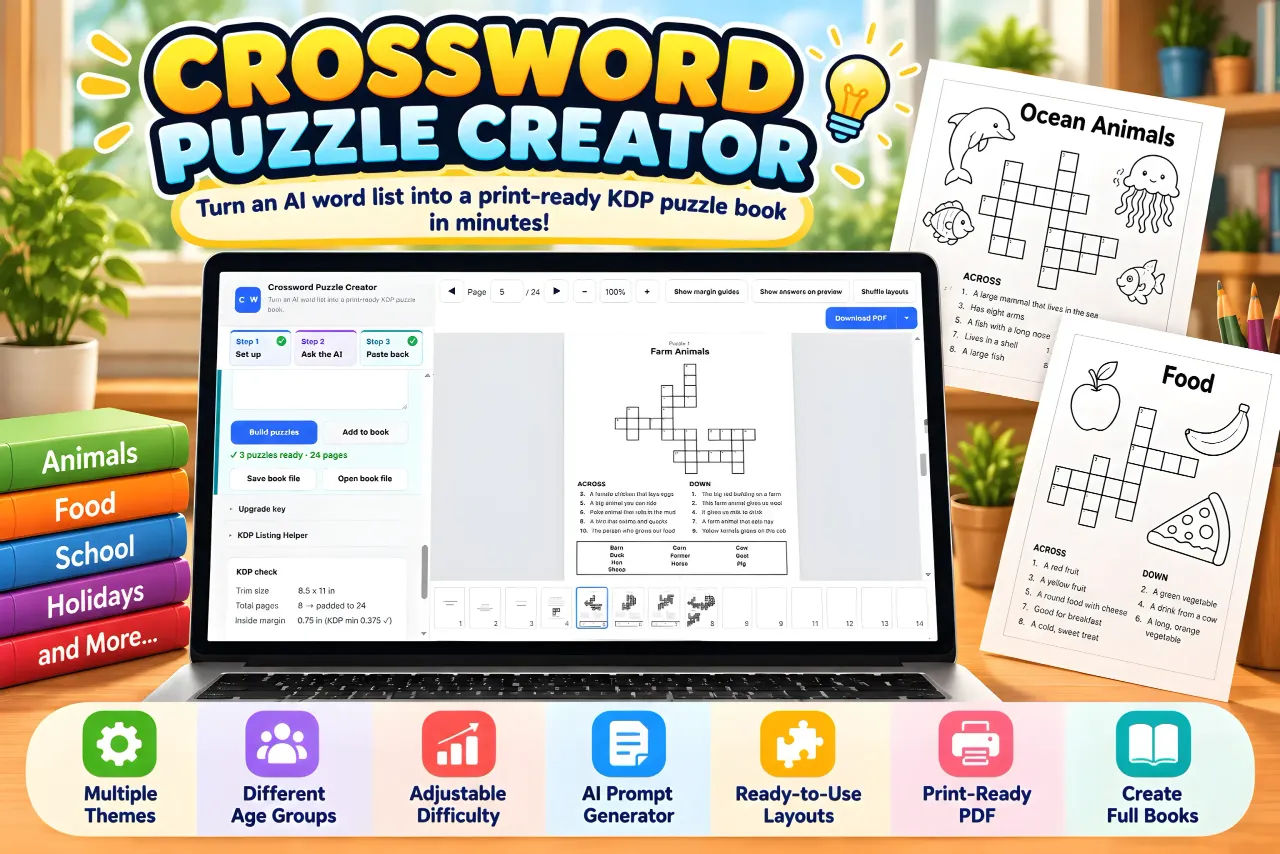
Crossword Puzzle Creator is a browser app. You download it, open it, and it runs locally on Windows or Mac. It works offline, which matters more than you would think, because it means none of your book files are being uploaded anywhere. Only your AI chat needs an internet connection.
The app itself is a single tool with one job, and the pieces of the job are:
- A setup screen where you enter a title, pick the number of puzzles (1 to 60), choose an age group and a page size, and add topics one per line.
- A prompt generator. You click "Copy prompt", paste it into ChatGPT, Claude, Gemini or Grok, and the AI writes the words and clues for you.
- A paste-back box and a "Build puzzles" button. This is where the grids get built, numbered and laid out.
- An export set: the full interior PDF, a separate answer-key PDF, PNG of the current page, and all pages as a .zip.
- A preview mode with zoom, an optional "Show answers on preview" toggle, and non-printing margin guides.
There is also a "Load sample book" button that opens a finished three-puzzle book so you can download a test PDF before you ever open an AI chat. I used that first, mostly to see whether the output was as clean as the screenshots suggested. It was.
Key Features And What They Do For You
Real grids, not word lists
The single biggest difference between this and asking an AI chat for a crossword. A chat will give you words and clues, but the words do not interlock and nothing is numbered. This app takes those same words and builds an actual grid where entries cross, with numbers placed the way a printed crossword places them. If you have never tried to number a crossword grid by hand, I want you to understand that this alone is worth the asking price.
Children's age levels
Three presets: ages 6 to 7 gets short 3 to 5 letter words at 6 per puzzle, ages 8 to 9 gets 10 words at 3 to 7 letters, ages 10 to 12 gets 14 words at 4 to 9 letters. You can override the word count yourself. If you are building a series, this is how you turn one topic into three products without rewriting anything.
KDP interior rules handled for you
This is where I expected the app to overpromise, and it was actually the most detailed part. Single pages, fonts embedded, page 1 starting on the right. Minimum 24 pages, always an even count, with blank pages added at the back if your book comes up short. Outside margin set to 0.5 inch against KDP's 0.25 inch minimum, and the inside margin grows as your page count grows, which is the rule most people miss. Grid lines at 1 pt against a 0.75 pt minimum. There is a "KDP check" panel that shows you all of these numbers before you export. The page tells you plainly that KDP reviews every book itself, which is honest and worth repeating: none of this guarantees approval.
Clue checking before you publish
You can switch on "Show answers on preview" and step through the book page by page, zoomed in, checking every clue against its answer. The sales page admits that AI-written clues can be wrong. I would go further and say they will be wrong somewhere in a 60-puzzle book, and this toggle is the only reason I would trust a long book at all.
Clue styles and word banks
Three styles: simple definition, fill in the blank, or a mix. You can add a word bank to every puzzle, which is what makes the youngest age level solvable. Extra pages include a title page, copyright page, a "This book belongs to" page, a "How to play" page and a thank-you page with your own message.
Export for whichever shop you sell on
Full interior PDF for a KDP paperback interior, answer-key-only PDF, and PNG pages individually or all at once as a .zip for Etsy and TPT listings. The app also has a print or save-as-PDF option as a fallback. The sales page is clear that KDP's layout rules apply to the print interior, and that Etsy and TPT have their own rules for digital products that you need to check yourself.
Smaller things worth knowing: five trim sizes (8.5 x 11, 8.25 x 11, 8 x 10, 7 x 10 and 6 x 9 inches), 42 kid-friendly topics grouped into Animals, Food, School, Home & Family, Outdoors, and Fun & Imagination, the ability to leave the topic box empty and let the AI choose, and a save/open book file option so you can move a project between computers. There is also a KDP Listing Helper, which is a prompt for your AI to draft a book description and keywords. It is a writing aid only, with no Amazon search or sales data behind it, so treat it as a first draft and not as research.
Actually Using It
Here is my afternoon, in order.
I opened the setup screen and filled it in. Title: "Animal Friends Crossword Book". Age group: 6 to 7. Page size: 8.5 x 11. Topic: animals. Puzzle count: I set it to 15 because I wanted enough pages to hit the 24-page minimum without sitting there for three hours.
I clicked "Copy prompt" and pasted it into ChatGPT. The prompt is doing more work than you would expect. It is telling the AI what word lengths to stay inside, how many words per puzzle, and how to format the reply so the app can read it back. That formatting requirement is the part that makes this whole pipeline function, and I want to flag it now because it is the one place a user can break it. If you take that prompt and start free-editing it into something the AI answers in a different shape, the paste-back will not parse properly. Paste the prompt as given. If you want changes, ask the AI for changes in your reply, but leave the structure alone.
ChatGPT came back with 15 puzzles of words and clues. I read through them. Most were fine. Two puzzles had a clue that was technically true but useless for a six-year-old ("an animal with a long nose" for a word I will not spoil), and one clue was flatly mismatched to its answer. I asked the chat to rewrite those and pasted the corrected reply into the app.
I clicked "Build puzzles" and it built everything. Grids, numbering, page layout, answer key at the back. It took a few seconds. I sat there for a moment genuinely annoyed at the four hours I lost in Canva last year.
Then I went into preview with answers showing and checked all 15 puzzles by hand. This took about twenty minutes and it is the step I would not skip. The app caught nothing for me because I had already fixed the bad clues in the chat, but the check is what let me be confident enough to export. If you are building a 60-puzzle book, budget real time for this and do not pretend you can skip it because the app built the grids. The grids are correct. The clues come from an AI and the AI is the fallible part.
I hit "Shuffle layouts" a few times on a couple of pages because some grids sat with more empty space than I liked. That is cosmetic and I am aware I spent ten minutes on something nobody buying a $6.99 paperback will notice.
Export was the easy part. The full interior PDF, then the answer-key PDF on its own, then a PNG of page one to use as a listing image for Etsy. I opened the interior in a PDF reader and scrolled through it. Margins looked right. Grid lines were clean. Page count landed on an even number with the blanks filled in at the back without me asking. The embedded fonts rendered correctly, which is the failure I have been bitten by before when exporting from design apps.
One thing I want to be straight about: the black-and-white interior and the "no bleed needed" note mean this is built for a specific kind of product. A black-and-white crossword paperback or a printable pack. If you were hoping for a custom-illustrated, full-colour activity book with themed art on every page, this is the wrong tool and you will be disappointed. It makes crosswords. It does not make them pretty in an illustrated sense.
The other honest limitation: I did not upload anything to KDP myself in this session, so I cannot tell you from personal experience whether a book built this way sails through review. The app is built to KDP's published interior rules and shows you the numbers, but KDP does its own review of every book. I know exactly what I know and no more than that.
Build your first book this afternoon
One-time purchase. Works offline on Windows and Mac.
Pricing And Value Analysis
The price is $16.95, one time, no subscription, no sign-up. That is the number that matters and it is the number the app is actually sold at. The sales page also mentions higher figures ($27, $97 and $178) in the context of upsells and bonus tiers, not as the price of the base product. If you see those numbers and get confused, the base app is $16.95. I would check the current page before buying in case anything has moved.
Now the comparison that actually matters. Not "is $16.95 a lot of money", because it is not. The question is what it replaces.
| Approach | Time per 15-puzzle book | Upfront cost | Ongoing cost |
|---|---|---|---|
| Build grids by hand in a design app | Hours, per book | Design app subscription or free tier | Your time, every book |
| Ask a plain AI chat for a crossword | Still hours, because you rebuild the grid yourself | AI chat subscription | Your time, every book |
| Crossword Puzzle Creator | One afternoon for the first book, less after that | $16.95 once | None |
If I price my own time at anything above minimum wage, the first book pays for the tool. The second book is profit. That is the entire argument, and it is a strong one if you are actually going to list something.
What it does not replace: the AI chat. You need access to ChatGPT, Claude, Gemini or Grok to generate words and clues. Most people reading this already have one of those.
There is also a bonus mentioned on the page: 664 paste-ready topics and 30 book plans, plus a KDP upload walkthrough. I did not use the bonus material for this build because I wanted to test the core tool honestly, so I cannot review its quality. I am noting it exists because it is listed on the page and it is the kind of thing that would save you setup time if you have no ideas of your own.
Pros And Cons
Pros
- Builds real interlocking grids with numbered squares instead of handing you a word list
- KDP interior rules handled including page count, margins and embedded fonts
- Three children's age levels mean one topic can become three products
- Show answers on preview catches AI clue errors before you publish
- One-time $16.95 with no subscription and it runs offline
- Exports PDF, separate answer-key PDF and PNG pages for KDP, Etsy or TPT
Cons
- You still need a separate AI chat to write the words and clues
- AI-written clues will contain mistakes somewhere in a long book and you have to check them
- Black-and-white interiors only, no illustrated or colour designs
- The KDP Listing Helper is a writing prompt with no keyword data behind it
- I cannot confirm from experience that KDP approves every book built this way
Who This Is For
You sell, or want to sell, puzzle books and printables on Amazon KDP, Etsy or TPT and you have been stuck at the word-list stage. You have tried asking a chat for a crossword and got back something that was not a crossword. You build children's activity books and want to add a crossword series without hiring a designer. You are a complete beginner who wants one clear path from a topic to a file you can upload. Or you already publish and want your themed series to come out faster.
Who Should Skip It
Skip it if you want illustrated or full-colour interiors, because this produces clean black-and-white puzzles and nothing else. Skip it if you are not willing to spend twenty minutes checking clues against answers before publishing, because unchecked AI clues will embarrass you in reviews. And skip it if you have no interest in the publishing side at all. This is a production tool for a product you intend to sell or give away. If you just want a crossword to solve on a Sunday, there are free ones.
Frequently Asked Questions
Is Crossword Puzzle Creator worth $16.95?
If you have ever abandoned a crossword book because building grids by hand took too long, yes. It replaces the slowest part of the process and pays for itself on your first finished book. If you have no intention of publishing a puzzle book or printable, it is not for you.
What do I actually need to run Crossword Puzzle Creator?
A Windows or Mac computer and a browser. The app runs offline and uploads nothing. You do need access to an AI chat, because the words and clues come from ChatGPT, Claude, Gemini or Grok, and that chat is the only part that needs an internet connection.
Does Crossword Puzzle Creator build real crossword grids?
Yes, and that is the whole point. A plain AI chat gives you words and clues with no grid. The app takes those words, builds grids where entries interlock, numbers every square, lays out the pages and generates a matching answer key.
Can I sell the books I make with it?
The page states the books and printables you make are yours to publish and sell. You can upload the PDF as a paperback interior on KDP or use the PNG pages as printables on Etsy and TPT. Check each platform's own rules for digital products before listing.
Do I need design skills or KDP knowledge?
No. That is the main draw. Margins, embedded fonts, the 24-page minimum, the even page count and the inside-margin rule that scales with page count are all handled, and a KDP check panel shows you the numbers before you export. KDP still reviews every book itself.
Will the clues be correct?
Not always. The clue text is written by your AI chat, and AI clues can be wrong or too hard for the age group. The app has a "Show answers on preview" toggle so you can check every clue against its answer before you publish. Use it every time.
Is there a subscription or a refund?
The page lists a one-time price of $16.95 with no subscription and no sign-up. I did not find a stated refund window in the material I had, so check the current terms on the Crossword Puzzle Creator page before you buy if that matters to you.
Final Verdict
I came in expecting a toy and got a production tool. Crossword Puzzle Creator does one thing, removes the bottleneck that kills most crossword book ideas, and charges $16.95 once for it. The grids are real, the numbering is correct, the KDP rules are handled, and the exports cover all three marketplaces I would want. The caveats are real too: you supply the AI, you check the clues, and the output is black and white. I built a 15-puzzle children's book in an afternoon and exported a file I would be comfortable uploading. Last year the same job cost me a weekend and produced nothing. I am giving it 4.3.
Stop rebuilding grids by hand
One-time $16.95. No subscription, no sign-up.