Game Craft Studio Review: Printable Board Games in Minutes
I printed a full 18-page adventure board game in under half an hour. Game Craft Studio is a browser tool that assembles the whole thing for you, dice and tokens included.
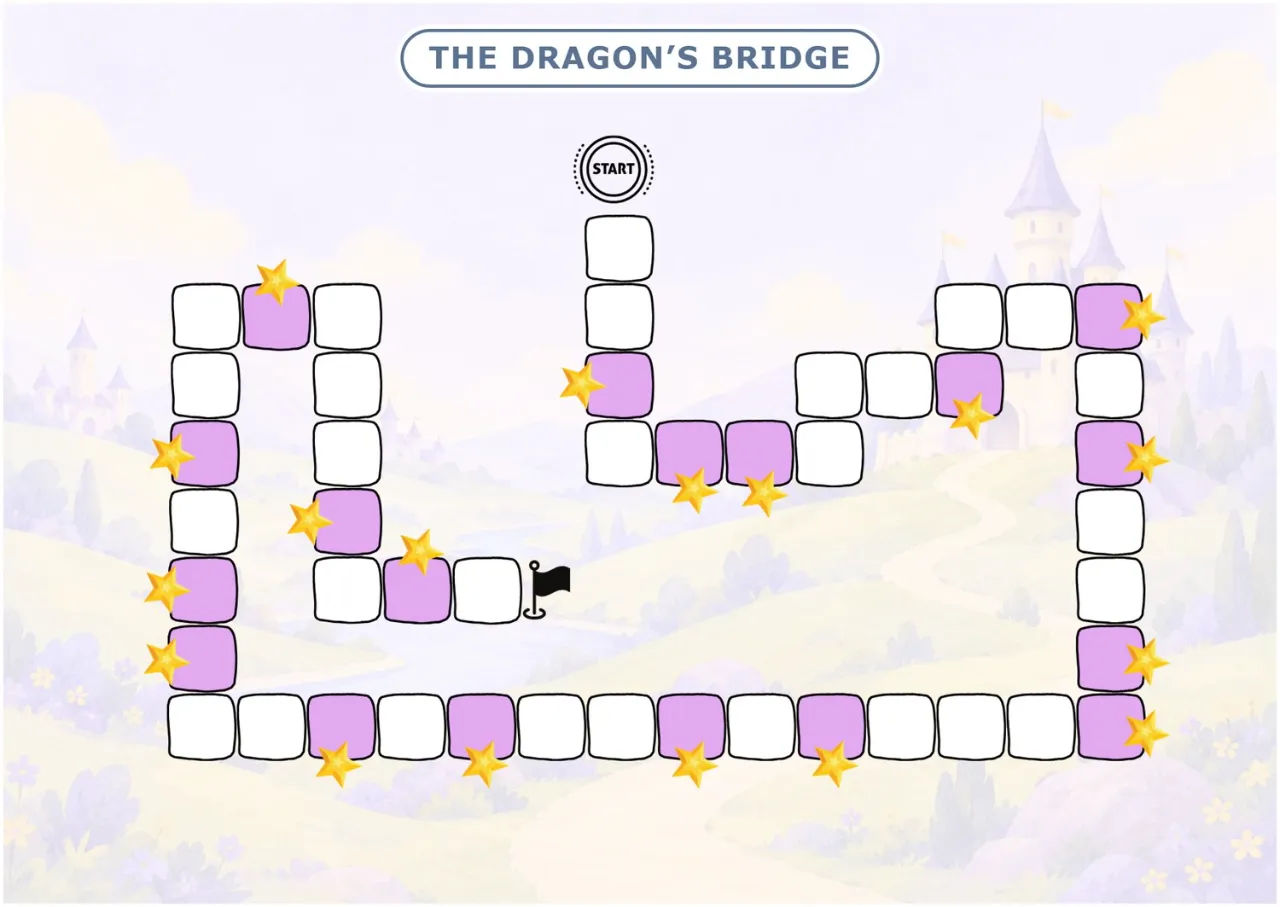
The first thing I did with Game Craft Studio was open it on a Sunday morning with a six year old sitting next to me asking how long it would take. I had already spent two evenings that month trying to hand-build a printable board game, and both attempts died somewhere around the point where I needed sixty questions that did not repeat. That is the specific wall I keep hitting. The map is easy. The rules are easy. The question bank is where the whole thing falls over.
So I bought it, ran a game, printed it, and sat on the floor colouring the map with my daughter while the printer did the rest. Here is what actually came out of it and where it annoyed me.
Game Craft Studio runs entirely in a browser. You are not downloading an installer, and you are not chatting with an AI to coax a board out of it. It assembles a finished, print-ready PDF from choices you make in five steps.
Our Verdict
Game Craft Studio
A one-off $17 browser tool that assembles a complete printable board game, mission cards, die and tokens included.
7-day money-back guarantee, no subscription
What You Actually Get
The $17 plan gives you a working studio with a fixed library inside it. Concretely, from the sales page:
- 12 map designs, split into six 12-space boards and six 18-space boards
- 10 character sets, each with three poses
- 5 mission card designs
- Beginner and Standard difficulty levels, which produce 60 or 90 mission cards per game
- 20 ready-made adventures, plus the ability to type your own title
- A written story and a rules page matched to your theme
- A fold-up paper die, one winner hero card and a cut-out sheet of player tokens
- An answer key printed automatically at the back
- 12 themes to pick from
- 8 question subjects you can mix however you like
- Print output in English, Spanish, French or German
- Unlimited projects. No cap on how many games you make
The only thing on the page that costs extra is the Advanced level. That one runs 24 spaces, 120 mission cards and targets ages 8 to 12, and it unlocks separately. Do not expect it in your $17.
Key Features
The template engine behind the mission cards. This is the feature that sold me, because it is the exact thing I could not do myself. Each card comes from a base pattern with blanks and value ranges. Fresh numbers get drawn per card, so one pattern yields a lot of distinct questions, and if a pattern runs out of room the engine moves to another one. Duplicates are blocked inside a game. You also get a count of how many distinct questions are available for the subject mix you ticked, before you commit.
One character that follows the whole game. Pick a character in step two and it appears on the mission cards, on the player tokens, and on the winner card the child keeps. I did not expect to care about this. I was wrong. My daughter has the winner card on her bedside table.
The map frame. The spaces, the path and the numbering are already positioned. You either drop in one of the twelve built-in designs or upload your own transparent PNG into the frame. I have not tested the upload path with anything complicated, and I would not promise it handles every file you throw at it.
The fixed print structure. Seven sections come out in the same order every time: map, story, how to play, paper die, mission cards, winner card, player tokens. Cards go nine to an A4 sheet with cut lines already drawn.
Resale rights on the finished game. The page says you can sell the assembled game on Etsy, Amazon or wherever, for a family, a classroom or a club. The library artwork stays theirs, so what you may resell is the finished game, not the raw art files.
Actually Using It
Step one asks for a name, a theme and a difficulty. I typed "Coral Rescue", picked Ocean, and left it on Standard.
Step two is where the library picks come in. Map frame, character set, card design. Ten character sets, three poses each. I picked a turtle. Then step three more or less vanished, because the built-in theme art covers the map background, and the custom path is optional. The page will write you an image prompt in one of six art styles if you want to generate your own and upload it, which I skipped on the first run.
Step four is the one that matters. You tick subjects. I picked Maths, Science and Logic. The app told me how many distinct questions it could fill from that mix before I went ahead, which is a small thing that saves you from starting a game you cannot finish.
Step five: preview, swap anything, export. The print page opens in a new tab and saves to PDF from the browser. You need margins set to None and background graphics turned on, or your map comes out with white bands down the edges. I learned that the second time, not the first.
The export produced 18 pages. Map, story, rules, a die to cut and fold, then the mission cards at nine to a sheet, then the winner card, then the tokens, then the answer key at the back. Straight to the printer, no design software in the loop at any point. I do not own Illustrator and I was not about to learn.
Time from opening a blank project to holding a printed game: under thirty minutes, and most of that was the printer. Colouring the map with my daughter took another forty or so, but that was us being slow and enjoying it, not the tool.
Two things bothered me. First, that print settings gotcha. It is documented on the page and most people will still get it wrong once. Second, this is deliberately not a chatbot. There is no conversation to have with it, no "make the dinosaur angrier", no tweaking a single card with a sentence. You pick a different card from the library or you write your own question. If you have got used to prompting your way into a specific look, this will feel rigid for the first ten minutes. Then you notice the output is actually finished instead of nearly finished, and you stop minding.
The paper die is worth a mention because it sounds like filler and it is not. A printable game that needs nothing from a cupboard is a game you can play five minutes after printing. No hunting for dice that rolled under the sofa in 2023, no missing pieces.
Build and print your first game tonight
One payment, 7-day money-back guarantee
Pricing and Value Analysis
The page lists $99 crossed out and $17 as the price. There is a mention of $30 once, which I assume is a later price point, and the operator notes confirm $17. There is a coupon, CRAFT05, that takes $5 off for the first 50 buyers, which puts the whole thing at $12 if you get in early.
The Advanced level is not part of this. It unlocks separately at a price the page does not state, so I am not going to guess at it.
| Option | Upfront cost | What you get |
|---|---|---|
| Game Craft Studio (this plan) | $17 one-off | 12 maps, 10 character sets, Beginner and Standard, 60 or 90 cards, unlimited games, resale on finished games |
| Game Craft Studio with CRAFT05 | $12 one-off | Same as above, first 50 buyers |
| Advanced level | Not stated | 24 spaces, 120 cards, ages 8 to 12 |
| Hand-building it yourself | Your evenings | Sixty questions to write and de-duplicate, art to source, layout to fix when the text overflows |
Against a boxed board game at $25 to $40 that the family plays twice, the maths is not close. Against paying someone to draw you a consistent character set across ninety cards, it is not close either. The one honest caveat is that the value depends on you actually printing things. If you make one game and never open it again, you have spent $17 on one game. If you make six, which the unlimited projects and twenty ready-made adventures invite you to do, it stops being a purchase and starts being a thing on your shelf.
There is a 7-day money-back guarantee. The page is specific about the shape of it: sign in, run the five steps once, export the PDF, print a page or two, and if it has not saved you the work it promised within those seven days, email and get your money back. No forms. That is a fair window for this product because you can genuinely evaluate it in one sitting. You can check the current price and terms on the Game Craft Studio page before you buy.
Pros and Cons
Pros
- Full 18-page game exported in under thirty minutes
- Mission cards are generated fresh with duplicates blocked inside a game
- Paper die, hero card and tokens included so nothing is needed from a cupboard
- One-off $17, no subscription, unlimited projects, resale allowed on finished games
Cons
- No chat interface, so you cannot prompt your way to a specific look
- Print settings trip people up: margins to None and background graphics on
- Advanced level with 120 cards unlocks separately
- Uploading custom art is the weak point and I would not rely on it heavily
Who This Is For
A parent who wants a real board game for a wet Saturday without paying boxed-game prices. A teacher who needs a maths or literacy activity that thirty children will actually want to play, printed in multiple copies. Someone running a birthday party, a holiday club, a library session or a tutoring centre who ends up printing the same thing repeatedly. Anyone who has been burned by AI tools that hand you something almost usable and leave the layout to you.
It is also a reasonable fit if you sell printables. The finished assembled game is yours to resell, which changes the arithmetic on the $17 considerably.
Who Should Skip It
Skip it if you want a design tool you can converse with. This is an assembler. There is no prompt box and no back and forth, on purpose.
Skip it if you want a digital or video game. Everything here is made to be printed on paper, cut out and played on a table.
Skip it if you have no printer and no easy way to get pages printed. There is no on-screen play mode that I could find.
And skip it if you need themes outside the twelve in the library and you are not willing to upload your own background art. The built-in set is broad, but it is finite.
Frequently Asked Questions
Is Game Craft Studio worth it?
For $17 one-off, yes, if you will print more than one game. It replaces the part of making a printable board game that actually kills the project: writing sixty to ninety non-repeating questions and laying out cards that survive printing. If you only ever make one game and stop, it is harder to justify.
How much does Game Craft Studio cost?
It is $17 as a one-off payment, with no subscription. The page shows $99 crossed out. A coupon, CRAFT05, takes $5 off for the first 50 buyers. The Advanced level with 24 spaces and 120 mission cards is not included and unlocks separately.
Is there a refund policy?
Yes, a 7-day money-back guarantee. The stated process is to sign in, run the five steps once, export the PDF and print a page or two. If it has not saved you the work it promised within seven days, you email and get a full refund with no forms.
Do I need to install anything?
No. It runs in your browser. There is no installer and nothing to download, and the export saves straight to PDF from the print dialog. You will want margins set to None and background graphics turned on so the map prints edge to edge.
Can I sell the games I make?
Yes, the finished assembled game is yours to sell on Etsy, Amazon or anywhere else, for family, classroom or club use. The library artwork stays with them, so what you may resell is the finished game, not the raw art files behind it.
What are the alternatives?
Building it by hand in Canva or a desktop publisher, which is free software and expensive in hours. Paying an illustrator, which is a different budget entirely. Or buying boxed games at $25 to $40 each, which gets you one game. You can compare that against the Game Craft Studio offer here.
Does it work for children outside the stated age range?
Beginner targets ages 4 to 6 with 12 spaces, 60 cards and 15 to 20 minutes of play. Standard targets 6 to 9 with 18 spaces, 90 cards and 25 to 35 minutes. Advanced, which is the 8 to 12 band with 120 cards, is a separate unlock.
Final Verdict
Game Craft Studio does one job and does it without drama. I opened a blank project, made six choices, and had a printed eighteen-page adventure game on the kitchen table before lunch. The question engine is the real product here, because it solves the thing that killed my own attempts twice. The lack of a chat interface is a feature rather than a flaw, even if it feels restrictive for the first ten minutes. If you have a printer, a child in roughly the 4 to 9 range, and a rainy afternoon coming, $17 one-off is an easy call, especially at $12 with the coupon while it lasts.
Make the next rainy afternoon easy
Instant access, 7-day money-back guarantee