Embroidery Design Vault Review: 680 Prompts for $17
Embroidery Design Vault Starter gives you 680 prompts and a browser toolkit for $17. I tested the library, the Prompt Builder and the puzzle studio. Here is the honest version.
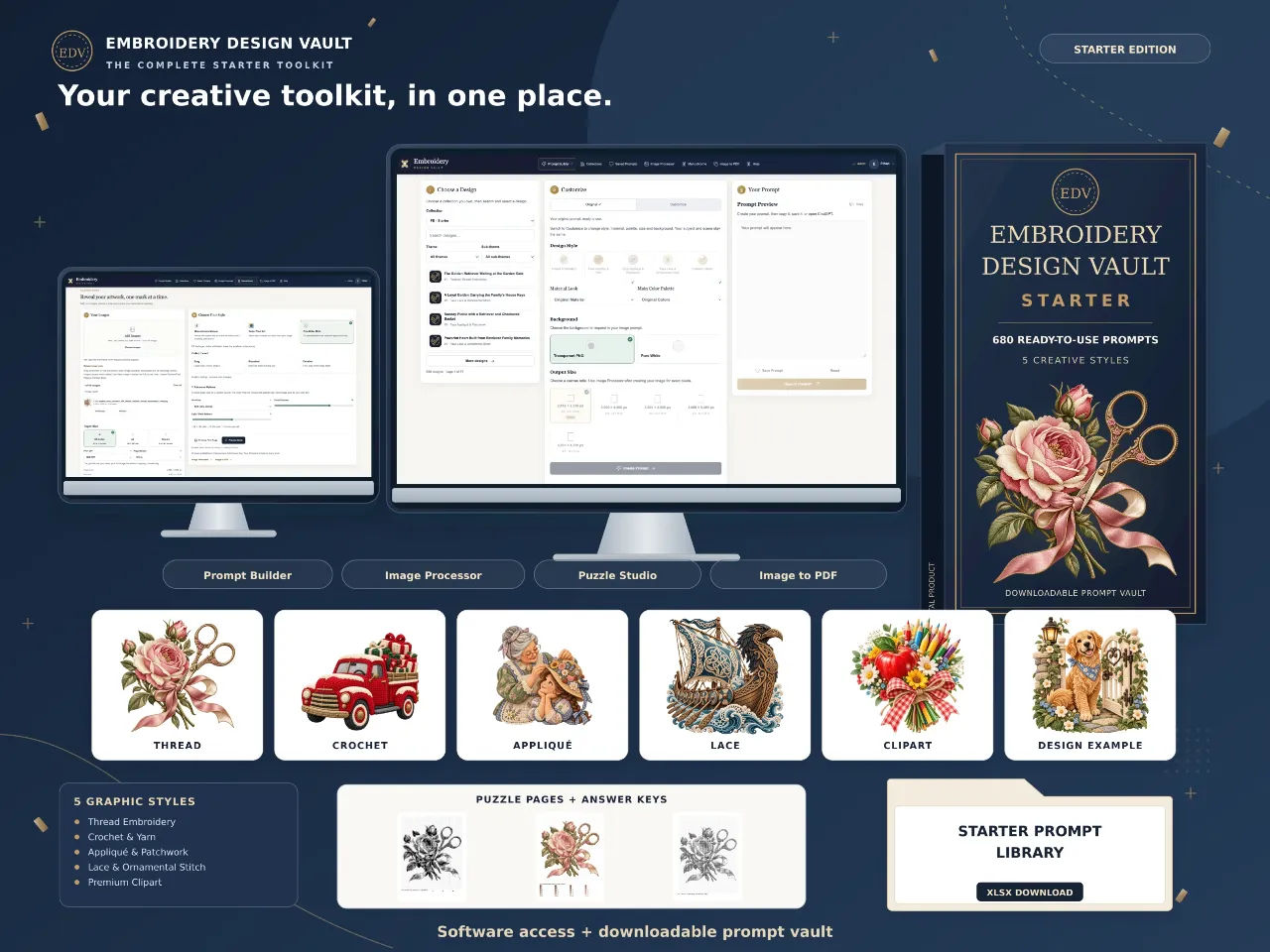
I bought Embroidery Design Vault on a Tuesday night after a run of failed ChatGPT attempts. I had a folder of forty-one images that were supposed to be embroidered rose patches for a Mother's Day printable set, and eleven of them were any good. The rest had stitches that went nowhere, thread that changed colour halfway across a petal, and one where the needle looked like a fountain pen. I was typing the same paragraph of description over and over with no result I could keep.
So when the sales page for Embroidery Design Vault Starter promised 680 prompts across five stitch styles for $17 as a one-time payment, I paid the $17 and went straight to the library. No bonus stacking, no upsell I had to click past.
This is what I found after working through the library, running prompts through my own ChatGPT account, and pushing a few images through the included tools.
Our Verdict
Embroidery Design Vault
A cheap, genuinely useful prompt library if you sell printables or print-on-demand, not an embroidery file pack, and you still need your own ChatGPT.
One-time $17, 30-day money-back guarantee
What You Actually Get
Before I go further, the thing that trips people up: this is not a pack of finished images, and it absolutely is not a set of machine embroidery files. The sales page says it outright, which I appreciated after buying. No PES, DST, JEF or any other stitch file format. If that is what you came for, close the tab now.
What lands in your account is this:
- 680 original prompts, split into 17 niches at 40 prompts each, with all five graphic styles represented in every niche.
- Online access to the Embroidery Design Vault (EDV) software, which runs in your browser.
- A matching Excel download with all 680 prompts, so you can sort and copy from a spreadsheet if that's how your brain works.
- Prompt Builder with a Customize mode and a Saved Prompts feature.
- Image Processor, for exact pixel sizing and export at up to 300 DPI.
- Image to PDF, for arranging one image per page into a single file, up to 40 images.
- Mosaic Puzzle Studio, the included bonus, which turns your images into printable puzzle books in three styles with matching answers.
The 17 niches are an odd mix and that is the point. Golden Retriever family portraits. Bunny cake-smash milestones. Vintage red truck Christmas. Viking longship voyages. Highland cow meadow picnics. Christian cross wildflower devotion. Kindergarten teacher classroom gifts. You will find some of these useful and roll your eyes at others, and which ones depends entirely on what you sell.
Usage rights are broader than I expected. The page grants full flexibility for personal and commercial work, including digital printables for Etsy, print-ready books for Amazon KDP, and editing, customising, combining, repackaging, distributing or reselling the prompts under your own brand.
Key Features
The five styles are the core of the product, not filler. Thread (silky fibres, directional stitches), Yarn (soft loops, amigurumi-style dimension), Fabric (faux appliqué and patchwork with decorative seams), Lace (delicate openwork and heirloom ornament) and Isolated Clipart (semi-hyperrealistic light and clean graphic finish, no background). Each one changes the material feel of the output rather than just adding a word like "embroidered" to the end of the prompt.
Prompt Builder is where most of the value sits. You find a subject in the library, and you can either hit Original and take the prompt exactly as written, or open Customize to adjust graphic style, material details, colour palette, canvas size and whether you want a transparent or white background. The subject and scene stay locked. That last bit matters: it means you can run the same Golden Retriever design in Thread for one customer and Yarn for another without the dog changing.
The sales page puts the combination count at up to 3,400 prompt-style pairings, and is honest enough to add that combinations can share themes or produce similar results. I respect that line more than any claim on the page.
Image Processor is a sizing tool. You import a PNG, JPG, WebP, GIF, BMP or AVIF, choose exact pixel dimensions, set print density up to 300 DPI, and export PNG, JPG or WebP with compression controls where your browser supports them. Their own example is 3,000 x 4,200 pixels, which they note is 10 x 14 inches at 300 DPI. There is a metadata readout so you can check resolution before you download.
Image to PDF is unglamorous and I used it twice in the first week. Up to 40 images, one per page, add or replace or reorder, set the DPI per print size, scroll through the full preview, then download.
Mosaic Puzzle Studio is the bonus and honestly the most interesting part of the bundle. Upload an image, pick Monochrome Mosaic (square cells with guide marks and a black-and-white solution), Color Pixel Art (numbered cells, a palette pulled from your image, a colour key and a colour solution) or One Color Dots (a picture revealed through circles, hollow in the solution). Up to 40 puzzles plus 40 answers, exported as puzzles only, answers only, or a combined book, in US Letter, A4 or 8.5 inch square at adjustable DPI.
One technical detail I want to flag because it surprised me: the image, PDF and puzzle tools process your uploads in your browser rather than sending them to EDV hosting. That is good for privacy and bad if you use an older browser, because format support depends on what your browser can handle.
Actually Using It
First hour was the Excel file. I am a spreadsheet person and I opened the download before I touched the web app. 680 rows, all niches, and it took me about twenty minutes of filtering to build a shortlist of sixty prompts across four subjects I could actually sell: Highland cow, English rose, vintage truck and the teacher classroom set. Copying a prompt out of Excel and pasting it into ChatGPT takes four seconds. This alone beat my old process of rewriting descriptions from scratch.
Then I went into the EDV workspace proper. The Prompt Builder is a two-column layout and the Customize panel is not hidden behind an upsell, which surprised me for a WarriorPlus product. I opened the Highland Cow Meadow Picnic prompt, switched to Lace, changed the palette from what I assume was autumnal to something paler, and requested a transparent background. Copy, paste into ChatGPT, wait.
Here is the honest part. The results were not perfect. My first Highland cow in Lace came back looking like a doily with a face falling off it. That is not an EDV failure exactly, it is what happens when the lace style lands on a furry subject with a lot of texture. I reran it in Thread and got something I would actually put on a tote bag mockup. The lesson I learned and you get for free: match the style to the subject, not to your mood. Lace and ornamental stitch suits English Rose Garden Romance. Thread suits almost everything. Yarn and I never fully got along, but a crocheted Bengal Tiger came out better than I expected.
Over four sessions I generated roughly 90 images from 34 prompts. I kept 51. That is a keeper rate of about 55 percent, which for a $17 prompt library is fine and for a $17 image pack would be terrible. Adjust your expectation to "good starting point" and the product holds up.
The Image Processor I used on my final eleven rose images. My print provider wants 3,000 x 4,200 for a card layout and my ChatGPT outputs were all square, so I had to upscale with exact dimensions set and check the preview. It is not a magic upscaler. Sharp edges held, fine stitch texture softened at the higher size. I ended up rethinking two images and generating fresh in the right aspect ratio, which is a workflow the Image Processor does not do and cannot do.
The Mosaic Puzzle Studio is where I lost an evening. I took my best Highland cow image, dropped it in at One Color Dots and exported a 10-page preview book in about eight minutes including upload and preview checks. That is a real product. Match it up with the Cozy Mystery Book Club niche and you have something you could sell on KDP with a straight face. Puzzle books in that niche are a strange number of them already on the market, so do your research first, but the tool works.
The one thing that bugged me: the Image to PDF tool exported cleanly, but arranging 40 pages through a scrolling preview is fiddly when you have more than about a dozen images and want a specific order. I found myself reordering three times on the first job. Budget more time than you think for that step.
You can also open prompts inside EDV and use the handoff to open ChatGPT directly. In my browser it worked about half the time and required a copy-paste the rest. The page says as much, mentioning a copy-and-paste fallback, so at least it is documented. Not a dealbreaker, just do not expect it to be seamless, pun intended. On a scale of one to ten I would put my frustration at about a three.
See the 680 prompt library for yourself
One-time payment. 30-day money-back guarantee if it is not for you.
Pricing and Value Analysis
Embroidery Design Vault Starter costs $17 as a one-time payment. Not a subscription. No upsell inside the checkout to get the tools. The sales page states this about nine times, which is heavy even for a WarriorPlus product, but it is at least accurate in my account.
Your own ChatGPT account is separate. If you do not already pay for one, factor that in. EDV does not include ChatGPT, and it does not include a subscription or credits. Free ChatGPT will run some of these prompts but the results will be inconsistent, and EDV's prompts are tuned for the image generation that ChatGPT offers on paid tiers. Also separate: any print provider, marketplace fees or KDP costs.
To put $17 in perspective:
| Option | Typical cost | What you get |
|---|---|---|
| Embroidery Design Vault Starter | $17 one-time | 680 prompts, Excel file, Prompt Builder, Image Processor, Image to PDF, Mosaic Puzzle Studio |
| Hiring a designer for one finished mockup set | Often more than $17 for a single set | Finished artwork only, no prompt library |
| Buying a stock image pack | Varies widely, often more than $17 | Finished images, sometimes no commercial resale |
| Generating from scratch in ChatGPT | Time cost only | No library, no style guidance, no toolkit |
If you sell printables, are already paying for ChatGPT, and can use even four of the 17 niches, the math works. If you can only use one niche and do not already pay for ChatGPT, you are better off spending the hour writing your own prompts for free.
There is a 30-day money-back guarantee, per the sales page. I did not use it, and the checkout is through WarriorPlus, so the refund process goes through that platform.
Pros and Cons
Pros
- 680 prompts with real style variety across five distinct material looks
- Excel download means you can sort and copy without opening the web app
- Commercial rights let you resell prompts under your own brand
- Mosaic Puzzle Studio is a genuinely useful bonus, not filler
Cons
- No machine embroidery stitch files, which will disappoint some buyers
- You still need your own paid ChatGPT account for decent results
- Browser-only processing means older browsers may limit format support
- Some niches will be irrelevant to you and there is no way to buy them separately
Who This Is For / Who Should Skip It
This is for you if you sell printables on Etsy or similar, you are building print-on-demand products where the artwork needs to look hand-stitched, or you publish puzzle books and want an image-to-book workflow that does not require three separate tools. Also if you are a designer who is tired of rewriting the same prompt forty times to get a consistent collection look. Buy it and you will save more time than the $17 is worth in one evening.
Skip this if you are looking for actual embroidery files. This is not a digitising tool and it does not output PES or DST. Skip it too if you are not willing to pay for ChatGPT separately, or if you only want finished images to use as-is. And skip it if your browser is old. The image processing and puzzle tools depend on it.
Frequently Asked Questions
Is Embroidery Design Vault worth $17?
For anyone who sells printables or print-on-demand products and already pays for ChatGPT, yes. You get 680 prompts, an Excel version, four browser tools and a puzzle-book bonus for a one-time $17. If you can only use one or two of the 17 niches and do not already pay for ChatGPT, it is harder to justify. The Embroidery Design Vault Starter is the cheapest way to test the workflow.
Are these finished images or embroidery files?
Neither. You get prompts and software access, not 680 finished images. The sales page is clear that the artwork examples show possible visual directions only. It also states EDV does not export PES, DST, JEF or other machine embroidery stitch files. Suitable artwork may be used as a reference for a separate digitising and stitch-testing process.
Do I need a ChatGPT account to use it?
Yes, for the artwork step. EDV provides and prepares prompts; you create the images in your own ChatGPT account that supports image generation. A ChatGPT subscription or credits are not included in the $17. The button inside EDV opens ChatGPT as a handoff, and you can always copy and paste the prompt manually if that does not work in your browser.
Can I sell what I make with Embroidery Design Vault?
The page grants full usage flexibility for personal and commercial use. That includes digital printables for Etsy or other marketplaces, print-ready books for Amazon KDP, and editing, customising, combining, repackaging, distributing or reselling the prompts under your own brand. Those permissions apply to the prompts. Your obligations around the artwork you generate live with your ChatGPT account terms.
What is the Mosaic Puzzle Studio bonus?
A tool that turns your own images into printable puzzle books in three styles: Monochrome Mosaic, Color Pixel Art and One Color Dots. It generates matching answers, supports up to 40 puzzles plus 40 answers per export, previews pages before download, and supports US Letter, A4 and 8.5 inch square sizes at adjustable DPI. It is included with Starter at no extra cost.
Is there a refund if it is not for me?
The sales page lists a 30-day money-back guarantee, and checkout runs through WarriorPlus. If you are unsure, the safest test is to use the tool for a week, generate twenty or so images, and check the keeper rate against your own workflow. If you cannot use at least three niches in that time, the refund is there.
How many prompts exactly, and how are they split?
680 original prompts across 17 niches, with 40 prompts per niche, and all five graphic styles represented in each niche. The library runs up to 3,400 prompt-style combinations when you pair each source prompt with each style. EDV notes that some of those combinations will share themes or produce similar results, so treat the higher number as a ceiling rather than 3,400 distinct designs.
Final Verdict
I went in expecting a folder of prompts I would forget about by Friday. I got a browser toolkit and a prompt library I have used in three client projects in the last month. My Highland cow puzzle book exists. My rose printable set ended up with eleven images I actually shipped. The 55 percent keeper rate is the real story, and I would rather have a tool that half works at $17 than a tool that fully works at $197.
Buy it if you sell printables or print-on-demand and your ChatGPT attempts are looking like mine did on that Tuesday. Skip it if you need embroidery stitch files or you are not prepared to pay separately for ChatGPT. That is the whole recommendation.
Grab the $17 Starter library
One-time $17. Digital access. Refundable for 30 days if you change your mind.
Related Posts
Xmas Magic AI Review: Can It Really Build Christmas Products?
I took Xmas Magic AI's one-sentence promise and tried to make a sellable Christmas activity book. The puzzles work. The proofing is weaker than I hoped. Here is the full picture.
StoryDeck Review: BookTok Carousels in a Minute
I turned a page of a public domain book into a 12 slide TikTok storytime carousel in about a minute. StoryDeck is $17 one time, and the odd bits matter more than the pitch.
CineMill Creator Review: Faceless Videos From One Sentence
I typed one sentence into CineMill Creator and got a finished narrated story video back. Here is what it does well, where it stumbles, and who should not buy it.
366 Prompts Bedtime Story Video: My Honest Review
I bought 366 Prompts Bedtime Story Video to see if one paste really turns into a finished 60-second vertical story. Here is what it does and where it stumbles.
300 Agentic Prompts for Tiny Worlds Coloring Books Review
I pasted one prompt and watched an agent plan, draw and package a 30-page tiny worlds coloring book. Here is what the files actually look like.
PuzzlePress AI Review: I Made a Puzzle Book in 4 Minutes
I typed "turtles," picked ages 6-8, and had a print-ready PDF on screen in under four minutes. Here is what the engine does well and where it annoys you.