FableForge Review: Print-Ready Kids' Books From ChatGPT
FableForge plans your children's fable book, writes locked prompts for every page, and binds your ChatGPT pictures into 300 DPI print files. Here's what happened when I built one.
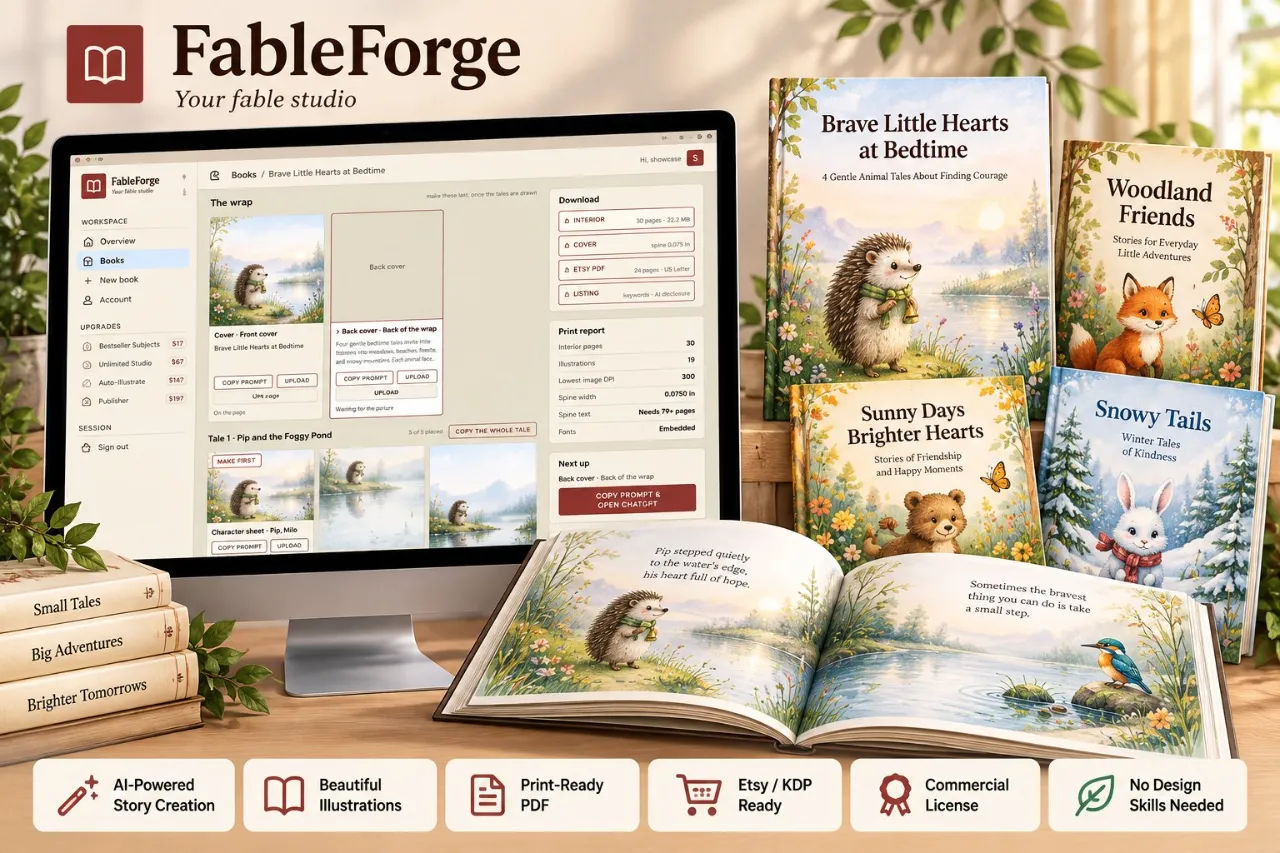
I lost a Sunday to a fox in a green scarf. Page one, perfect. Page two, the scarf had turned orange. Page four, the fox had quietly become a dog. By page six I was in a design tool at half past midnight guessing at spine widths with a calculator, and I closed the tab. That was my third attempt at an illustrated children's book, and it was the third time the pictures beat me.
FableForge is the first tool I have used that treats that as a production problem rather than a creative one. It is a web studio that plans a fable book, writes a locked prompt for every single page, and then lays out, raises and binds the pictures you make in your own ChatGPT account into print-ready files for Amazon KDP and Etsy. One-time $17. No credits, no API key.
I bought it, built a book with it, and uploaded the interior to check the numbers. Here is what actually happened, including the parts that annoyed me.
Our Verdict
FableForge
A $17 production studio that fixes the pages AI image tools cannot keep consistent, as long as you accept that you are still the one making the pictures.
One-time payment. Login emailed to your checkout address.
What You Actually Get
FableForge is not a book generator. Nothing writes itself here. What you get for the $17 is the machinery around the writing and the drawing, and that turns out to be most of the work.
When you build a book, the studio hands you four downloads:
- interior.pdf at your trim size, with bleed, embedded fonts, a contents page, a lesson page after each tale, a "The End" page and a copyright page. It pads to KDP's 24-page minimum and to an even page count.
- cover.pdf as a back, spine and front wrap, with the spine width calculated from the final page count.
- etsy-print.pdf, a US Letter edition with safe margins for people printing at home.
- A listing pack: title, subtitle, keywords and categories to start your listing, the print specification, and the AI disclosure wording KDP asks for.
There is also a print report with each build. Page count, lowest DPI, spine width, whether fonts embedded. That one screen is what stopped me re-uploading a broken file five times, which is roughly what happened on my last attempt.
Key Features, and What They Do For You
The headline feature is the locked page prompts. Every page's prompt repeats the same exact description of the same animal, word for word, so the hedgehog on page seven is the hedgehog from page two. You are not retyping the description and you are not forgetting it. That alone was my failure point on all three previous attempts.
Each tale also gets a character-sheet prompt, so you start with a reference picture and then draw every page with that sheet attached. Two layers of consistency rather than one.
The reserved text area is the clever bit. Print books live or die on whether a child can read the sentence over the picture. FableForge prompts ChatGPT to leave a calm, simple area in a specific part of each image, then measures where that calm area actually landed before placing the words. It does not assume. It looks.
Then there is automatic 300 DPI. Every picture is raised to print resolution before the book is bound, so you never open an upscaler. Reading-age pacing sets words per page from the age band you picked, and flags pages that come back too long or too short so you can edit them rather than discovering the problem after building.
Five formats ship in the box: Five-Minute Bedtime, One Story a Day, Classroom / SEL, Faith & Values, and Gift Treasury. Two book shapes, a short Sampler and a full Standard storybook, with the page count, picture count and estimated picture-making time shown before you commit. You also choose how illustrated the book is (rich, balanced or light), which changes how many pictures you have to make.
Smaller things that matter more than they sound: a book preview that shows pages as they will print before you press Build; uploads by file picker, drag-and-drop batch or pasting straight from your clipboard; a proper back cover with the blurb set on it instead of a blank rectangle; and EB Garamond under the SIL Open Font License, so the font is cleared for books you sell. You can download every prompt for a book as one text file if that suits your workflow better.
Actually Using It
Setup took about four minutes. I picked a moral fable, typed "kindness" as the lesson, chose the 6 to 8 reading age and the 8.5 x 8.5 trim, and left it fully illustrated. The studio came back with a Sampler of 24 printed pages, four tales of three pages each, 14 pictures and 4 character sheets, and an estimated 45 minutes of picture-making. It shows you that estimate before a single picture exists, which is either helpful or a warning depending on your afternoon.
Step two is the least glamorous and the most effective. You press "Copy the prompt", paste it into ChatGPT, and paste the reply back. That prompt carries the whole brief: reading age, words per page, one animal per illustration, a scene matching its own text, and the exact format the studio needs returned. Longer books are written in parts so no reply gets truncated. My writing pass took maybe ten minutes of actual work, most of it waiting.
Step three is where the time goes. Every page gets its own card with its own prompt. You start with the character sheet for each tale, then make each page with that sheet attached. Download each picture, drop it on its card, or drop a batch at once. I did the four character sheets first, and this is the part that previous me would have skipped. Do not skip it. The difference between a book where the rabbit is the same rabbit on all 14 pictures and a book where it isn't is entirely that step.
Two things irritated me. First, FableForge is not connected to ChatGPT. There is no button that sends the prompt and brings the picture back. You are moving between two browser tabs roughly 18 times for a Sampler of this size, and it is copy, paste, download, drag, repeat. The "Copy the prompt and open ChatGPT" one-click link softens it. It does not remove it.
Second, the quality of your pictures is the quality of your ChatGPT account. FableForge has no image model of its own and no credits to spend. If you are not happy with what ChatGPT draws for you, no amount of good layout will fix that. The studio solves consistency, resolution and page furniture. It does not make you a better illustrator, and it does not pretend to.
Step four is genuinely satisfying. Each picture is measured, placed with the words in the calm area the prompt reserved, and raised to 300 DPI. Press Build and the four files appear with the print report. I checked the interior PDF at 100 percent. The words sat in quiet space on every spread. No text printed across a face. Page count even and above the minimum. Spine width matched the number on the cover file.
Total time for me: a little over two hours, including the faffing about and a redo of two pictures where I didn't like the composition. Picture-making, as estimated, was the bulk of it.
Build your first book this afternoon
One-time $17. Unlimited books, no credits or per-book fees.
Pricing and Value Analysis
FableForge is a one-time $17. No credits, no API key, no monthly counter, no per-book fee. The page states unlimited books, so the fiftieth build costs the same as the first. Your login is emailed to the address you use at checkout.
To judge the value you have to put that $17 next to what it replaces. The honest comparison is not another AI book tool, because the useful alternatives are either a designer or your own unpaid evenings.
| Option | What it costs | What you still do yourself |
|---|---|---|
| FableForge | $17 once | Write and draw in your own ChatGPT, paste and upload the pictures |
| Doing it by hand | $0, plus many evenings | Character consistency, page layout, DPI, bleed, spine maths, listing copy |
| Hiring a book designer | Commission rates apply, quote per book | The pictures and the story |
| Another AI book tool | Often credit or subscription based | Depends on the tool; credit costs can scale with every book |
I only have the sales page's own figures to go on for the negative case, so I will be straight about the limits of this analysis. I paid $17 and I do not know what a designer would quote you for a 24-page picture book interior and wrap cover, because that number was not in front of me when I wrote this. What I can say is that the $17 is a single payment and the books are unlimited, so the break-even is quick if you intend to publish more than one.
The one thing the price does not include is ChatGPT. The studio assumes you already pay for the account you are using, and it says so plainly. If you do not have one, that is a separate cost and you should count it.
You can check the current page and terms here: FableForge on the official site.
Pros and Cons
Pros
- Locked page prompts keep the same animal the same animal across every page
- Words are placed where the calm area actually landed, so text never prints over a face
- Automatic 300 DPI, bleed, embedded fonts and spine width calculated from the final page count
- One-time $17 with unlimited books, no credits or API fees
- Four downloads per book plus a listing pack with KDP's AI disclosure wording
Cons
- No direct ChatGPT connection, so you copy, paste and upload by hand roughly 18 times for a 24-page book
- Picture quality depends entirely on your own ChatGPT account
- Fiddly for anyone who does not want to touch ChatGPT at all
Who This Is For
KDP publishers and Etsy printable sellers who already use ChatGPT and keep stalling at the production stage. If your problem is that page one looks wonderful and page four has become a dog, this was built for exactly that. It also suits teachers and parents making one keepsake book, because the price is one payment and there is nothing to cancel.
It works best for people who are willing to spend an hour or two per book in the studio, moving between tabs. The creative choices stay yours: the lesson, the reading age, the look of the book, which pictures you keep.
Who Should Skip It
Skip it if you want a single button that produces a finished book, because this is not that. Skip it if you do not have ChatGPT, since the studio is a companion to it and not a replacement. And skip it if you are expecting a specific art style out of the box beyond the Vintage Storybook direction in the front-end edition. I do not know how the extra art directions are priced beyond the page mentioning an Unlimited Studio upgrade, and I am not going to guess.
Frequently Asked Questions
Is FableForge worth it?
For anyone publishing AI-illustrated children's books on KDP or Etsy, yes. It fixes the three things that kill these projects: character drift across pages, text printed over busy artwork, and files that fail print requirements. One-time $17 with unlimited books means it pays for itself if you finish even a couple of titles.
How much does FableForge cost?
It is a one-time $17 with no credits, no API key and no per-book fee. Your login is emailed to the address you use at checkout. You still need your own ChatGPT account, since FableForge does not generate words or images itself and does not charge for either.
Do I need an API key or credits to use FableForge?
No. FableForge explicitly runs without API keys and without credits. The writing and the pictures are made inside the ChatGPT account you already have, and the studio handles planning, prompt writing, layout, resolution and binding. There is no counter ticking down per book.
What files does FableForge give me?
Four downloads per built book: a print interior PDF at your trim size with bleed and embedded fonts, a wrap cover PDF with the spine worked out from the page count, an Etsy US Letter edition with safe margins, and a listing pack with title, keywords, categories, print spec and KDP's AI disclosure wording.
How long does one book take?
For a 24-page Sampler, the studio estimated about 45 minutes of picture-making before I started, and that estimate held up. My whole build ran a little over two hours including redoing two pictures. Longer Standard books with more pictures will take proportionally longer.
Can I sell the books I make with FableForge?
The page states you can make one book or fifty, and the book font, EB Garamond, is under the SIL Open Font License so it is cleared for books you sell. The listing pack includes the AI disclosure wording KDP asks for, which suggests the intended use is commercial publishing. Check current KDP policy yourself before uploading.
Are there alternatives to FableForge?
You can do it all by hand in an AI image tool and a design app, or hire a book designer per title. FableForge's argument is that the production work is the tedious part and worth automating for a single $17 payment. Full details are on the FableForge page.
Final Verdict
FableForge did not write my book and it did not draw my fox. What it did was make sure the fox stayed a fox, that the words landed in space I had left for them, and that the file I uploaded was 300 DPI with a spine that matched its own page count. On my three previous attempts those were the exact points where I gave up.
At $17 once with no credits and unlimited books, the maths is not close if you plan to publish more than one title. The copy-paste loop between the studio and ChatGPT is real friction and you should know it is there. But it is twenty minutes of tedium instead of a lost weekend, which is a trade I will take every time.
Stop losing weekends to the production stage
One-time payment. No credits, no API keys, unlimited books.